
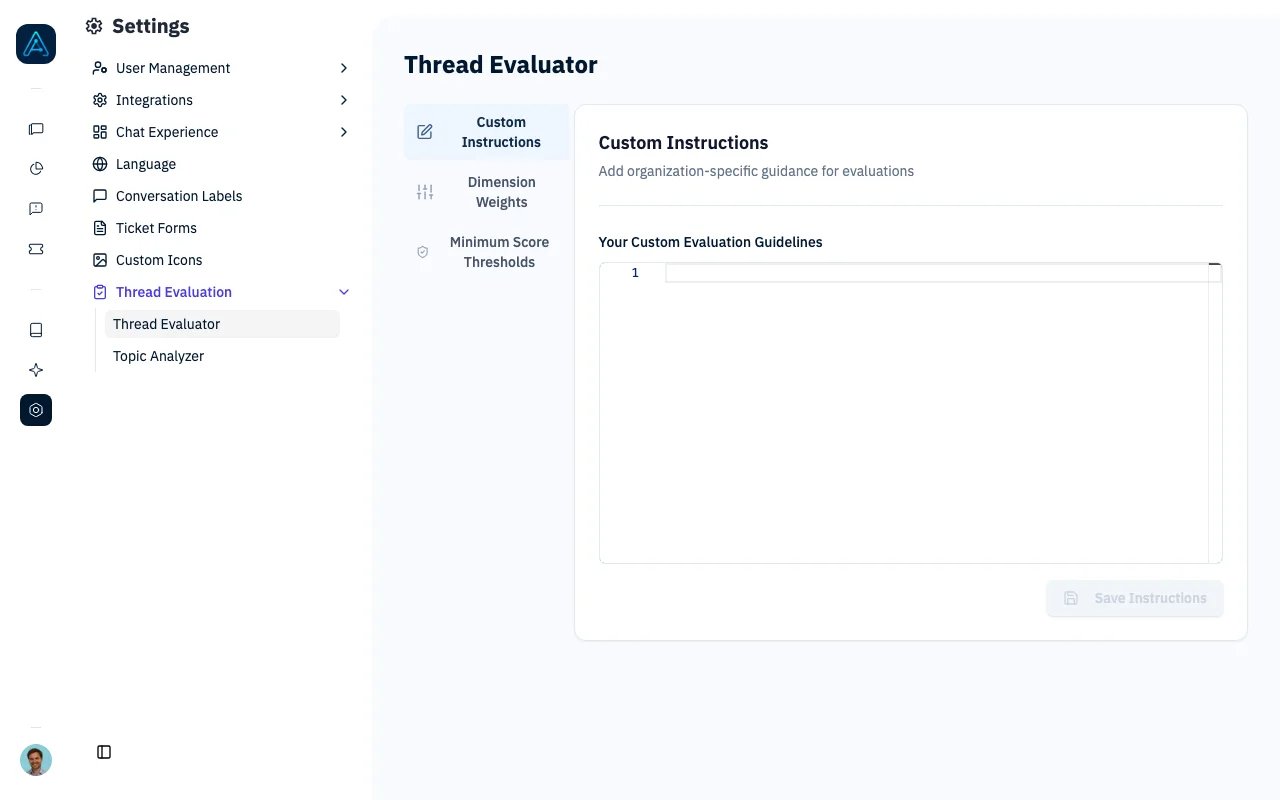
Thread Evaluator - Custom Instructions
Overview
The Thread Evaluator uses AI to analyze completed conversations and generate:- CX Score - Overall quality score (0-100)
- Dimension scores - Detailed scoring across 5 quality dimensions
- Review flags - Identifies conversations needing human review
- Improvement suggestions - Actionable feedback for agent improvement
Prerequisites
System Requirements
- AGO platform deployed and accessible
- Staff-level access to configure evaluator
Knowledge Required
- Understanding of customer experience metrics
- Familiarity with quality assessment concepts
Configuration Required
- Thread Evaluator enabled in tenant settings
- LLM model configured (uses default or dedicated evaluation LLM)
Enabling Thread Evaluator
Via Admin Interface
- Navigate to Settings → Thread Evaluation → Thread Evaluator
- Toggle Enable
- Configure CX Score weights (optional)
Thread Evaluator can also be configured via API. See the Public API v1 Reference for endpoint details.
How It Works
- Thread completion - Conversation ends or times out
- Evaluation trigger - Daily batch job or manual evaluation
- Prompt building - Combines generic + custom + criteria instructions
- LLM analysis - Structured evaluation with reasoning
- Score storage - Results saved to thread record
The evaluator runs as a daily scheduled task, analyzing conversations from the previous day.
Quality Dimensions
The CX Score is calculated from five weighted dimensions:Score Ranges
Configuration
Access Settings
Navigate to Settings → Thread Evaluation → Thread EvaluatorCustom Instructions
Add organization-specific evaluation guidelines:Adjust Dimension Weights
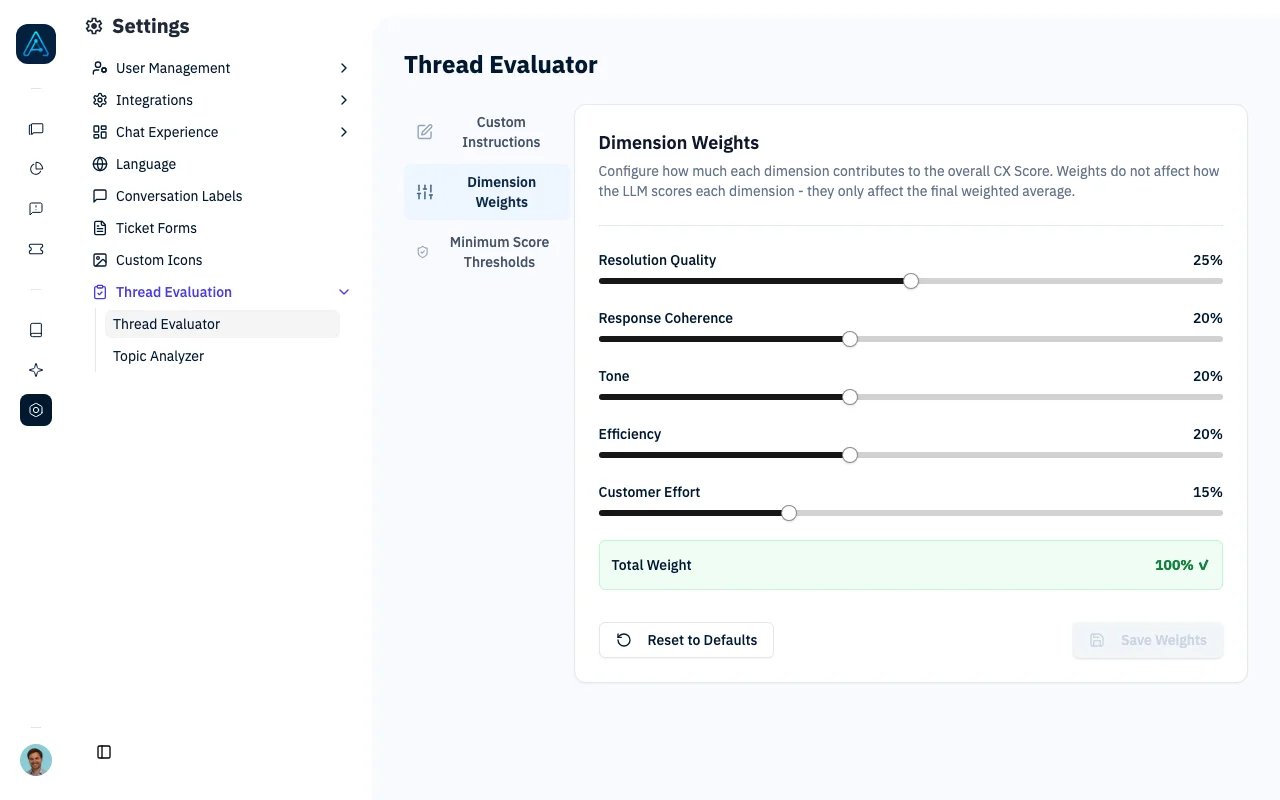
Thread Evaluator - CX Score Dimension Weights
- Use sliders to adjust each dimension (0-50%)
- Weights must sum to 100%
- Click Save to apply changes
- Increase Resolution Quality to 35% for support-focused agents
- Increase Tone to 30% for customer service agents
- Reduce Efficiency weight for complex technical support
Minimum Score Thresholds
Configure minimum score thresholds to automatically flag conversations for review when scores fall below acceptable levels:- Navigate to Settings → Thread Evaluation → Thread Evaluator
- Scroll to the Minimum Score Thresholds section
- Adjust the Overall CX Score Minimum (default: 70)
- Adjust per-dimension minimums (default: 50 each)
- Click Save Thresholds
Evaluation Prompt Structure
The evaluator uses a three-part prompt:1. Generic Instructions (System)
Core evaluation principles - not editable:- Expert evaluator perspective
- Independent dimension scoring
- Granular score differentiation
2. Tenant Instructions (Custom)
Your organization-specific guidelines - fully editable in admin3. Scoring Criteria (Generated)
Detailed rubrics for each dimension based on current weights Use Preview Prompt to see the complete evaluation prompt.Review Flags
Threads are flagged for human review when:- The overall CX Score is below the minimum validation score (default: 70)
- Any individual dimension score is below its minimum threshold (default: 50 each)
- The LLM evaluator detects issues such as contradictory information or user frustration
- User explicitly requested human assistance
Score-based review flags are enforced at the system level and cannot be overridden by the LLM evaluator. If the LLM marks a conversation as “Validated” but the scores fall below the configured thresholds, the conversation is still flagged for review.
Managing Reviews
- Go to Chat History in the sidebar
- Filter by “Needs Review”
- Review flagged conversations
- Take action (training, knowledge gaps, escalation)
Manual Evaluation
Evaluate Selected Conversations in the Backend Admin
With access to the backend admin and Thread Evaluator enabled, you can evaluate a selection of conversations in the background.1
Select conversations
Open the conversation list in the backend admin and select the conversations to evaluate.
2
Choose an evaluation action
Choose Run evaluation for selected threads to evaluate conversations that have neither an AI evaluation nor a human evaluation.Choose Force evaluation for selected threads (replace AI evaluation) to recalculate AI results, including for conversations already evaluated by AI or a person. Use this after changing evaluation instructions, weights, or thresholds. Human evaluations, comments, and reviewer assignments are preserved.
3
View the results
Apply the action. The confirmation means your selection has been queued for background processing. You can leave the page and refresh the conversation details later to view the results.
Evaluate One Conversation
To evaluate a specific thread immediately:- Navigate to the thread in admin
- Click Evaluate button
- Wait for LLM analysis
- View results in thread details
Analytics Integration
Thread Evaluator data powers several analytics views:CX Score Distribution
- Breakdown of scores across ranges
- Identify quality trends
CX Score by Agent
- Compare agent performance
- Identify training needs
CX Score Trends
- Daily/weekly averages over time
- Track improvement initiatives
Review Queue
- Count of threads needing review
- Prioritize quality assurance efforts
Best Practices
Custom Instructions
- Be specific - Vague guidelines produce inconsistent evaluations
- Prioritize - List most important criteria first
- Provide examples - Show what “good” and “bad” look like
- Update regularly - Evolve with your quality standards
Weight Configuration
- Start with defaults - Observe results before customizing
- Small adjustments - Change weights by 5% increments
- Align with goals - Weights should reflect business priorities
- Document changes - Track why weights were modified
Review Process
- Sample reviews - Manually verify LLM evaluation accuracy
- Calibrate regularly - Adjust custom instructions based on findings
- Act on insights - Use data to improve agent training and knowledge
Troubleshooting
Threads not being evaluated
Threads not being evaluated
Problem: Conversations complete but no CX score appears.Solutions:
- Verify Thread Evaluator is enabled in settings
- Check if thread is marked as simulation (simulations are skipped)
- Verify the scheduled evaluation task is active
- Manually trigger evaluation to test
Scores seem inconsistent
Scores seem inconsistent
Problem: Similar conversations receive very different scores.Solutions:
- Review custom instructions for clarity
- Check if weights are appropriately configured
- Examine reasoning in dimension scores for insights
- Consider adjusting evaluation LLM temperature (lower = more consistent)
Too many threads flagged for review
Too many threads flagged for review
Problem: Excessive review flags overwhelming the team.Solutions:
- Adjust custom instructions to be more specific about review criteria
- Review flag triggers in the scoring criteria
- Consider which issues truly require human review
- Implement automated handling for common flag reasons
Evaluation takes too long
Evaluation takes too long
Problem: Large backlog of unevaluated threads.Solutions:
- Verify background processing has sufficient capacity
- Check evaluation LLM response times
- Consider using a faster LLM for evaluations
- Review if all threads need evaluation (filter criteria)
Related Features
- CX Score - How the score is calculated and what each dimension measures
- Evaluation Dashboard - View CX Score charts and trends
- Conversations - Filter conversations by evaluation status and CX Score
- Diagnose Quality Issues - Investigate low scores step by step
- Monitor and Improve Performance - Full analytics tutorial