
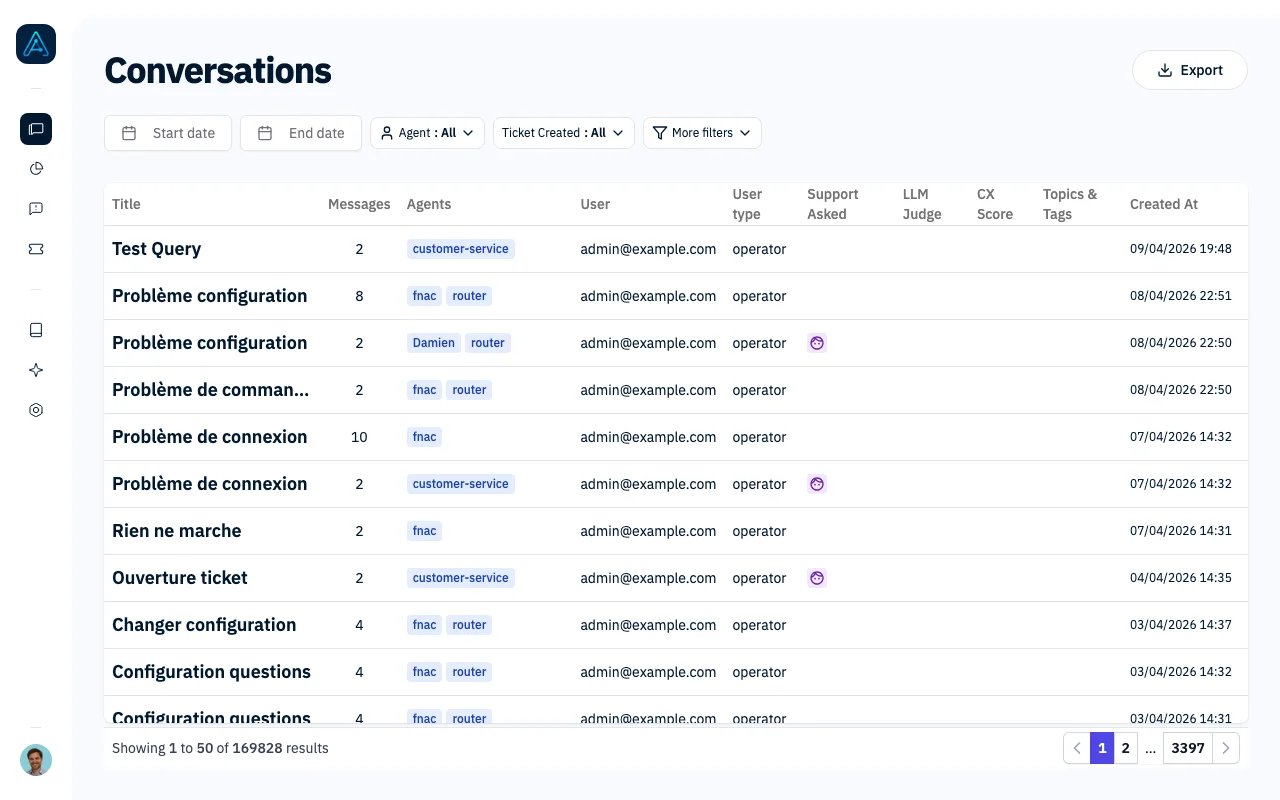
Conversations List
Accessing Conversations
Navigate to Chat History in the sidebar.Imported conversations
Conversations sent through the import API appear alongside AGO conversations. To filter by provenance, open More filters, add Conversation source, then select AGO conversations or one external source. Without this filter, both are included. The selection also applies to CSV exports. Opening an imported conversation shows its source, external reference, and separate quality/CX and topic-analysis statuses. Its transcript is read-only; review evaluations, comments, and labels remain available. Use the original conversation dates when searching historical imports.You need Admin, Account Manager, or Viewer permissions to access the Conversations page.
Conversation Table
The table displays all conversations with the following information:
In the Support Asked column, a lightning bolt identifies tickets created automatically after conversation inactivity. Hover over it to see Ticket created automatically. Other tickets use the ticket icon; a face indicates a support request without a ticket.
Click any row to open the Conversation Management view where you can evaluate and manage the thread.
Primary Filters
These filters are always visible at the top of the page:
Clear the Agent filter to include all agents. Your selection is saved with the other filters and applies to CSV exports.
Secondary Filters
Click “More filters” to access additional filtering options:Common Filter Combinations
Quality Review
- Needs Review = Yes
- CX Score Range = Poor or Needs Improvement
Escalation Analysis
- Support Asked = Yes
- Ticket Created = Yes
Agent Performance
- Agent = [Select one or more agents]
- Evaluation = [Select status]
- Date range = Last 30 days
Topic Research
- Search Content = [keyword]
- Topic = [relevant topics]
Exporting Data
Click the Export button to download the current filtered results as a CSV file. The export includes:- Conversation content, dates, user and agent details, evaluations, CX scores, tags, and feedback
- Applied filters are reflected in the exported data
Large Exports
Exports of more than 1,000 conversations are prepared in the background so you can keep working:- A progress notification shows the export being built in real time
- When it is ready, the download starts automatically (compressed transfer, delivered as a regular CSV)
- If you navigate away, a bell notification lets you download the file later
- Background exports stay available for 24 hours, then expire
Navigation Features
Pagination
Results are displayed in pages of 50 conversations. Use the pagination controls at the bottom to navigate between pages.Filter Persistence
Your filter settings are automatically saved in your browser. When you return to the page, your previous filters will still be applied.Quick Navigation
After opening a conversation, use the navigation arrows in the conversation view to move to the next or previous conversation without returning to the list.Best Practices
- Start with date range: Narrow down by time period first, then add specific filters
- Use “Needs Review” for QA: Focus your quality assurance efforts on flagged conversations
- Combine filters strategically: Multiple filters work together (AND logic) to narrow results
- Export regularly: Create periodic exports for trend analysis and reporting
- Clear filters when done: Click “Clear all” to reset and see all conversations
Related Features
- Conversation Management - Review and manage individual conversations
- Thread Evaluator - Configure automated evaluation
- Feedback Analytics - Analyze user feedback trends