
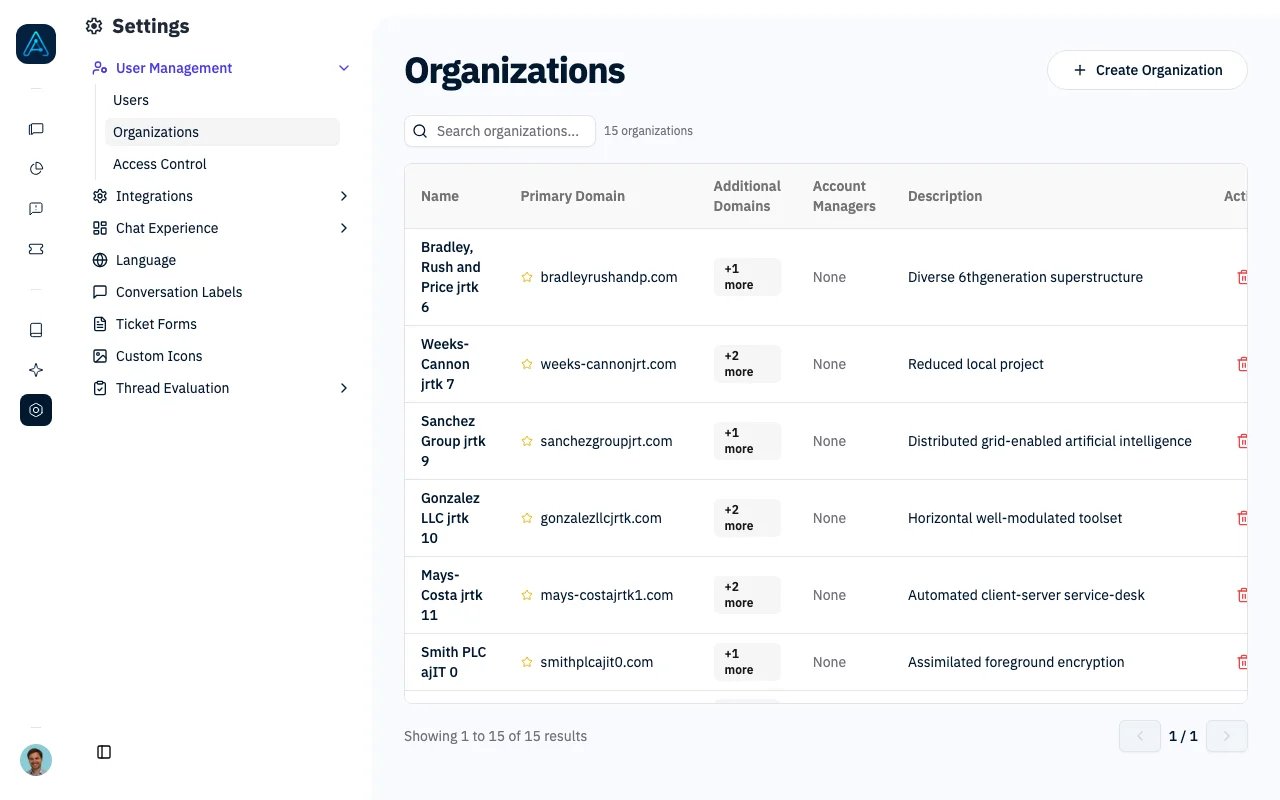
Organization Management
- Support for multiple email domains per organization
- Primary and secondary domain designation
- Centralized admin interface for organization and domain management
- Improved user-to-organization linking based on any of the organization’s domains
- Flexible email domain configuration with primary and secondary designations
Features
Organization Management
- List Organizations: View all organizations in a table format
- Create Organization: Add new organizations with name, primary domain, additional domains, and description
- Edit Organization: Update organization details (name and description)
- Delete Organization: Remove organizations with confirmation dialog
Email Domain Management
- View Domains: See all email domains associated with an organization
- Add Domains: Add new email domains to an organization
- Set Primary Domain: Designate which domain is the primary one
- Delete Domains: Remove email domains from an organization
User Interface
Main Organization Table
- Organization name
- Primary domain (marked with star icon)
- Additional domains count
- Description
- Actions dropdown menu
Create/Edit Dialog
- Organization name (required)
- Primary email domain (required for new orgs)
- Additional email domains (multiple inputs)
- Description (optional)
Email Domain Management Dialog
- Add new domain form with primary checkbox
- List of current domains with primary/secondary indicators
- Make primary and delete actions for each domain
Navigation
- Accessible from the Organizations page under Settings → User Management
Permissions
- Only users with staff-level privileges can access organization management
ℹ️ NOTE: Organizations can also be managed via API. See the Public API v1 Reference for endpoint details.
User Linking Behavior
Automatic User-Organization Linking
When a user registers or is created:- The system extracts the email domain from the user’s email
- Searches for organizations with a matching email domain configured
- Links the user to the first matching organization found
Bulk User Linking
The system provides functionality to automatically link existing users without organizations to appropriate organizations based on their email domains.Admin Interface
- Admin Action: “Link users to organizations based on email domains” available as an admin action
- Immediate Execution: Process runs synchronously and provides immediate feedback
- Usage Statistics: Shows detailed results including users processed, linked, and organizations matched
Linking Process
- Email Domain Extraction: For each user without an organization, the system extracts their email domain
- Organization Lookup: Searches for organizations that have the matching email domain configured
- User Assignment: If a match is found, the user is automatically assigned to that organization
- Statistics Tracking: The process tracks and reports detailed statistics
Usage Examples
Via Admin Interface:- Navigate to Settings → User Management
- Select “Link users to organizations based on email domains” from Actions dropdown
- Click “Go” to execute immediately
Business Rules
Domain Management
- Each organization must have at least one email domain
- Domains must be unique within an organization
- Only one domain can be marked as primary per organization
- Deleting the last domain is prevented
User Assignment
- Users are automatically linked to organizations based on any matching domain
- Manual organization assignment takes precedence over automatic domain matching
- Users can only belong to one organization at a time
Error Handling
The system provides detailed error handling:- Form validation for required fields
- User-friendly error messages when operations fail
- Loading indicators for asynchronous operations
- Confirmation dialogs for destructive actions
Security Considerations
- Staff-only access enforced on all operations
- All requests require authentication and authorization
- Confirmation dialogs prevent accidental deletions