> ## Documentation Index
> Fetch the complete documentation index at: https://ago.mintlify.site/llms.txt
> Use this file to discover all available pages before exploring further.
# Access Control Rules
> Assign permissions and agents based on dynamic criteria
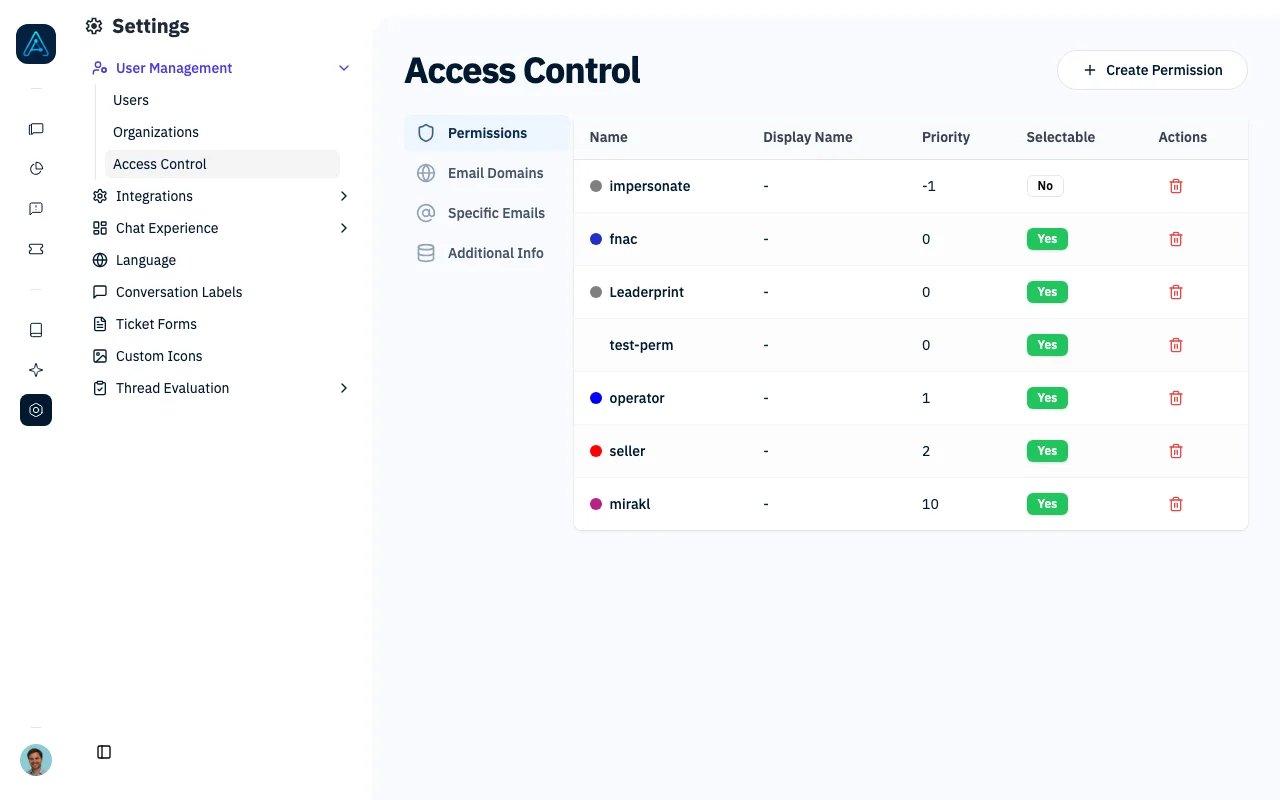
Automatically assign permissions and agents to users based on dynamic criteria. Access control rules provide flexible, scalable user access management without manual per-user configuration.
 ## Overview
The system supports three types of access control rules:
1. **Email Domain Rules** - Assign permissions based on user email domains
2. **Specific Email Rules** - Assign permissions to specific email addresses
3. **Additional Info Rules** - Assign permissions based on custom user metadata
All rules support priority ordering, enabling fine-grained control when multiple rules could apply to a user.
## Prerequisites
### System Requirements
* AGO platform deployed and accessible
* Staff-level access to manage rules
### Knowledge Required
* Understanding of AGO permission system
* JWT concepts (for additional info rules with JWT claims)
### Configuration Required
* Permissions and agents created in the system
* (Optional) JWT field mapping configured for widget authentication
> **ℹ️ NOTE**: Changes to rules take effect immediately on the user's next request. No restart required.
***
## Rule Types
### Email Domain Rules
Automatically grant permissions to users whose email matches a specific domain pattern.
**Use Cases:**
* Grant company-wide access to all employees (e.g., `@company.com`)
* Provide universal access using wildcard domain (`*`)
* Assign different permissions to different partner organizations
**Configuration:**
| Field | Type | Description |
| ------------ | ------- | ---------------------------------------------------------- |
| Domain | string | Email domain to match (e.g., `company.com` or `*` for all) |
| Permissions | UUID\[] | Permissions to grant when domain matches |
| Agents | UUID\[] | Agents to associate with matching users |
| Organization | UUID | Optionally link to specific organization |
| Priority | integer | Higher priority rules evaluated first |
| Is Active | boolean | Enable/disable the rule |
### Specific Email Rules
Grant permissions to individual users based on their exact email address.
**Use Cases:**
* Provide VIP access to specific customers
* Grant special permissions to external consultants
* Create exceptions for individual users
**Configuration:**
| Field | Type | Description |
| ----------- | ------- | ------------------------------------- |
| Email | string | Exact email address to match |
| Permissions | UUID\[] | Permissions to grant |
| Agents | UUID\[] | Agents to associate |
| Priority | integer | Higher priority rules evaluated first |
| Is Active | boolean | Enable/disable the rule |
### Additional Info Rules
Grant permissions based on key-value data stored in the user's `additional_info` field. This provides maximum flexibility for custom business logic.
**Use Cases:**
* Grant premium features to subscription tier users
* Provide regional access based on user location
* Assign permissions based on user roles or departments
* Create complex conditional access patterns
* Use JWT claims extracted during authentication
**Configuration:**
| Field | Type | Description |
| ----------- | ------- | --------------------------------------------------------- |
| Conditions | array | List of key-value conditions (ALL must match - AND logic) |
| Permissions | UUID\[] | Permissions to grant when all conditions match |
| Agents | UUID\[] | Agents to associate |
| Priority | integer | Higher priority rules evaluated first |
| Is Active | boolean | Enable/disable the rule |
**Condition Fields:**
| Field | Type | Description |
| ------ | ------- | --------------------------------------------------------- |
| Key | string | Field name in user's `additional_info` JSON (snake\_case) |
| Value | string | Expected value for that field |
| Negate | boolean | If true, grant when condition does NOT match |
> **⚠️ WARNING**: All conditions within an Additional Info Rule must match (AND logic). For OR logic, create separate rules.
***
## Data Sources for Additional Info
### 1. JWT Claims
When widget authentication uses JWT, configured fields are automatically extracted and flattened:
**JWT Configuration Example:**
```json theme={null}
// AGO Config: widget_jwt_fields_mapping
[
{"jwt_field": "department", "label": "Department"},
{"jwt_field": "custom.tier", "label": "Subscription Tier"},
{"jwt_field": "location.region", "label": "Region"}
]
```
**Resulting additional\_info:**
```json theme={null}
{
"jwt_extracted_fields": {
"Department": "IT",
"Subscription Tier": "premium",
"Region": "europe"
},
"department": "IT", // ← Use these for rules
"subscription_tier": "premium", // ← Flattened & normalized
"region": "europe" // ← Ready for permissions
}
```
**Field Name Normalization:**
| JWT Field Label | Flattened Key |
| ------------------- | ------------------- |
| "Department" | `department` |
| "Employee ID" | `employee_id` |
| "User Role" | `user_role` |
| "subscription-tier" | `subscription_tier` |
| "Region Name" | `region_name` |
> **💡 TIP**: Always use the flattened key format (snake\_case) when creating rules, not the nested `jwt_extracted_fields` path.
### 2. Manual API Updates
Update user's `additional_info` via API.
### 3. Integration Data
Sync from external systems (CRM, subscription platforms, etc.)
***
## Type Handling
The system intelligently handles type conversion when matching conditions:
| Rule Value (string) | Matches |
| -------------------- | ---------------------------- |
| `"25"` | Integer `25` or float `25.0` |
| `"true"` / `"false"` | Boolean `true` / `false` |
| `"3.14"` | Float `3.14` |
| `"premium"` | String `"premium"` |
This means you can enter values in the UI as text, and they'll correctly match numeric or boolean values.
***
## Condition Examples
### Example 1: Premium Subscribers (from JWT)
```json theme={null}
{
"name": "Premium Subscribers",
"conditions": [
{
"key": "subscription_tier",
"value": "premium",
"negate": false
}
],
"permissions": ["premium_access"]
}
```
### Example 2: Non-Trial Users (using negate)
```json theme={null}
{
"name": "Non-Trial Users",
"conditions": [
{
"key": "account_type",
"value": "trial",
"negate": true
}
],
"permissions": ["full_access"]
}
```
### Example 3: Multiple Conditions (AND logic)
```json theme={null}
{
"name": "Enterprise European Users",
"conditions": [
{
"key": "subscription_tier",
"value": "enterprise",
"negate": false
},
{
"key": "region",
"value": "europe",
"negate": false
}
],
"permissions": ["enterprise_eu_access"]
}
```
***
## How Rules Are Evaluated
When determining a user's permissions, the system:
1. Checks if user is staff or superuser (grants all permissions)
2. Collects permissions from direct user assignments
3. Evaluates wildcard domain rules (`domain = "*"`)
4. Evaluates specific email rules matching user's email
5. Evaluates email domain rules matching user's domain
6. Evaluates additional info rules where all conditions match
7. Returns all collected permissions ordered by priority
**Key Points:**
* Rules are **cumulative** - users receive permissions from ALL matching rules
* Priority affects ordering but doesn't prevent lower-priority rules from applying
* Changes take effect immediately on next request
***
## API Endpoints
> **⚠️ WARNING**: All endpoints require staff-level access.
### List All Rules
```
GET /api/tenant-access
```
Returns all email domain rules, specific email rules, and additional info rules.
### Email Domain Rules
| Method | Endpoint |
| ------ | ------------------------------------------- |
| POST | `/api/tenant-access/email-domain` |
| GET | `/api/tenant-access/email-domain/{rule_id}` |
| PUT | `/api/tenant-access/email-domain/{rule_id}` |
| DELETE | `/api/tenant-access/email-domain/{rule_id}` |
### Specific Email Rules
| Method | Endpoint |
| ------ | --------------------------------------------- |
| POST | `/api/tenant-access/specific-email` |
| GET | `/api/tenant-access/specific-email/{rule_id}` |
| PUT | `/api/tenant-access/specific-email/{rule_id}` |
| DELETE | `/api/tenant-access/specific-email/{rule_id}` |
### Additional Info Rules
| Method | Endpoint |
| ------ | ---------------------------------------------- |
| POST | `/api/tenant-access/additional-info` |
| GET | `/api/tenant-access/additional-info/{rule_id}` |
| PUT | `/api/tenant-access/additional-info/{rule_id}` |
| DELETE | `/api/tenant-access/additional-info/{rule_id}` |
***
## Best Practices
1. **Use Priority Wisely**: Assign higher priorities to more specific rules
2. **Test Rules**: Verify with test users before deploying
3. **Document Business Logic**: Add clear names and descriptions
4. **Regular Audits**: Periodically review and remove unused rules
5. **Avoid Conflicts**: Be mindful of overlapping rules
6. **Use Negate Carefully**: Negative conditions can be harder to understand
7. **Keep Conditions Simple**: Complex rules impact evaluation performance
***
## Security Considerations
* All rule management endpoints require staff-level access
* Rules are evaluated server-side and cannot be bypassed by clients
* Changes take effect immediately
* Follow the principle of least privilege when designing rules
* Regularly audit which users have which permissions through rule assignments
***
## Troubleshooting
**Problem**: Rule appears correct but user doesn't have permissions.
**Solutions**:
1. Verify rule is active (`is_active: true`)
2. Check all conditions match (AND logic for additional info rules)
3. Verify key names use correct format (snake\_case, not labels)
4. Check user's `additional_info` contains expected values
5. Review if a higher-priority rule is affecting results
**Problem**: User has correct data but rule doesn't apply.
**Solutions**:
1. Verify key is in snake\_case format (e.g., `subscription_tier` not `Subscription Tier`)
2. Check type handling - string `"25"` should match int `25`
3. Ensure the key exists at the root level of `additional_info`, not nested
4. Use API or admin to inspect actual user `additional_info` values
**Problem**: JWT fields configured but not showing in user data.
**Solutions**:
1. Verify `widget_jwt_fields_mapping` is correctly configured
2. Check JWT token actually contains the specified fields
3. Ensure user authenticates via widget (not other auth methods)
4. Review field normalization - labels become snake\_case keys
**Problem**: Users receiving more permissions than expected.
**Solutions**:
1. Remember rules are cumulative - check for overlapping rules
2. Review wildcard domain rules (`*`) which apply to everyone
3. Check if user has direct permission assignments
4. Audit all active rules for unintended matches
***
## Related Documentation
* [Agent Permissions](./agent-permissions) - Control agent access
* [Access Control Examples](./access-control-examples) - Common patterns
* [Widget Authentication](../security/widget-authentication) - JWT integration
* [Security Overview](../security/security) - Authentication methods
## Overview
The system supports three types of access control rules:
1. **Email Domain Rules** - Assign permissions based on user email domains
2. **Specific Email Rules** - Assign permissions to specific email addresses
3. **Additional Info Rules** - Assign permissions based on custom user metadata
All rules support priority ordering, enabling fine-grained control when multiple rules could apply to a user.
## Prerequisites
### System Requirements
* AGO platform deployed and accessible
* Staff-level access to manage rules
### Knowledge Required
* Understanding of AGO permission system
* JWT concepts (for additional info rules with JWT claims)
### Configuration Required
* Permissions and agents created in the system
* (Optional) JWT field mapping configured for widget authentication
> **ℹ️ NOTE**: Changes to rules take effect immediately on the user's next request. No restart required.
***
## Rule Types
### Email Domain Rules
Automatically grant permissions to users whose email matches a specific domain pattern.
**Use Cases:**
* Grant company-wide access to all employees (e.g., `@company.com`)
* Provide universal access using wildcard domain (`*`)
* Assign different permissions to different partner organizations
**Configuration:**
| Field | Type | Description |
| ------------ | ------- | ---------------------------------------------------------- |
| Domain | string | Email domain to match (e.g., `company.com` or `*` for all) |
| Permissions | UUID\[] | Permissions to grant when domain matches |
| Agents | UUID\[] | Agents to associate with matching users |
| Organization | UUID | Optionally link to specific organization |
| Priority | integer | Higher priority rules evaluated first |
| Is Active | boolean | Enable/disable the rule |
### Specific Email Rules
Grant permissions to individual users based on their exact email address.
**Use Cases:**
* Provide VIP access to specific customers
* Grant special permissions to external consultants
* Create exceptions for individual users
**Configuration:**
| Field | Type | Description |
| ----------- | ------- | ------------------------------------- |
| Email | string | Exact email address to match |
| Permissions | UUID\[] | Permissions to grant |
| Agents | UUID\[] | Agents to associate |
| Priority | integer | Higher priority rules evaluated first |
| Is Active | boolean | Enable/disable the rule |
### Additional Info Rules
Grant permissions based on key-value data stored in the user's `additional_info` field. This provides maximum flexibility for custom business logic.
**Use Cases:**
* Grant premium features to subscription tier users
* Provide regional access based on user location
* Assign permissions based on user roles or departments
* Create complex conditional access patterns
* Use JWT claims extracted during authentication
**Configuration:**
| Field | Type | Description |
| ----------- | ------- | --------------------------------------------------------- |
| Conditions | array | List of key-value conditions (ALL must match - AND logic) |
| Permissions | UUID\[] | Permissions to grant when all conditions match |
| Agents | UUID\[] | Agents to associate |
| Priority | integer | Higher priority rules evaluated first |
| Is Active | boolean | Enable/disable the rule |
**Condition Fields:**
| Field | Type | Description |
| ------ | ------- | --------------------------------------------------------- |
| Key | string | Field name in user's `additional_info` JSON (snake\_case) |
| Value | string | Expected value for that field |
| Negate | boolean | If true, grant when condition does NOT match |
> **⚠️ WARNING**: All conditions within an Additional Info Rule must match (AND logic). For OR logic, create separate rules.
***
## Data Sources for Additional Info
### 1. JWT Claims
When widget authentication uses JWT, configured fields are automatically extracted and flattened:
**JWT Configuration Example:**
```json theme={null}
// AGO Config: widget_jwt_fields_mapping
[
{"jwt_field": "department", "label": "Department"},
{"jwt_field": "custom.tier", "label": "Subscription Tier"},
{"jwt_field": "location.region", "label": "Region"}
]
```
**Resulting additional\_info:**
```json theme={null}
{
"jwt_extracted_fields": {
"Department": "IT",
"Subscription Tier": "premium",
"Region": "europe"
},
"department": "IT", // ← Use these for rules
"subscription_tier": "premium", // ← Flattened & normalized
"region": "europe" // ← Ready for permissions
}
```
**Field Name Normalization:**
| JWT Field Label | Flattened Key |
| ------------------- | ------------------- |
| "Department" | `department` |
| "Employee ID" | `employee_id` |
| "User Role" | `user_role` |
| "subscription-tier" | `subscription_tier` |
| "Region Name" | `region_name` |
> **💡 TIP**: Always use the flattened key format (snake\_case) when creating rules, not the nested `jwt_extracted_fields` path.
### 2. Manual API Updates
Update user's `additional_info` via API.
### 3. Integration Data
Sync from external systems (CRM, subscription platforms, etc.)
***
## Type Handling
The system intelligently handles type conversion when matching conditions:
| Rule Value (string) | Matches |
| -------------------- | ---------------------------- |
| `"25"` | Integer `25` or float `25.0` |
| `"true"` / `"false"` | Boolean `true` / `false` |
| `"3.14"` | Float `3.14` |
| `"premium"` | String `"premium"` |
This means you can enter values in the UI as text, and they'll correctly match numeric or boolean values.
***
## Condition Examples
### Example 1: Premium Subscribers (from JWT)
```json theme={null}
{
"name": "Premium Subscribers",
"conditions": [
{
"key": "subscription_tier",
"value": "premium",
"negate": false
}
],
"permissions": ["premium_access"]
}
```
### Example 2: Non-Trial Users (using negate)
```json theme={null}
{
"name": "Non-Trial Users",
"conditions": [
{
"key": "account_type",
"value": "trial",
"negate": true
}
],
"permissions": ["full_access"]
}
```
### Example 3: Multiple Conditions (AND logic)
```json theme={null}
{
"name": "Enterprise European Users",
"conditions": [
{
"key": "subscription_tier",
"value": "enterprise",
"negate": false
},
{
"key": "region",
"value": "europe",
"negate": false
}
],
"permissions": ["enterprise_eu_access"]
}
```
***
## How Rules Are Evaluated
When determining a user's permissions, the system:
1. Checks if user is staff or superuser (grants all permissions)
2. Collects permissions from direct user assignments
3. Evaluates wildcard domain rules (`domain = "*"`)
4. Evaluates specific email rules matching user's email
5. Evaluates email domain rules matching user's domain
6. Evaluates additional info rules where all conditions match
7. Returns all collected permissions ordered by priority
**Key Points:**
* Rules are **cumulative** - users receive permissions from ALL matching rules
* Priority affects ordering but doesn't prevent lower-priority rules from applying
* Changes take effect immediately on next request
***
## API Endpoints
> **⚠️ WARNING**: All endpoints require staff-level access.
### List All Rules
```
GET /api/tenant-access
```
Returns all email domain rules, specific email rules, and additional info rules.
### Email Domain Rules
| Method | Endpoint |
| ------ | ------------------------------------------- |
| POST | `/api/tenant-access/email-domain` |
| GET | `/api/tenant-access/email-domain/{rule_id}` |
| PUT | `/api/tenant-access/email-domain/{rule_id}` |
| DELETE | `/api/tenant-access/email-domain/{rule_id}` |
### Specific Email Rules
| Method | Endpoint |
| ------ | --------------------------------------------- |
| POST | `/api/tenant-access/specific-email` |
| GET | `/api/tenant-access/specific-email/{rule_id}` |
| PUT | `/api/tenant-access/specific-email/{rule_id}` |
| DELETE | `/api/tenant-access/specific-email/{rule_id}` |
### Additional Info Rules
| Method | Endpoint |
| ------ | ---------------------------------------------- |
| POST | `/api/tenant-access/additional-info` |
| GET | `/api/tenant-access/additional-info/{rule_id}` |
| PUT | `/api/tenant-access/additional-info/{rule_id}` |
| DELETE | `/api/tenant-access/additional-info/{rule_id}` |
***
## Best Practices
1. **Use Priority Wisely**: Assign higher priorities to more specific rules
2. **Test Rules**: Verify with test users before deploying
3. **Document Business Logic**: Add clear names and descriptions
4. **Regular Audits**: Periodically review and remove unused rules
5. **Avoid Conflicts**: Be mindful of overlapping rules
6. **Use Negate Carefully**: Negative conditions can be harder to understand
7. **Keep Conditions Simple**: Complex rules impact evaluation performance
***
## Security Considerations
* All rule management endpoints require staff-level access
* Rules are evaluated server-side and cannot be bypassed by clients
* Changes take effect immediately
* Follow the principle of least privilege when designing rules
* Regularly audit which users have which permissions through rule assignments
***
## Troubleshooting
**Problem**: Rule appears correct but user doesn't have permissions.
**Solutions**:
1. Verify rule is active (`is_active: true`)
2. Check all conditions match (AND logic for additional info rules)
3. Verify key names use correct format (snake\_case, not labels)
4. Check user's `additional_info` contains expected values
5. Review if a higher-priority rule is affecting results
**Problem**: User has correct data but rule doesn't apply.
**Solutions**:
1. Verify key is in snake\_case format (e.g., `subscription_tier` not `Subscription Tier`)
2. Check type handling - string `"25"` should match int `25`
3. Ensure the key exists at the root level of `additional_info`, not nested
4. Use API or admin to inspect actual user `additional_info` values
**Problem**: JWT fields configured but not showing in user data.
**Solutions**:
1. Verify `widget_jwt_fields_mapping` is correctly configured
2. Check JWT token actually contains the specified fields
3. Ensure user authenticates via widget (not other auth methods)
4. Review field normalization - labels become snake\_case keys
**Problem**: Users receiving more permissions than expected.
**Solutions**:
1. Remember rules are cumulative - check for overlapping rules
2. Review wildcard domain rules (`*`) which apply to everyone
3. Check if user has direct permission assignments
4. Audit all active rules for unintended matches
***
## Related Documentation
* [Agent Permissions](./agent-permissions) - Control agent access
* [Access Control Examples](./access-control-examples) - Common patterns
* [Widget Authentication](../security/widget-authentication) - JWT integration
* [Security Overview](../security/security) - Authentication methods