> ## Documentation Index
> Fetch the complete documentation index at: https://ago.mintlify.site/llms.txt
> Use this file to discover all available pages before exploring further.
# Ticketing System
> Complete support ticketing with multi-system backend integration
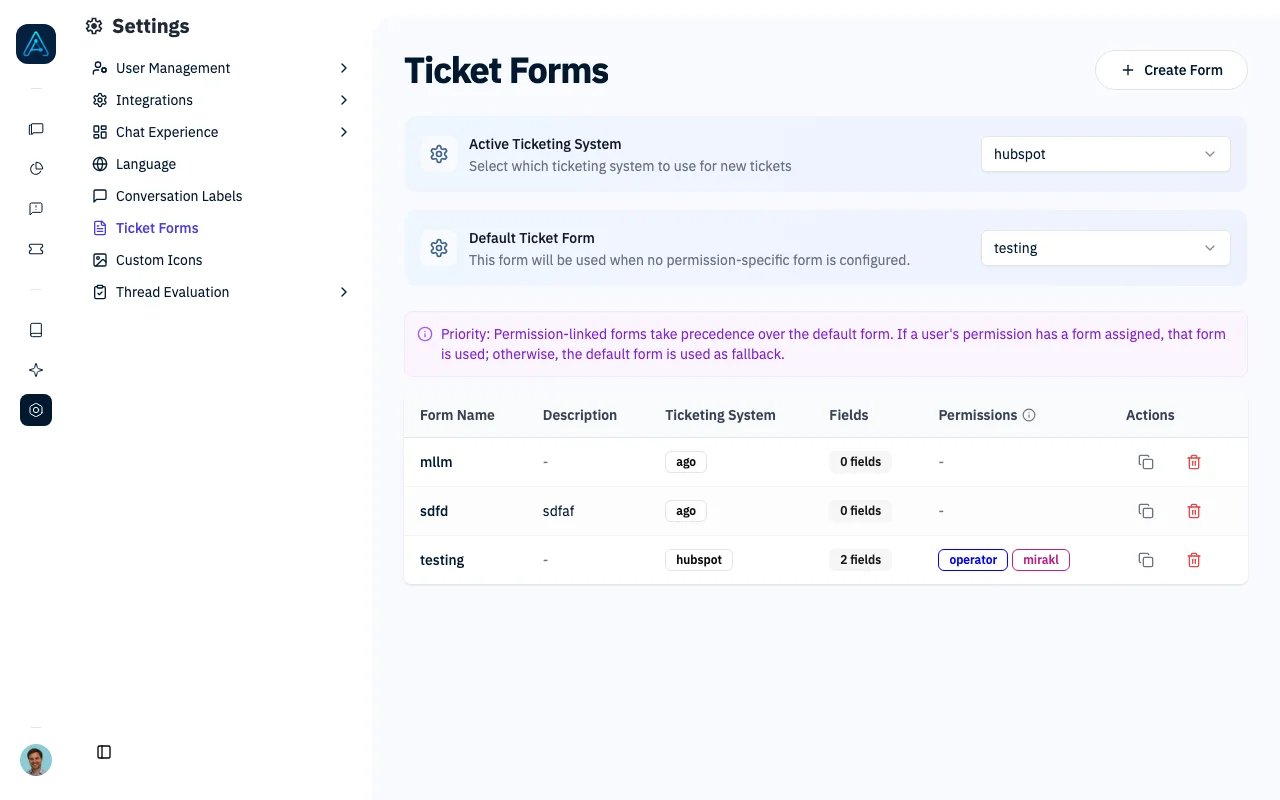
AGO's ticketing system provides a complete solution for support requests, enabling users to create tickets through integrated contact forms and allowing administrators to manage conversations across multiple ticketing backends.
 ## Overview
The ticketing system enables:
* **Multi-system support**: AGO Internal, Zendesk, HelpScout, and HubSpot
* **Contact form integration**: Dynamic forms with custom fields
* **Ticket messaging**: Two-way communication between admins and users
* **Permission-based access**: Control who can create tickets
* **Custom configurations**: Tailored messages and AI instructions
***
## Supported Ticketing Systems
| System | Description | Key Features |
| ---------------- | -------------------------------- | --------------------------------------------------------- |
| **AGO Internal** | Built-in ticketing system | Full feature support, no external dependencies |
| **Zendesk** | External ticket creation via API | User synchronization, custom field mapping |
| **HelpScout** | Conversation-based management | Tag support, email-based user management |
| **HubSpot** | Service Hub ticket creation | Contact auto-creation, property mapping, owner assignment |
### AGO Internal System
The AGO Internal ticketing system provides built-in ticket management without external dependencies.
**Key Features:**
* No additional configuration or API credentials required
* Automatic ticket status creation and management
* Integrated with business message threads for full conversation context
* Full custom fields support matching external systems
* Built-in admin dashboard for ticket management
* Email notifications for ticket updates
**When to Use AGO Internal:**
* Organizations without existing ticketing systems
* Simple support workflows that don't require enterprise features
* Testing and development environments
* Self-contained deployments where external integrations aren't needed
**Configuration:**
1. Navigate to **Settings** → **Integrations** → **API Configuration**
2. Set **Active Ticketing System** to "AGO Internal"
3. Configure email notification settings (optional)
**Limitations compared to external systems:**
* No integration with existing support team workflows
* Limited to AGO admin interface for ticket management
* No advanced routing or automation rules (use Triggers for automation)
### Zendesk Integration
* External ticket creation via Zendesk API
* User synchronization with Zendesk user management
* Private comment addition with conversation links
* Custom field mapping between systems
### HelpScout Integration
* Conversation-based ticket management
* Tag support for categorization
* Email-based user management
* Automatic priority tagging
### HubSpot Integration
* Ticket creation in HubSpot Service Hub
* Automatic contact creation from email
* Property mapping and sync from HubSpot
* Owner assignment for ticket routing
***
## Contact Form Configuration
### Form Fields
The contact form supports configurable fields:
| Field Type | Description |
| ---------------- | ------------------------------------- |
| Subject | Ticket title (optional/required) |
| Typology | Ticket type selection |
| Priority | Urgency level |
| Custom fields | Dynamic fields based on configuration |
| File attachments | Multiple file upload support |
### Custom Fields
#### Field Types
* Text input
* Select dropdown
* Multi-select
* Boolean checkbox
* Textarea
#### Grouped Options (Hierarchical)
For select fields, create grouped options that display as hover submenus:
| Option Name | Option Value | Group |
| --------------- | ------------ | ----------- |
| Slack connector | `slack` | `Connector` |
| Drive connector | `drive` | `Connector` |
| Email support | `email` | `Support` |
| Simple option | `simple` | *(empty)* |
Options with a `group` value appear under that group as a hoverable submenu. Options without a group appear as top-level items.
### Progressive Disclosure and Conditional Fields
Fields can appear based on previous selections, creating dynamic forms that adapt to user input. For example, selecting "Technical Issue" can reveal a "Browser Version" field, while "Billing" reveals an "Invoice Number" field.
You can also restrict priority to specific typologies using the `priority_typologies` setting — the priority field only appears when a matching typology is selected.
See [Ticket Form Customization](./ticket-form-customization#conditional-fields) for full details on conditional fields and options.
### Widget User Support
For anonymous widget users (with auto-generated emails), AGO collects their real email address during ticket creation. The email is validated and stored for future reference.
### JWT Field Extraction
When users authenticate via JWT tokens, AGO extracts configured claims (e.g., `customer_id`, `plan_tier`) and includes them as context in the private comment attached to the ticket. This gives your support team user metadata without manual data entry.
### AI-Powered Ticket Prefilling
AI analyzes the conversation to pre-fill ticket fields — subject, description, priority, category, and any custom fields with AI pre-fill enabled. Pre-filled values are marked with a sparkles icon so users can review before submitting. Customize the extraction behavior with a system prompt on each form.
See [Ticket Form Customization — AI Prefilling](./ticket-form-customization#ai-prefilling) for configuration details.
***
## Ticket Messaging
The messaging system enables ongoing communication within tickets.
### Message Types
| Type | Visibility | Use Case |
| ------------ | ---------------- | ----------------------------------- |
| **Public** | Admins and users | Direct communication with requester |
| **Internal** | Admins only | Team coordination, documentation |
### For Administrators
When viewing a ticket:
1. **View all messages** in chronological order
2. **Send responses** directly from the ticket interface
3. **Add internal notes** visible only to other administrators
4. **Filter messages** to show/hide internal communications
### Message Flow
```mermaid theme={null}
flowchart TD
A[User submits ticket] --> B[Admin reviews]
B --> C[Admin sends public message]
C --> D[User receives notification]
D --> E[User replies]
E --> B
B --> F[Admin adds internal note]
F --> G[Resolution documented]
```
### Sending Messages
1. Navigate to ticket detail page
2. Scroll to Messages section
3. Type message in text area
4. Check "Internal message" for admin-only visibility
5. Click "Send"
### Email Notifications
The messaging system includes automatic email notifications:
**For Users:**
* Receive email when admin sends a public message
* Email includes message content and link to view ticket
* Configurable email templates
**For Admins:**
* Notifications when users reply to tickets
* Configurable per-admin notification preferences
**Configuration:**
* Email notifications are enabled by default for AGO Internal
* For external systems (Zendesk, HelpScout), notifications are handled by the external platform
***
## Permission Configuration
### Ticket Creation Permissions
Control who can create tickets through:
1. **Custom Permission settings** - Per-user-type configuration
2. **Global AGO Config** - System-wide defaults
3. **Allow all users** - Override to enable all users
### Permission Hierarchy
```mermaid theme={null}
flowchart TD
A[User requests ticket creation] --> B{Custom Permission allows?}
B -->|Yes| C[Create ticket]
B -->|Check global| D{Allow all users enabled?}
D -->|Yes| C
D -->|No| E{Global config allows?}
E -->|Yes| C
E -->|No| F[Show denied message]
```
### Allow All Users to Create Tickets
Enable ticket creation for all users regardless of external system status:
**Configuration (Superadmin only):**
This setting is configured at the system level via the backend configuration or Config API.
**Behavior by System:**
| System | With Setting Enabled |
| ------------ | ------------------------------------------------------------- |
| Zendesk | Users without Zendesk accounts can create tickets using email |
| HelpScout | Already allows all users (consistent behavior) |
| AGO Internal | Already allows all users (consistent behavior) |
***
## AI Instructions Configuration
Configure instructions appended to the AI's system prompt based on ticket permissions.
### Permission-Level Instructions
Configure separate instructions for:
* **When tickets allowed**: Instructions for users who can create tickets
* **When tickets denied**: Instructions for users who cannot create tickets
### Example: Users With Permission
```
You can help the user create support tickets. When they express a need for
assistance, offer to create a ticket using the available ticketing tools.
Ask for relevant details so the ticket is properly categorized.
```
### Example: Users Without Permission
```
This user does not have permission to create support tickets directly.
If they request to create a ticket, kindly inform them that they need to
contact their administrator or use alternative support channels.
```
### Configuration via Admin Interface
1. Navigate to **Settings** → **User Management** → **Access Control**
2. Create or edit a permission
3. Scroll to **Ticket Creation Instructions** section
4. Configure both "When Tickets Allowed" and "When Tickets Denied" fields
5. Save
***
## Denied Message Customization
When users cannot create tickets, display custom markdown messages instead of default behavior.
### Message Hierarchy
| Priority | Source | Description |
| ----------- | ---------------- | ---------------------------------------- |
| 1 (Highest) | CustomPermission | Permission-specific message |
| 2 | Global Config | `default_ticket_creation_denied_message` |
| 3 (Lowest) | System Fallback | Default system behavior |
### Markdown Support
Messages support GitHub-flavored markdown:
* Headers (`# ## ###`)
* Bold and italic (`**bold**` `*italic*`)
* Links (`[text](url)`)
* Lists (`- item` or `1. item`)
* Code blocks
* Blockquotes (`> quote`)
### Example Messages
**Support Restrictions:**
```markdown theme={null}
# Contact Support Required
Your account requires **administrator approval** for ticket creation.
Please contact your account manager at:
- Email: support@company.com
- Phone: +1-555-0123
Or visit our [support portal](https://support.company.com) for assistance.
```
**License Restrictions:**
```markdown theme={null}
### Upgrade Required
Your current license does not include ticket support features.
[**Upgrade your plan**](https://billing.company.com/upgrade) to access:
- Direct ticket creation
- Priority support
- 24/7 assistance
```
***
## User Permissions
### Access Levels
| Role | Capabilities |
| ---------------- | -------------------------------------------- |
| Regular Users | Create tickets for own issues |
| Account Managers | View tickets from managed organizations |
| Staff/Admin | Full access to all tickets and configuration |
### Organization Filtering
* Account managers see only tickets from managed organizations
* Organization-based access control throughout
* Secure data isolation between organizations
***
## Integration Points
### Business Message Thread Integration
* Tickets linked to conversation threads
* Full conversation context available
* Automatic thread URL inclusion in external systems
### Trigger System Integration
* Automatic trigger processing on ticket creation
* Support for custom automation workflows
* Error handling to prevent ticket creation failures
### Zendesk Ticket Sync
If you use Zendesk, AGO can automatically sync ticket statuses, assignees, comments, and custom fields back into the admin dashboard. See [Zendesk Ticketing — Ticket Sync](../data-connector/zendesk-ticketing-integration#ticket-sync) for setup details.
### Analytics Integration
* Ticket creation metrics
* Performance tracking
* Feedback analytics
* Dashboard statistics via API
### CSV Export
Export ticket data for external analysis and reporting:
**How to Export:**
1. Navigate to **Tickets** in the sidebar
2. Apply desired filters (date range, status, priority, etc.)
3. Click **Export to CSV**
4. Download the generated file
**Exported Fields:**
* Ticket ID, Subject, Body
* Status, Priority, Typology
* Requester information (name, email)
* Creation and update timestamps
* Custom field values
* Organization (if applicable)
**Use Cases:**
* Monthly support metrics reporting
* SLA compliance analysis
* Trend identification across ticket categories
* Integration with external BI tools
### Success Messages
Configure custom messages shown to users after successful ticket creation:
**Per-Form Configuration:**
| Field | Description |
| --------------------------- | -------------------------------------------- |
| `success_message_text` | Custom thank you message (supports markdown) |
| `success_message_url_label` | Text for optional action link |
**Example:**
```
success_message_text: "Thank you! Your ticket #{{ticket.id}} has been created. Our team will respond within 24 hours."
success_message_url_label: "View your tickets"
```
### Custom Redirect URL
If you use an external ticketing portal, set the `override_url_ticket_user` field on a ticket form or on the ticketing system itself. After ticket creation, users are redirected to that URL instead of seeing the default success screen. This is useful when your users track tickets in a separate portal (e.g., Zendesk Help Center or a custom status page).
***
## Troubleshooting
**Problem:** Anonymous widget users not prompted for email.
**Solutions:**
1. Check if user email starts with `unknown_ago@`
2. Verify widget authentication configuration
3. Check email validation regex
**Problem:** Tickets not created in Zendesk/HelpScout.
**Solutions:**
1. Verify API credentials and endpoints
2. Check network connectivity
3. Review external system user permissions
4. Validate field mapping configuration
**Problem:** Expected fields don't appear in form.
**Solutions:**
1. Check field active status
2. Verify conditional display logic
3. Review field ordering configuration
4. Check user permissions for field access
**Problem:** User cannot create tickets despite expected permission.
**Solutions:**
1. Check user's custom permission settings
2. Verify "Allow all users" global setting
3. For Zendesk: Check if user exists in Zendesk
4. Review permission hierarchy for conflicts
**Problem:** Users see admin internal notes.
**Solutions:**
1. Verify message was marked as "Internal"
2. Check filter configuration
3. Review API response filtering
***
## Related
* [Ticket Form Customization](./ticket-form-customization) — Customize ticket forms
* [Tickets List](./tickets-list) — Browse tickets
* [Tickets Analytics](./tickets-analytics) — Ticket metrics
* [Ticketing Tool](../tools/ticketing-tool) — Agent ticketing tool
* [Ticketing Connectors](../data-connector/ticketing-connectors) — External integrations
* [Set Up Ticket Escalation](../guides/setup-ticketing-howto) — Setup guide
* [Ticketing Best Practices](../guides/ticketing-best-practices) — Workflow patterns
## Overview
The ticketing system enables:
* **Multi-system support**: AGO Internal, Zendesk, HelpScout, and HubSpot
* **Contact form integration**: Dynamic forms with custom fields
* **Ticket messaging**: Two-way communication between admins and users
* **Permission-based access**: Control who can create tickets
* **Custom configurations**: Tailored messages and AI instructions
***
## Supported Ticketing Systems
| System | Description | Key Features |
| ---------------- | -------------------------------- | --------------------------------------------------------- |
| **AGO Internal** | Built-in ticketing system | Full feature support, no external dependencies |
| **Zendesk** | External ticket creation via API | User synchronization, custom field mapping |
| **HelpScout** | Conversation-based management | Tag support, email-based user management |
| **HubSpot** | Service Hub ticket creation | Contact auto-creation, property mapping, owner assignment |
### AGO Internal System
The AGO Internal ticketing system provides built-in ticket management without external dependencies.
**Key Features:**
* No additional configuration or API credentials required
* Automatic ticket status creation and management
* Integrated with business message threads for full conversation context
* Full custom fields support matching external systems
* Built-in admin dashboard for ticket management
* Email notifications for ticket updates
**When to Use AGO Internal:**
* Organizations without existing ticketing systems
* Simple support workflows that don't require enterprise features
* Testing and development environments
* Self-contained deployments where external integrations aren't needed
**Configuration:**
1. Navigate to **Settings** → **Integrations** → **API Configuration**
2. Set **Active Ticketing System** to "AGO Internal"
3. Configure email notification settings (optional)
**Limitations compared to external systems:**
* No integration with existing support team workflows
* Limited to AGO admin interface for ticket management
* No advanced routing or automation rules (use Triggers for automation)
### Zendesk Integration
* External ticket creation via Zendesk API
* User synchronization with Zendesk user management
* Private comment addition with conversation links
* Custom field mapping between systems
### HelpScout Integration
* Conversation-based ticket management
* Tag support for categorization
* Email-based user management
* Automatic priority tagging
### HubSpot Integration
* Ticket creation in HubSpot Service Hub
* Automatic contact creation from email
* Property mapping and sync from HubSpot
* Owner assignment for ticket routing
***
## Contact Form Configuration
### Form Fields
The contact form supports configurable fields:
| Field Type | Description |
| ---------------- | ------------------------------------- |
| Subject | Ticket title (optional/required) |
| Typology | Ticket type selection |
| Priority | Urgency level |
| Custom fields | Dynamic fields based on configuration |
| File attachments | Multiple file upload support |
### Custom Fields
#### Field Types
* Text input
* Select dropdown
* Multi-select
* Boolean checkbox
* Textarea
#### Grouped Options (Hierarchical)
For select fields, create grouped options that display as hover submenus:
| Option Name | Option Value | Group |
| --------------- | ------------ | ----------- |
| Slack connector | `slack` | `Connector` |
| Drive connector | `drive` | `Connector` |
| Email support | `email` | `Support` |
| Simple option | `simple` | *(empty)* |
Options with a `group` value appear under that group as a hoverable submenu. Options without a group appear as top-level items.
### Progressive Disclosure and Conditional Fields
Fields can appear based on previous selections, creating dynamic forms that adapt to user input. For example, selecting "Technical Issue" can reveal a "Browser Version" field, while "Billing" reveals an "Invoice Number" field.
You can also restrict priority to specific typologies using the `priority_typologies` setting — the priority field only appears when a matching typology is selected.
See [Ticket Form Customization](./ticket-form-customization#conditional-fields) for full details on conditional fields and options.
### Widget User Support
For anonymous widget users (with auto-generated emails), AGO collects their real email address during ticket creation. The email is validated and stored for future reference.
### JWT Field Extraction
When users authenticate via JWT tokens, AGO extracts configured claims (e.g., `customer_id`, `plan_tier`) and includes them as context in the private comment attached to the ticket. This gives your support team user metadata without manual data entry.
### AI-Powered Ticket Prefilling
AI analyzes the conversation to pre-fill ticket fields — subject, description, priority, category, and any custom fields with AI pre-fill enabled. Pre-filled values are marked with a sparkles icon so users can review before submitting. Customize the extraction behavior with a system prompt on each form.
See [Ticket Form Customization — AI Prefilling](./ticket-form-customization#ai-prefilling) for configuration details.
***
## Ticket Messaging
The messaging system enables ongoing communication within tickets.
### Message Types
| Type | Visibility | Use Case |
| ------------ | ---------------- | ----------------------------------- |
| **Public** | Admins and users | Direct communication with requester |
| **Internal** | Admins only | Team coordination, documentation |
### For Administrators
When viewing a ticket:
1. **View all messages** in chronological order
2. **Send responses** directly from the ticket interface
3. **Add internal notes** visible only to other administrators
4. **Filter messages** to show/hide internal communications
### Message Flow
```mermaid theme={null}
flowchart TD
A[User submits ticket] --> B[Admin reviews]
B --> C[Admin sends public message]
C --> D[User receives notification]
D --> E[User replies]
E --> B
B --> F[Admin adds internal note]
F --> G[Resolution documented]
```
### Sending Messages
1. Navigate to ticket detail page
2. Scroll to Messages section
3. Type message in text area
4. Check "Internal message" for admin-only visibility
5. Click "Send"
### Email Notifications
The messaging system includes automatic email notifications:
**For Users:**
* Receive email when admin sends a public message
* Email includes message content and link to view ticket
* Configurable email templates
**For Admins:**
* Notifications when users reply to tickets
* Configurable per-admin notification preferences
**Configuration:**
* Email notifications are enabled by default for AGO Internal
* For external systems (Zendesk, HelpScout), notifications are handled by the external platform
***
## Permission Configuration
### Ticket Creation Permissions
Control who can create tickets through:
1. **Custom Permission settings** - Per-user-type configuration
2. **Global AGO Config** - System-wide defaults
3. **Allow all users** - Override to enable all users
### Permission Hierarchy
```mermaid theme={null}
flowchart TD
A[User requests ticket creation] --> B{Custom Permission allows?}
B -->|Yes| C[Create ticket]
B -->|Check global| D{Allow all users enabled?}
D -->|Yes| C
D -->|No| E{Global config allows?}
E -->|Yes| C
E -->|No| F[Show denied message]
```
### Allow All Users to Create Tickets
Enable ticket creation for all users regardless of external system status:
**Configuration (Superadmin only):**
This setting is configured at the system level via the backend configuration or Config API.
**Behavior by System:**
| System | With Setting Enabled |
| ------------ | ------------------------------------------------------------- |
| Zendesk | Users without Zendesk accounts can create tickets using email |
| HelpScout | Already allows all users (consistent behavior) |
| AGO Internal | Already allows all users (consistent behavior) |
***
## AI Instructions Configuration
Configure instructions appended to the AI's system prompt based on ticket permissions.
### Permission-Level Instructions
Configure separate instructions for:
* **When tickets allowed**: Instructions for users who can create tickets
* **When tickets denied**: Instructions for users who cannot create tickets
### Example: Users With Permission
```
You can help the user create support tickets. When they express a need for
assistance, offer to create a ticket using the available ticketing tools.
Ask for relevant details so the ticket is properly categorized.
```
### Example: Users Without Permission
```
This user does not have permission to create support tickets directly.
If they request to create a ticket, kindly inform them that they need to
contact their administrator or use alternative support channels.
```
### Configuration via Admin Interface
1. Navigate to **Settings** → **User Management** → **Access Control**
2. Create or edit a permission
3. Scroll to **Ticket Creation Instructions** section
4. Configure both "When Tickets Allowed" and "When Tickets Denied" fields
5. Save
***
## Denied Message Customization
When users cannot create tickets, display custom markdown messages instead of default behavior.
### Message Hierarchy
| Priority | Source | Description |
| ----------- | ---------------- | ---------------------------------------- |
| 1 (Highest) | CustomPermission | Permission-specific message |
| 2 | Global Config | `default_ticket_creation_denied_message` |
| 3 (Lowest) | System Fallback | Default system behavior |
### Markdown Support
Messages support GitHub-flavored markdown:
* Headers (`# ## ###`)
* Bold and italic (`**bold**` `*italic*`)
* Links (`[text](url)`)
* Lists (`- item` or `1. item`)
* Code blocks
* Blockquotes (`> quote`)
### Example Messages
**Support Restrictions:**
```markdown theme={null}
# Contact Support Required
Your account requires **administrator approval** for ticket creation.
Please contact your account manager at:
- Email: support@company.com
- Phone: +1-555-0123
Or visit our [support portal](https://support.company.com) for assistance.
```
**License Restrictions:**
```markdown theme={null}
### Upgrade Required
Your current license does not include ticket support features.
[**Upgrade your plan**](https://billing.company.com/upgrade) to access:
- Direct ticket creation
- Priority support
- 24/7 assistance
```
***
## User Permissions
### Access Levels
| Role | Capabilities |
| ---------------- | -------------------------------------------- |
| Regular Users | Create tickets for own issues |
| Account Managers | View tickets from managed organizations |
| Staff/Admin | Full access to all tickets and configuration |
### Organization Filtering
* Account managers see only tickets from managed organizations
* Organization-based access control throughout
* Secure data isolation between organizations
***
## Integration Points
### Business Message Thread Integration
* Tickets linked to conversation threads
* Full conversation context available
* Automatic thread URL inclusion in external systems
### Trigger System Integration
* Automatic trigger processing on ticket creation
* Support for custom automation workflows
* Error handling to prevent ticket creation failures
### Zendesk Ticket Sync
If you use Zendesk, AGO can automatically sync ticket statuses, assignees, comments, and custom fields back into the admin dashboard. See [Zendesk Ticketing — Ticket Sync](../data-connector/zendesk-ticketing-integration#ticket-sync) for setup details.
### Analytics Integration
* Ticket creation metrics
* Performance tracking
* Feedback analytics
* Dashboard statistics via API
### CSV Export
Export ticket data for external analysis and reporting:
**How to Export:**
1. Navigate to **Tickets** in the sidebar
2. Apply desired filters (date range, status, priority, etc.)
3. Click **Export to CSV**
4. Download the generated file
**Exported Fields:**
* Ticket ID, Subject, Body
* Status, Priority, Typology
* Requester information (name, email)
* Creation and update timestamps
* Custom field values
* Organization (if applicable)
**Use Cases:**
* Monthly support metrics reporting
* SLA compliance analysis
* Trend identification across ticket categories
* Integration with external BI tools
### Success Messages
Configure custom messages shown to users after successful ticket creation:
**Per-Form Configuration:**
| Field | Description |
| --------------------------- | -------------------------------------------- |
| `success_message_text` | Custom thank you message (supports markdown) |
| `success_message_url_label` | Text for optional action link |
**Example:**
```
success_message_text: "Thank you! Your ticket #{{ticket.id}} has been created. Our team will respond within 24 hours."
success_message_url_label: "View your tickets"
```
### Custom Redirect URL
If you use an external ticketing portal, set the `override_url_ticket_user` field on a ticket form or on the ticketing system itself. After ticket creation, users are redirected to that URL instead of seeing the default success screen. This is useful when your users track tickets in a separate portal (e.g., Zendesk Help Center or a custom status page).
***
## Troubleshooting
**Problem:** Anonymous widget users not prompted for email.
**Solutions:**
1. Check if user email starts with `unknown_ago@`
2. Verify widget authentication configuration
3. Check email validation regex
**Problem:** Tickets not created in Zendesk/HelpScout.
**Solutions:**
1. Verify API credentials and endpoints
2. Check network connectivity
3. Review external system user permissions
4. Validate field mapping configuration
**Problem:** Expected fields don't appear in form.
**Solutions:**
1. Check field active status
2. Verify conditional display logic
3. Review field ordering configuration
4. Check user permissions for field access
**Problem:** User cannot create tickets despite expected permission.
**Solutions:**
1. Check user's custom permission settings
2. Verify "Allow all users" global setting
3. For Zendesk: Check if user exists in Zendesk
4. Review permission hierarchy for conflicts
**Problem:** Users see admin internal notes.
**Solutions:**
1. Verify message was marked as "Internal"
2. Check filter configuration
3. Review API response filtering
***
## Related
* [Ticket Form Customization](./ticket-form-customization) — Customize ticket forms
* [Tickets List](./tickets-list) — Browse tickets
* [Tickets Analytics](./tickets-analytics) — Ticket metrics
* [Ticketing Tool](../tools/ticketing-tool) — Agent ticketing tool
* [Ticketing Connectors](../data-connector/ticketing-connectors) — External integrations
* [Set Up Ticket Escalation](../guides/setup-ticketing-howto) — Setup guide
* [Ticketing Best Practices](../guides/ticketing-best-practices) — Workflow patterns