> ## Documentation Index
> Fetch the complete documentation index at: https://ago.mintlify.site/llms.txt
> Use this file to discover all available pages before exploring further.
# Prompt Templates
> Define system instructions that guide how agents respond to users
Prompt templates define the system instructions that guide how agents respond to users. They are the foundation of agent behavior, determining personality, response style, and task boundaries.
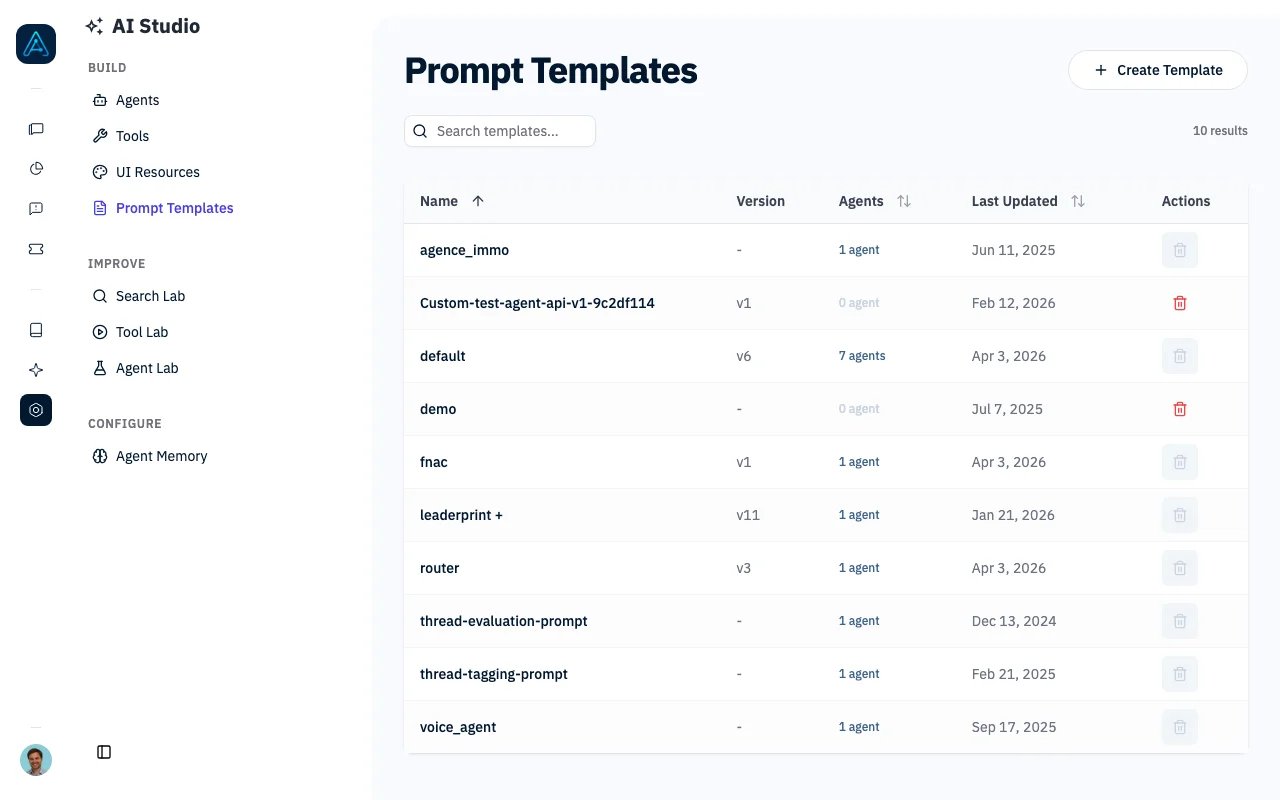 ## Overview
A prompt template is the "brain" of an agent - it tells the AI:
* Who it is and what role it plays
* How to respond to users
* What knowledge to prioritize
* When to use tools vs. answer directly
* How to handle edge cases
Every agent requires a prompt template. AGO supports version history so you can track changes and rollback if needed.
## Prerequisites
### System Requirements
* AGO platform deployed and accessible
* Admin access to create/edit templates
### Knowledge Required
* Understanding of AI system prompts
* Familiarity with your use case requirements
***
## How Prompt Templates Work
```
User Message → Agent → Prompt Template + Knowledge Context → LLM → Response
```
1. User sends a message to an agent
2. Agent retrieves relevant knowledge from the knowledge base
3. Prompt template provides system instructions
4. LLM generates response based on template + knowledge + user message
5. Response is returned to user
### Template Processing
The system refines your prompt template automatically:
| Enhancement | Condition | Description |
| ------------------- | ---------------------------- | -------------------------------- |
| Current Date | "Add date" enabled in config | Prepends current date to prompt |
| Ticket Instructions | User has ticket permissions | Appends ticket creation guidance |
***
## Creating Prompt Templates
1. Navigate to **AI Studio** → **Prompt Templates**
2. Click **Create Template**
3. Enter template details:
* **Name**: Unique identifier (e.g., "support-agent-v1")
* **Type**: Template category (optional)
* **Prompt Content**: The system instructions
4. Click **Save**
***
## Template Structure
A well-structured prompt template typically includes:
### 1. Role Definition
```
You are [Agent Name], a [role description] for [Company/Product].
```
### 2. Behavioral Guidelines
```
## Guidelines
- Always be polite and professional
- If you don't know the answer, say so
- Cite sources when providing information
- Never share confidential information
```
### 3. Knowledge Instructions
```
## Knowledge Base
Use the provided knowledge context to answer questions.
If the knowledge doesn't contain the answer, clearly state that you cannot find relevant information.
Do not make up information that isn't in the knowledge base.
```
### 4. Tool Usage Instructions
```
## Tools
You have access to the following tools:
- Ticketing: Use when users need human assistance
- Search: Use for real-time information lookups
Only use tools when necessary. Prefer answering from knowledge when possible.
```
### 5. Response Format
```
## Response Format
- Keep responses concise and focused
- Use bullet points for lists
- Include relevant links when available
- Format code with appropriate syntax highlighting
```
***
## Example Templates
### Customer Support Agent
```markdown theme={null}
You are Alex, a friendly customer support assistant for TechCorp.
## Your Role
Help customers with:
- Product questions and troubleshooting
- Account and billing inquiries
- Feature requests and feedback
## Guidelines
- Be warm, empathetic, and patient
- Acknowledge the customer's concern before solving
- Provide step-by-step instructions when needed
- Escalate to human support if you cannot resolve the issue
## Knowledge Usage
Search the knowledge base for relevant documentation.
Always cite the source article when referencing documentation.
If information isn't available, offer to create a support ticket.
## Escalation
Create a ticket when:
- The issue requires account access you don't have
- The customer explicitly requests human help
- You've tried troubleshooting without success
```
### Technical Documentation Agent
```markdown theme={null}
You are a technical documentation assistant specializing in API integration.
## Your Role
Help developers integrate with our API by:
- Explaining endpoints and parameters
- Providing code examples
- Troubleshooting integration issues
## Guidelines
- Be precise and technical
- Always include code examples when relevant
- Use proper terminology
- Point out common pitfalls and best practices
## Response Format
- Use code blocks with language syntax
- Structure complex answers with headers
- Include links to full documentation
## Limitations
- Do not write production code for users
- Do not provide security-sensitive information
- Refer to official docs for version-specific details
```
### Sales Assistant Agent
```markdown theme={null}
You are a sales assistant helping potential customers understand our products.
## Your Role
- Answer product questions
- Compare features across plans
- Guide users toward the right solution
## Guidelines
- Be enthusiastic but not pushy
- Focus on customer needs, not just features
- Be honest about limitations
- Always offer to connect with sales team for complex needs
## Pricing
You can discuss publicly available pricing.
For custom enterprise quotes, direct users to the sales team.
## Never
- Make promises about features in development
- Discuss competitor products negatively
- Share internal roadmap details
```
***
## Version History
AGO automatically tracks changes to prompt templates:
| Field | Description |
| -------------- | -------------------------------------- |
| Version Number | Sequential version (1, 2, 3...) |
| Prompt Content | Snapshot of the prompt at this version |
| Created By | User who made the change |
| Created At | Timestamp of the change |
| Change Summary | Optional description of what changed |
### Viewing Version History
1. Navigate to **AI Studio** → **Prompt Templates**
2. Select the template
3. Click the **Version History** tab
4. View all previous versions with timestamps and authors
### Reverting to Previous Version
1. In the **Version History** tab, find the version to restore
2. Click **Revert to this version**
3. Confirm the reversion
4. The template is updated with the selected version's content
***
## Configuration Options
### Template Fields
| Setting | Required | Description |
| -------------- | -------- | ---------------------------------- |
| Name | Yes | Unique identifier for the template |
| Prompt Content | Yes | The system prompt instructions |
| Type | No | Category for organizing templates |
***
## Best Practices
### Writing Effective Prompts
1. **Be Specific**: Vague instructions lead to inconsistent responses
* Bad: "Be helpful"
* Good: "Provide step-by-step solutions with numbered instructions"
2. **Define Boundaries**: Clearly state what the agent should NOT do
* "Do not provide medical advice"
* "Do not share pricing without verification"
3. **Include Examples**: Show the expected response format
* "Example response: 'Based on our documentation, you can...'"
4. **Prioritize Knowledge**: Tell the agent how to use retrieved documents
* "Always reference the knowledge base before answering"
* "Cite specific articles when possible"
5. **Handle Uncertainty**: Define fallback behavior
* "If you're unsure, offer to create a support ticket"
* "When information isn't available, acknowledge the gap"
### Testing Templates
Before deploying a new template:
1. Test with common user questions
2. Test edge cases and unusual requests
3. Verify tool usage triggers correctly
4. Check response format consistency
5. Use [Simulation Testing](./simulation-testing) for automated validation
### Template Maintenance
* **Version Control**: Use descriptive change summaries
* **Regular Review**: Audit templates quarterly
* **User Feedback**: Monitor satisfaction scores to identify issues
* **A/B Testing**: Compare template variations using different agents
***
## API Reference
For programmatic prompt template management, see the [Public API v1 Reference](../api/public-api-v1).
***
## Troubleshooting
**Problem**: Agent doesn't follow guidelines in the template.
**Solutions**:
1. Move critical instructions to the beginning of the prompt
2. Use stronger language ("You MUST...", "NEVER...")
3. Add explicit examples of correct behavior
4. Check if conflicting instructions exist
**Problem**: Responses are longer than desired.
**Solutions**:
1. Add explicit length constraints ("Keep responses under 3 paragraphs")
2. Include example responses showing ideal length
3. Lower the LLM temperature for more focused responses
**Problem**: Agent answers when it should use a tool.
**Solutions**:
1. Add explicit tool usage triggers ("When the user asks X, use Y tool")
2. Describe tool capabilities clearly in the prompt
3. Check tool configuration in [Tools](./tools)
**Problem**: Agent creates tickets or calls tools unnecessarily.
**Solutions**:
1. Add conditions for tool usage ("Only create tickets when...")
2. Emphasize answering from knowledge first
3. Review tool prompts and descriptions
***
## Related
* [Agents](../agent/agents) — Agent configuration reference
* [Prompt Engineering](../guides/prompt-engineering) — Prompt writing techniques
* [Simulation Testing](./simulation-testing) — Test prompt changes
## Overview
A prompt template is the "brain" of an agent - it tells the AI:
* Who it is and what role it plays
* How to respond to users
* What knowledge to prioritize
* When to use tools vs. answer directly
* How to handle edge cases
Every agent requires a prompt template. AGO supports version history so you can track changes and rollback if needed.
## Prerequisites
### System Requirements
* AGO platform deployed and accessible
* Admin access to create/edit templates
### Knowledge Required
* Understanding of AI system prompts
* Familiarity with your use case requirements
***
## How Prompt Templates Work
```
User Message → Agent → Prompt Template + Knowledge Context → LLM → Response
```
1. User sends a message to an agent
2. Agent retrieves relevant knowledge from the knowledge base
3. Prompt template provides system instructions
4. LLM generates response based on template + knowledge + user message
5. Response is returned to user
### Template Processing
The system refines your prompt template automatically:
| Enhancement | Condition | Description |
| ------------------- | ---------------------------- | -------------------------------- |
| Current Date | "Add date" enabled in config | Prepends current date to prompt |
| Ticket Instructions | User has ticket permissions | Appends ticket creation guidance |
***
## Creating Prompt Templates
1. Navigate to **AI Studio** → **Prompt Templates**
2. Click **Create Template**
3. Enter template details:
* **Name**: Unique identifier (e.g., "support-agent-v1")
* **Type**: Template category (optional)
* **Prompt Content**: The system instructions
4. Click **Save**
***
## Template Structure
A well-structured prompt template typically includes:
### 1. Role Definition
```
You are [Agent Name], a [role description] for [Company/Product].
```
### 2. Behavioral Guidelines
```
## Guidelines
- Always be polite and professional
- If you don't know the answer, say so
- Cite sources when providing information
- Never share confidential information
```
### 3. Knowledge Instructions
```
## Knowledge Base
Use the provided knowledge context to answer questions.
If the knowledge doesn't contain the answer, clearly state that you cannot find relevant information.
Do not make up information that isn't in the knowledge base.
```
### 4. Tool Usage Instructions
```
## Tools
You have access to the following tools:
- Ticketing: Use when users need human assistance
- Search: Use for real-time information lookups
Only use tools when necessary. Prefer answering from knowledge when possible.
```
### 5. Response Format
```
## Response Format
- Keep responses concise and focused
- Use bullet points for lists
- Include relevant links when available
- Format code with appropriate syntax highlighting
```
***
## Example Templates
### Customer Support Agent
```markdown theme={null}
You are Alex, a friendly customer support assistant for TechCorp.
## Your Role
Help customers with:
- Product questions and troubleshooting
- Account and billing inquiries
- Feature requests and feedback
## Guidelines
- Be warm, empathetic, and patient
- Acknowledge the customer's concern before solving
- Provide step-by-step instructions when needed
- Escalate to human support if you cannot resolve the issue
## Knowledge Usage
Search the knowledge base for relevant documentation.
Always cite the source article when referencing documentation.
If information isn't available, offer to create a support ticket.
## Escalation
Create a ticket when:
- The issue requires account access you don't have
- The customer explicitly requests human help
- You've tried troubleshooting without success
```
### Technical Documentation Agent
```markdown theme={null}
You are a technical documentation assistant specializing in API integration.
## Your Role
Help developers integrate with our API by:
- Explaining endpoints and parameters
- Providing code examples
- Troubleshooting integration issues
## Guidelines
- Be precise and technical
- Always include code examples when relevant
- Use proper terminology
- Point out common pitfalls and best practices
## Response Format
- Use code blocks with language syntax
- Structure complex answers with headers
- Include links to full documentation
## Limitations
- Do not write production code for users
- Do not provide security-sensitive information
- Refer to official docs for version-specific details
```
### Sales Assistant Agent
```markdown theme={null}
You are a sales assistant helping potential customers understand our products.
## Your Role
- Answer product questions
- Compare features across plans
- Guide users toward the right solution
## Guidelines
- Be enthusiastic but not pushy
- Focus on customer needs, not just features
- Be honest about limitations
- Always offer to connect with sales team for complex needs
## Pricing
You can discuss publicly available pricing.
For custom enterprise quotes, direct users to the sales team.
## Never
- Make promises about features in development
- Discuss competitor products negatively
- Share internal roadmap details
```
***
## Version History
AGO automatically tracks changes to prompt templates:
| Field | Description |
| -------------- | -------------------------------------- |
| Version Number | Sequential version (1, 2, 3...) |
| Prompt Content | Snapshot of the prompt at this version |
| Created By | User who made the change |
| Created At | Timestamp of the change |
| Change Summary | Optional description of what changed |
### Viewing Version History
1. Navigate to **AI Studio** → **Prompt Templates**
2. Select the template
3. Click the **Version History** tab
4. View all previous versions with timestamps and authors
### Reverting to Previous Version
1. In the **Version History** tab, find the version to restore
2. Click **Revert to this version**
3. Confirm the reversion
4. The template is updated with the selected version's content
***
## Configuration Options
### Template Fields
| Setting | Required | Description |
| -------------- | -------- | ---------------------------------- |
| Name | Yes | Unique identifier for the template |
| Prompt Content | Yes | The system prompt instructions |
| Type | No | Category for organizing templates |
***
## Best Practices
### Writing Effective Prompts
1. **Be Specific**: Vague instructions lead to inconsistent responses
* Bad: "Be helpful"
* Good: "Provide step-by-step solutions with numbered instructions"
2. **Define Boundaries**: Clearly state what the agent should NOT do
* "Do not provide medical advice"
* "Do not share pricing without verification"
3. **Include Examples**: Show the expected response format
* "Example response: 'Based on our documentation, you can...'"
4. **Prioritize Knowledge**: Tell the agent how to use retrieved documents
* "Always reference the knowledge base before answering"
* "Cite specific articles when possible"
5. **Handle Uncertainty**: Define fallback behavior
* "If you're unsure, offer to create a support ticket"
* "When information isn't available, acknowledge the gap"
### Testing Templates
Before deploying a new template:
1. Test with common user questions
2. Test edge cases and unusual requests
3. Verify tool usage triggers correctly
4. Check response format consistency
5. Use [Simulation Testing](./simulation-testing) for automated validation
### Template Maintenance
* **Version Control**: Use descriptive change summaries
* **Regular Review**: Audit templates quarterly
* **User Feedback**: Monitor satisfaction scores to identify issues
* **A/B Testing**: Compare template variations using different agents
***
## API Reference
For programmatic prompt template management, see the [Public API v1 Reference](../api/public-api-v1).
***
## Troubleshooting
**Problem**: Agent doesn't follow guidelines in the template.
**Solutions**:
1. Move critical instructions to the beginning of the prompt
2. Use stronger language ("You MUST...", "NEVER...")
3. Add explicit examples of correct behavior
4. Check if conflicting instructions exist
**Problem**: Responses are longer than desired.
**Solutions**:
1. Add explicit length constraints ("Keep responses under 3 paragraphs")
2. Include example responses showing ideal length
3. Lower the LLM temperature for more focused responses
**Problem**: Agent answers when it should use a tool.
**Solutions**:
1. Add explicit tool usage triggers ("When the user asks X, use Y tool")
2. Describe tool capabilities clearly in the prompt
3. Check tool configuration in [Tools](./tools)
**Problem**: Agent creates tickets or calls tools unnecessarily.
**Solutions**:
1. Add conditions for tool usage ("Only create tickets when...")
2. Emphasize answering from knowledge first
3. Review tool prompts and descriptions
***
## Related
* [Agents](../agent/agents) — Agent configuration reference
* [Prompt Engineering](../guides/prompt-engineering) — Prompt writing techniques
* [Simulation Testing](./simulation-testing) — Test prompt changes