> ## Documentation Index
> Fetch the complete documentation index at: https://ago.mintlify.site/llms.txt
> Use this file to discover all available pages before exploring further.
# Knowledge Quality
> Evaluate and improve your knowledge base content with AI-powered analysis
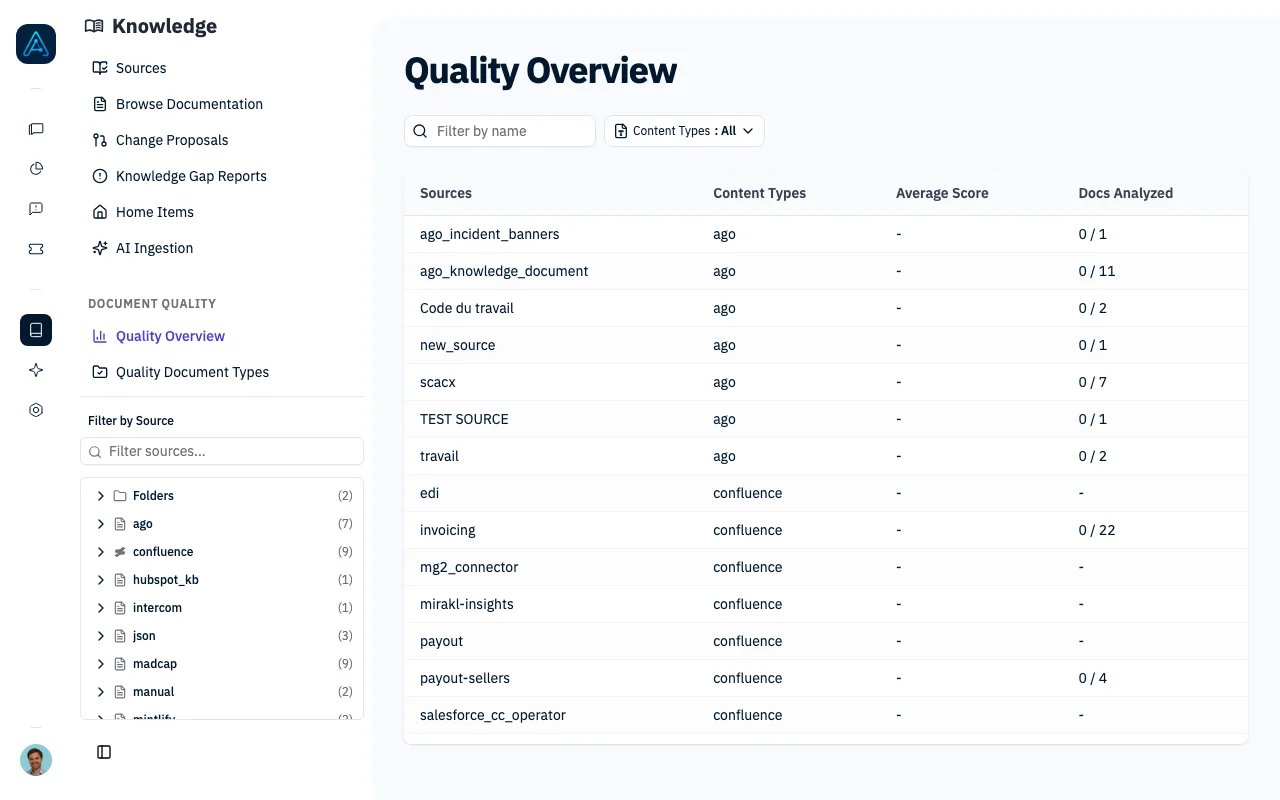 Evaluate and improve your knowledge base content with AI-powered quality analysis. The quality scoring system identifies areas for improvement to verify your documentation is structured for AI retrieval and user understanding.
## Overview
Knowledge Quality Analysis provides:
* **AI-Readiness Scoring**: Evaluate how well documents work with AI agents
* **Automated Quality Checks**: Detect structural and content issues
* **Actionable Recommendations**: Get specific suggestions for improvement
* **Bulk Analysis**: Analyze entire sources at once
## Quality Scoring
### Score Range
Documents receive a quality score from **0 to 5 points**:
| Score | Rating | Description |
| --------- | ---------- | ----------------------------------------------- |
| 3.5 - 5.0 | **Good** | Well-structured, clear content ready for AI |
| 2.0 - 3.4 | **Medium** | Adequate but has room for improvement |
| 0 - 1.9 | **Poor** | Significant issues that impact AI effectiveness |
### Score Composition
The total score combines two types of analysis:
| Component | Max Points | Description |
| -------------------- | ---------- | ------------------------------ |
| Deterministic Checks | 1.5 | Rule-based structural analysis |
| LLM Semantic Checks | 3.5 | AI-powered content analysis |
***
## Quality Checks
### Deterministic Checks (1.5 points)
These checks run instantly and evaluate document structure:
| Check | Points | Pass Criteria |
| ----------------- | ------ | ----------------------------------------------- |
| Has Headings | 0.2 | Document has 2+ headings |
| Heading Hierarchy | 0.3 | No skipped heading levels (H1 to H3 without H2) |
| Code Examples | 0.2 | Contains at least one code block |
| Image Captions | 0.2 | All images have alt text |
| Table Complexity | 0.2 | Tables have max 20 rows and 5 columns |
| Document Length | 0.2 | Between 100-5000 words |
| Error Handling | 0.2 | Mentions error-related keywords |
### LLM Semantic Checks (3.5 points)
These checks use AI to evaluate content quality:
| Check | Points | Evaluation Criteria |
| ----------------------- | ------ | ------------------------------------------------ |
| Introduction Quality | 0.5 | Does the intro explain WHAT, WHY, WHEN, and WHO? |
| Content Clarity | 0.8 | Are sentences clear? Is jargon explained? |
| Completeness | 0.7 | Covers use cases, edge cases, and limitations |
| Terminology Consistency | 0.5 | Uses consistent terms throughout |
| Examples Quality | 0.5 | Are examples concrete and helpful? |
| Organization | 0.5 | Is content logically organized? |
***
## Document Types
Document types let you define custom quality rules tailored to specific documentation categories. Each document type contains a set of quality checks that documents are evaluated against.
### Creating Document Types
1. Navigate to **Knowledge** > **Content Types**
2. Click **Create Doc Type**
3. Configure the name, description, and quality rules
4. Save the document type
### Starting from a Template
To quickly create document types aligned with the Diataxis documentation framework:
1. Navigate to **Knowledge** > **Content Types**
2. Click **Start from Template**
3. Choose from four Diataxis documentation types:
* **Tutorial** — Learning-oriented guides with numbered steps and code examples
* **How-to Guide** — Problem-focused guides for accomplishing specific tasks
* **Reference** — Descriptive, factual documentation of APIs and configurations
* **Explanation** — Conceptual documentation explaining the "why" behind decisions
4. The form pre-fills with recommended quality rules
5. Customize the rules as needed and save
### Assigning Document Types to Sources
Once created, document types can be assigned to knowledge sources:
1. Navigate to **Knowledge** > **Sources**
2. Edit a source
3. Under **Quality Evaluation**, select a document type
4. All documents in the source will be evaluated against the type's rules during analysis
***
## Analyzing Documents
### Single Document Analysis
**Via Admin Interface:**
1. Navigate to **Knowledge** → **All Content**
2. Select a document
3. Click **Analyze Quality**
4. View the score breakdown and recommendations
### Bulk Source Analysis
Analyze all documents in a source at once:
**Via Admin Interface:**
1. Navigate to **Knowledge** → **Sources**
2. Select a source
3. Click **Analyze All Documents**
4. Analysis runs in the background
The analysis runs asynchronously. Check progress via the source overview.
### Source Quality Overview
The Quality Overview page shows aggregate quality metrics for all sources. Clicking a source row navigates to that source's detail page, where you can view its quality data under the **Quality** tab.
Each source's quality tab displays:
| Metric | Description |
| ------------------ | ----------------------------------- |
| Total documents | All documents in the source |
| Analyzed documents | Documents with quality scores |
| Average score | Mean quality score across documents |
| Score distribution | Count of good/medium/poor documents |
For API access, see [Public API v1 Reference](../api/public-api-v1).
***
## Understanding Results
### Quality Issues
Failed checks are reported as issues with severity levels:
| Severity | Score Impact | Example |
| ---------- | ------------------------- | ----------------------------- |
| **High** | \< 30% of possible points | Missing introduction entirely |
| **Medium** | 30-70% of possible points | Unclear terminology |
| **Low** | > 70% of possible points | Minor formatting issues |
### Unanalyzable Documents
Some documents cannot be analyzed:
| Reason | Description |
| --------------- | -------------------------------- |
| `empty_content` | Document has no content |
| `too_short` | Document has fewer than 20 words |
These documents are excluded from score averages.
### Cached Results
Quality scores are cached after analysis. You can view cached results without re-analyzing in the admin interface by navigating to the document's quality tab.
***
## Improving Document Quality
### High-Impact Improvements
1. **Add Clear Introduction**
* Explain what the document covers
* State who should read it
* Describe when to use the information
2. **Use Consistent Terminology**
* Pick one term and use it throughout
* Define technical terms on first use
* Avoid unexplained jargon
3. **Structure with Headings**
* Use hierarchical headings (H1 > H2 > H3)
* Don't skip levels
* Make headings descriptive
4. **Include Examples**
* Add code examples where relevant
* Use concrete, realistic scenarios
* Show expected outputs
### Quick Wins
* Add alt text to images
* Break up long documents (> 5000 words)
* Expand very short documents (\< 100 words)
* Simplify complex tables
***
## Grammar Fix
The Grammar Fix feature uses AI to detect and automatically propose corrections for spelling, grammar, and punctuation issues.
### How It Works
1. Select a document to analyze
2. Click **Fix Grammar**
3. AI analyzes the content for:
* Spelling errors
* Grammar issues
* Punctuation problems
* Clarity improvements
4. A [Change Proposal](./knowledge-change-proposals) is created with suggested fixes
5. Review and accept/reject the proposal
### Using Grammar Fix
**Via Admin Interface:**
1. Open a document in the editor
2. Click **Fix Grammar** in the toolbar
3. If issues are found, a proposal is created
4. Review the changes in the proposal view
For API access, see [Public API v1 Reference](../api/public-api-v1).
***
## AI Readiness
AI Readiness analysis evaluates how well a document will work with AI retrieval and response generation.
### Understanding AI Readiness
Documents are evaluated for:
| Factor | Description |
| ------------------ | ------------------------------------------------- |
| **Retrievability** | Can AI find this document for relevant queries? |
| **Extractability** | Can AI extract clear answers from the content? |
| **Completeness** | Does the document provide complete information? |
| **Clarity** | Is the content unambiguous for AI interpretation? |
### AI Readiness Indicators
The admin interface shows visual indicators:
| Indicator | Meaning |
| --------------- | ------------------------------------------- |
| Green checkmark | Document is well-structured for AI |
| Yellow warning | Some improvements recommended |
| Red alert | Significant issues affecting AI performance |
### Improving AI Readiness
1. **Clear Structure**: Use headings to organize content
2. **Direct Answers**: Put key information early in sections
3. **Complete Information**: Include all relevant details
4. **Consistent Terms**: Use the same terminology throughout
***
## Document Type Classification
Automatically classify documents into doc types (e.g., Tutorial, How-to, Reference, Explanation) using AI analysis.
### Auto-Classification
Instead of manually assigning doc types to each document, you can classify all documents in a source at once:
1. Navigate to **Knowledge** > **Sources** and select a source
2. Open the **Quality** tab
3. Click **Classify Documents**
4. Choose one of:
* **Classify unassigned only** -- only documents without a doc type are classified
* **Re-classify all documents** -- overwrites all existing doc type assignments
Classification runs in the background. The AI analyzes each document's content and assigns the best-matching doc type from your configured types.
If the classifier cannot determine a match with sufficient confidence, the source's default doc type is used as a fallback (if one is set). You can always manually override the assigned doc type on individual documents.
### Doc Type Coverage Report
The Quality tab includes a coverage report showing how documents are distributed across doc types:
* **Classification progress** -- how many documents have been classified out of the total
* **Distribution chart** -- visual breakdown of document counts per doc type
* **Per-type cards** -- each doc type shows its document count and average quality score
* **Gap alerts** -- highlights doc types that have no documents in this source, helping you identify content gaps
***
## Integration with Change Proposals
Quality analysis integrates with the [Change Proposals](./knowledge-change-proposals) workflow:
1. Identify documents with low quality scores
2. Use **Grammar Fix** to create proposals for quick fixes
3. Create manual proposals for larger content improvements
4. Review and approve changes through the proposal workflow
This creates an audit trail of quality improvements.
***
## Related
* [Knowledge Source Management](./knowledge-source-management) — Managing sources
* [Knowledge Change Proposals](./knowledge-change-proposals) — Suggest content fixes
* [Knowledge Best Practices](../guides/knowledge-best-practices) — Content quality strategies
Evaluate and improve your knowledge base content with AI-powered quality analysis. The quality scoring system identifies areas for improvement to verify your documentation is structured for AI retrieval and user understanding.
## Overview
Knowledge Quality Analysis provides:
* **AI-Readiness Scoring**: Evaluate how well documents work with AI agents
* **Automated Quality Checks**: Detect structural and content issues
* **Actionable Recommendations**: Get specific suggestions for improvement
* **Bulk Analysis**: Analyze entire sources at once
## Quality Scoring
### Score Range
Documents receive a quality score from **0 to 5 points**:
| Score | Rating | Description |
| --------- | ---------- | ----------------------------------------------- |
| 3.5 - 5.0 | **Good** | Well-structured, clear content ready for AI |
| 2.0 - 3.4 | **Medium** | Adequate but has room for improvement |
| 0 - 1.9 | **Poor** | Significant issues that impact AI effectiveness |
### Score Composition
The total score combines two types of analysis:
| Component | Max Points | Description |
| -------------------- | ---------- | ------------------------------ |
| Deterministic Checks | 1.5 | Rule-based structural analysis |
| LLM Semantic Checks | 3.5 | AI-powered content analysis |
***
## Quality Checks
### Deterministic Checks (1.5 points)
These checks run instantly and evaluate document structure:
| Check | Points | Pass Criteria |
| ----------------- | ------ | ----------------------------------------------- |
| Has Headings | 0.2 | Document has 2+ headings |
| Heading Hierarchy | 0.3 | No skipped heading levels (H1 to H3 without H2) |
| Code Examples | 0.2 | Contains at least one code block |
| Image Captions | 0.2 | All images have alt text |
| Table Complexity | 0.2 | Tables have max 20 rows and 5 columns |
| Document Length | 0.2 | Between 100-5000 words |
| Error Handling | 0.2 | Mentions error-related keywords |
### LLM Semantic Checks (3.5 points)
These checks use AI to evaluate content quality:
| Check | Points | Evaluation Criteria |
| ----------------------- | ------ | ------------------------------------------------ |
| Introduction Quality | 0.5 | Does the intro explain WHAT, WHY, WHEN, and WHO? |
| Content Clarity | 0.8 | Are sentences clear? Is jargon explained? |
| Completeness | 0.7 | Covers use cases, edge cases, and limitations |
| Terminology Consistency | 0.5 | Uses consistent terms throughout |
| Examples Quality | 0.5 | Are examples concrete and helpful? |
| Organization | 0.5 | Is content logically organized? |
***
## Document Types
Document types let you define custom quality rules tailored to specific documentation categories. Each document type contains a set of quality checks that documents are evaluated against.
### Creating Document Types
1. Navigate to **Knowledge** > **Content Types**
2. Click **Create Doc Type**
3. Configure the name, description, and quality rules
4. Save the document type
### Starting from a Template
To quickly create document types aligned with the Diataxis documentation framework:
1. Navigate to **Knowledge** > **Content Types**
2. Click **Start from Template**
3. Choose from four Diataxis documentation types:
* **Tutorial** — Learning-oriented guides with numbered steps and code examples
* **How-to Guide** — Problem-focused guides for accomplishing specific tasks
* **Reference** — Descriptive, factual documentation of APIs and configurations
* **Explanation** — Conceptual documentation explaining the "why" behind decisions
4. The form pre-fills with recommended quality rules
5. Customize the rules as needed and save
### Assigning Document Types to Sources
Once created, document types can be assigned to knowledge sources:
1. Navigate to **Knowledge** > **Sources**
2. Edit a source
3. Under **Quality Evaluation**, select a document type
4. All documents in the source will be evaluated against the type's rules during analysis
***
## Analyzing Documents
### Single Document Analysis
**Via Admin Interface:**
1. Navigate to **Knowledge** → **All Content**
2. Select a document
3. Click **Analyze Quality**
4. View the score breakdown and recommendations
### Bulk Source Analysis
Analyze all documents in a source at once:
**Via Admin Interface:**
1. Navigate to **Knowledge** → **Sources**
2. Select a source
3. Click **Analyze All Documents**
4. Analysis runs in the background
The analysis runs asynchronously. Check progress via the source overview.
### Source Quality Overview
The Quality Overview page shows aggregate quality metrics for all sources. Clicking a source row navigates to that source's detail page, where you can view its quality data under the **Quality** tab.
Each source's quality tab displays:
| Metric | Description |
| ------------------ | ----------------------------------- |
| Total documents | All documents in the source |
| Analyzed documents | Documents with quality scores |
| Average score | Mean quality score across documents |
| Score distribution | Count of good/medium/poor documents |
For API access, see [Public API v1 Reference](../api/public-api-v1).
***
## Understanding Results
### Quality Issues
Failed checks are reported as issues with severity levels:
| Severity | Score Impact | Example |
| ---------- | ------------------------- | ----------------------------- |
| **High** | \< 30% of possible points | Missing introduction entirely |
| **Medium** | 30-70% of possible points | Unclear terminology |
| **Low** | > 70% of possible points | Minor formatting issues |
### Unanalyzable Documents
Some documents cannot be analyzed:
| Reason | Description |
| --------------- | -------------------------------- |
| `empty_content` | Document has no content |
| `too_short` | Document has fewer than 20 words |
These documents are excluded from score averages.
### Cached Results
Quality scores are cached after analysis. You can view cached results without re-analyzing in the admin interface by navigating to the document's quality tab.
***
## Improving Document Quality
### High-Impact Improvements
1. **Add Clear Introduction**
* Explain what the document covers
* State who should read it
* Describe when to use the information
2. **Use Consistent Terminology**
* Pick one term and use it throughout
* Define technical terms on first use
* Avoid unexplained jargon
3. **Structure with Headings**
* Use hierarchical headings (H1 > H2 > H3)
* Don't skip levels
* Make headings descriptive
4. **Include Examples**
* Add code examples where relevant
* Use concrete, realistic scenarios
* Show expected outputs
### Quick Wins
* Add alt text to images
* Break up long documents (> 5000 words)
* Expand very short documents (\< 100 words)
* Simplify complex tables
***
## Grammar Fix
The Grammar Fix feature uses AI to detect and automatically propose corrections for spelling, grammar, and punctuation issues.
### How It Works
1. Select a document to analyze
2. Click **Fix Grammar**
3. AI analyzes the content for:
* Spelling errors
* Grammar issues
* Punctuation problems
* Clarity improvements
4. A [Change Proposal](./knowledge-change-proposals) is created with suggested fixes
5. Review and accept/reject the proposal
### Using Grammar Fix
**Via Admin Interface:**
1. Open a document in the editor
2. Click **Fix Grammar** in the toolbar
3. If issues are found, a proposal is created
4. Review the changes in the proposal view
For API access, see [Public API v1 Reference](../api/public-api-v1).
***
## AI Readiness
AI Readiness analysis evaluates how well a document will work with AI retrieval and response generation.
### Understanding AI Readiness
Documents are evaluated for:
| Factor | Description |
| ------------------ | ------------------------------------------------- |
| **Retrievability** | Can AI find this document for relevant queries? |
| **Extractability** | Can AI extract clear answers from the content? |
| **Completeness** | Does the document provide complete information? |
| **Clarity** | Is the content unambiguous for AI interpretation? |
### AI Readiness Indicators
The admin interface shows visual indicators:
| Indicator | Meaning |
| --------------- | ------------------------------------------- |
| Green checkmark | Document is well-structured for AI |
| Yellow warning | Some improvements recommended |
| Red alert | Significant issues affecting AI performance |
### Improving AI Readiness
1. **Clear Structure**: Use headings to organize content
2. **Direct Answers**: Put key information early in sections
3. **Complete Information**: Include all relevant details
4. **Consistent Terms**: Use the same terminology throughout
***
## Document Type Classification
Automatically classify documents into doc types (e.g., Tutorial, How-to, Reference, Explanation) using AI analysis.
### Auto-Classification
Instead of manually assigning doc types to each document, you can classify all documents in a source at once:
1. Navigate to **Knowledge** > **Sources** and select a source
2. Open the **Quality** tab
3. Click **Classify Documents**
4. Choose one of:
* **Classify unassigned only** -- only documents without a doc type are classified
* **Re-classify all documents** -- overwrites all existing doc type assignments
Classification runs in the background. The AI analyzes each document's content and assigns the best-matching doc type from your configured types.
If the classifier cannot determine a match with sufficient confidence, the source's default doc type is used as a fallback (if one is set). You can always manually override the assigned doc type on individual documents.
### Doc Type Coverage Report
The Quality tab includes a coverage report showing how documents are distributed across doc types:
* **Classification progress** -- how many documents have been classified out of the total
* **Distribution chart** -- visual breakdown of document counts per doc type
* **Per-type cards** -- each doc type shows its document count and average quality score
* **Gap alerts** -- highlights doc types that have no documents in this source, helping you identify content gaps
***
## Integration with Change Proposals
Quality analysis integrates with the [Change Proposals](./knowledge-change-proposals) workflow:
1. Identify documents with low quality scores
2. Use **Grammar Fix** to create proposals for quick fixes
3. Create manual proposals for larger content improvements
4. Review and approve changes through the proposal workflow
This creates an audit trail of quality improvements.
***
## Related
* [Knowledge Source Management](./knowledge-source-management) — Managing sources
* [Knowledge Change Proposals](./knowledge-change-proposals) — Suggest content fixes
* [Knowledge Best Practices](../guides/knowledge-best-practices) — Content quality strategies