> ## Documentation Index
> Fetch the complete documentation index at: https://ago.mintlify.site/llms.txt
> Use this file to discover all available pages before exploring further.
# Knowledge Overview
> Power your AI agents with accurate, up-to-date documentation
The Knowledge feature powers your AI agents with accurate, up-to-date information. Import documentation from external platforms, create custom content, and let AI deliver precise answers to your users.
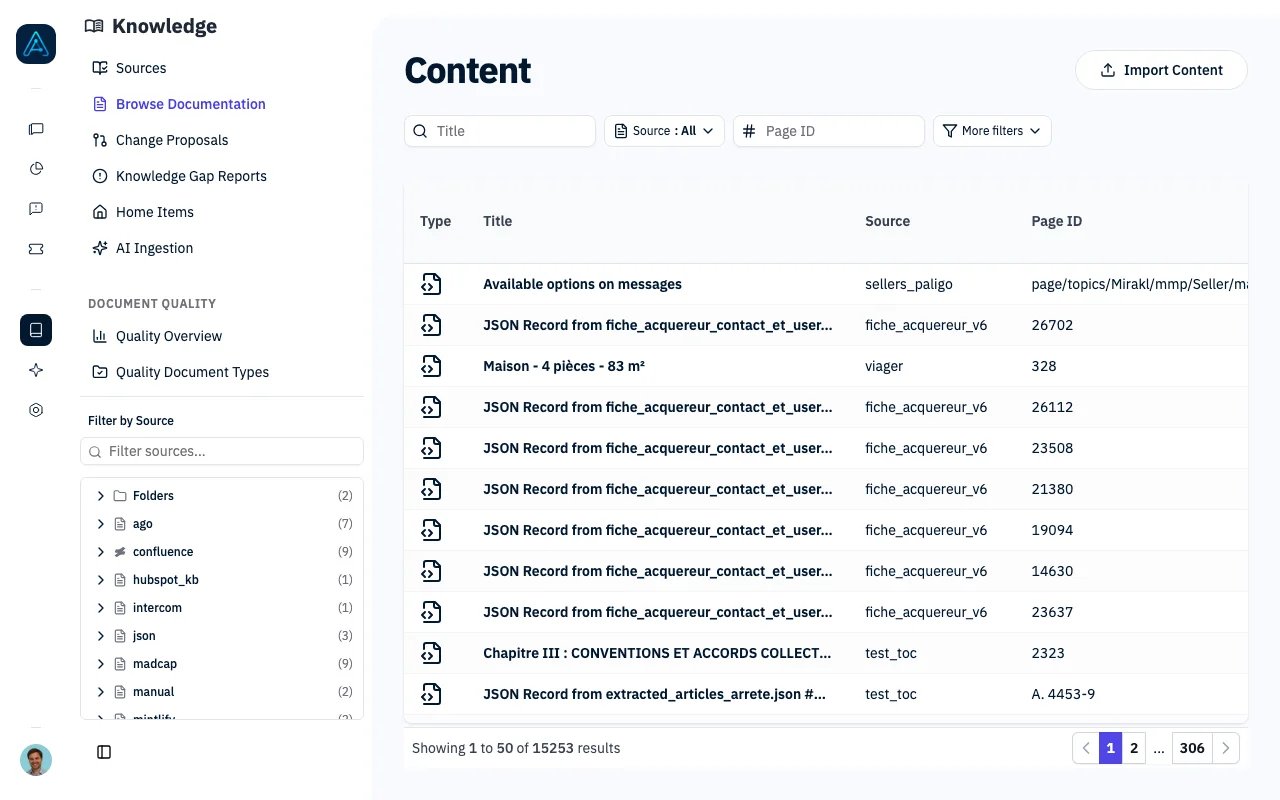 ## What is Knowledge?
Knowledge is AGO's document management and retrieval system. It stores your organization's documentation, processes it for AI understanding, and enables your agents to find and deliver relevant information in conversations.
```mermaid theme={null}
flowchart LR
A[External Docs] --> B[Knowledge Sources]
C[Manual Content] --> B
B --> D[Document Processing]
D --> E[Vector Indexing]
E --> F[AI Agents]
F --> G[User Conversations]
```
## Key Concepts
### Knowledge Sources
A **source** is a connection to documentation. Sources can be:
* **External connectors**: Notion, Confluence, Zendesk, etc.
* **Manual sources**: Documents created directly in AGO
* **File imports**: PDFs and other documents
### Documents
**Documents** are individual pieces of content within a source. Each document has:
* Title and content
* Optional translations
* Version history
* Quality score
* Related questions
### Hierarchy
Documents can be organized hierarchically:
```mermaid theme={null}
flowchart TD
A[Product Documentation] --> B[Getting Started]
A --> C[Features]
A --> D[Troubleshooting]
B --> B1[Quick Start Guide]
B --> B2[Installation]
C --> C1[Feature A]
C --> C2[Feature B]
```
### Embeddings
Documents are converted to **vector embeddings** for semantic search. This allows the AI to find relevant content even when users don't use exact keywords.
## Core Capabilities
Import from Zendesk, Notion, Confluence, Intercom, HelpScout, and more
Keep content fresh with minute, daily, or weekly sync schedules
Serve global users with document translations in 12+ languages
AI-powered scoring (0-5 scale) with actionable improvement suggestions
Extract knowledge from PDFs, Word, and text with automatic deduplication
Track changes with automatic versioning and full content snapshots
Review, accept, or reject proposed content changes before applying
Track knowledge gaps identified from conversations
Upload images and files, reference them in Markdown content
## How AI Uses Knowledge
When a user asks a question:
1. **Query Processing**: User's question is converted to a vector
2. **Semantic Search**: Most relevant documents are retrieved
3. **Context Assembly**: Top documents form the AI's context
4. **Response Generation**: AI answers using the retrieved knowledge
5. **Source Attribution**: Response can include document references
## Architecture Overview
```mermaid theme={null}
flowchart TB
subgraph External["External Platforms"]
N[Notion]
C[Confluence]
Z[Zendesk]
I[Intercom]
O[Other Connectors...]
end
subgraph Sources["Knowledge Sources"]
SC[Source Configuration]
CR[Credentials]
SY[Sync Schedules]
end
subgraph Documents["Knowledge Documents"]
CO[Content]
TR[Translations]
VE[Versions]
QS[Quality Scores]
end
subgraph Search["Search Layer"]
VE2[Vector Embeddings]
SI[Semantic Index]
end
subgraph AI["AI Layer"]
AG[AI Agents]
RE[Retrieval]
GE[Response Generation]
end
subgraph Users["User Interface"]
UC[User Conversations]
PO[Knowledge Portal]
end
N --> SC
C --> SC
Z --> SC
I --> SC
O --> SC
SC --> CO
CR --> CO
SY --> CO
CO --> VE2
TR --> VE2
VE --> VE2
QS --> VE2
VE2 --> SI
SI --> RE
RE --> AG
AG --> GE
GE --> UC
CO --> PO
```
## Related
Set up your first connector
Add and manage sources
Analyze and improve content
Manage content changes
Track knowledge gaps
Content strategy
Step-by-step tutorial
Programmatic access
## What is Knowledge?
Knowledge is AGO's document management and retrieval system. It stores your organization's documentation, processes it for AI understanding, and enables your agents to find and deliver relevant information in conversations.
```mermaid theme={null}
flowchart LR
A[External Docs] --> B[Knowledge Sources]
C[Manual Content] --> B
B --> D[Document Processing]
D --> E[Vector Indexing]
E --> F[AI Agents]
F --> G[User Conversations]
```
## Key Concepts
### Knowledge Sources
A **source** is a connection to documentation. Sources can be:
* **External connectors**: Notion, Confluence, Zendesk, etc.
* **Manual sources**: Documents created directly in AGO
* **File imports**: PDFs and other documents
### Documents
**Documents** are individual pieces of content within a source. Each document has:
* Title and content
* Optional translations
* Version history
* Quality score
* Related questions
### Hierarchy
Documents can be organized hierarchically:
```mermaid theme={null}
flowchart TD
A[Product Documentation] --> B[Getting Started]
A --> C[Features]
A --> D[Troubleshooting]
B --> B1[Quick Start Guide]
B --> B2[Installation]
C --> C1[Feature A]
C --> C2[Feature B]
```
### Embeddings
Documents are converted to **vector embeddings** for semantic search. This allows the AI to find relevant content even when users don't use exact keywords.
## Core Capabilities
Import from Zendesk, Notion, Confluence, Intercom, HelpScout, and more
Keep content fresh with minute, daily, or weekly sync schedules
Serve global users with document translations in 12+ languages
AI-powered scoring (0-5 scale) with actionable improvement suggestions
Extract knowledge from PDFs, Word, and text with automatic deduplication
Track changes with automatic versioning and full content snapshots
Review, accept, or reject proposed content changes before applying
Track knowledge gaps identified from conversations
Upload images and files, reference them in Markdown content
## How AI Uses Knowledge
When a user asks a question:
1. **Query Processing**: User's question is converted to a vector
2. **Semantic Search**: Most relevant documents are retrieved
3. **Context Assembly**: Top documents form the AI's context
4. **Response Generation**: AI answers using the retrieved knowledge
5. **Source Attribution**: Response can include document references
## Architecture Overview
```mermaid theme={null}
flowchart TB
subgraph External["External Platforms"]
N[Notion]
C[Confluence]
Z[Zendesk]
I[Intercom]
O[Other Connectors...]
end
subgraph Sources["Knowledge Sources"]
SC[Source Configuration]
CR[Credentials]
SY[Sync Schedules]
end
subgraph Documents["Knowledge Documents"]
CO[Content]
TR[Translations]
VE[Versions]
QS[Quality Scores]
end
subgraph Search["Search Layer"]
VE2[Vector Embeddings]
SI[Semantic Index]
end
subgraph AI["AI Layer"]
AG[AI Agents]
RE[Retrieval]
GE[Response Generation]
end
subgraph Users["User Interface"]
UC[User Conversations]
PO[Knowledge Portal]
end
N --> SC
C --> SC
Z --> SC
I --> SC
O --> SC
SC --> CO
CR --> CO
SY --> CO
CO --> VE2
TR --> VE2
VE --> VE2
QS --> VE2
VE2 --> SI
SI --> RE
RE --> AG
AG --> GE
GE --> UC
CO --> PO
```
## Related
Set up your first connector
Add and manage sources
Analyze and improve content
Manage content changes
Track knowledge gaps
Content strategy
Step-by-step tutorial
Programmatic access