> ## Documentation Index
> Fetch the complete documentation index at: https://ago.mintlify.site/llms.txt
> Use this file to discover all available pages before exploring further.
# Knowledge Home Page
> Customize the knowledge portal home page with navigation and links
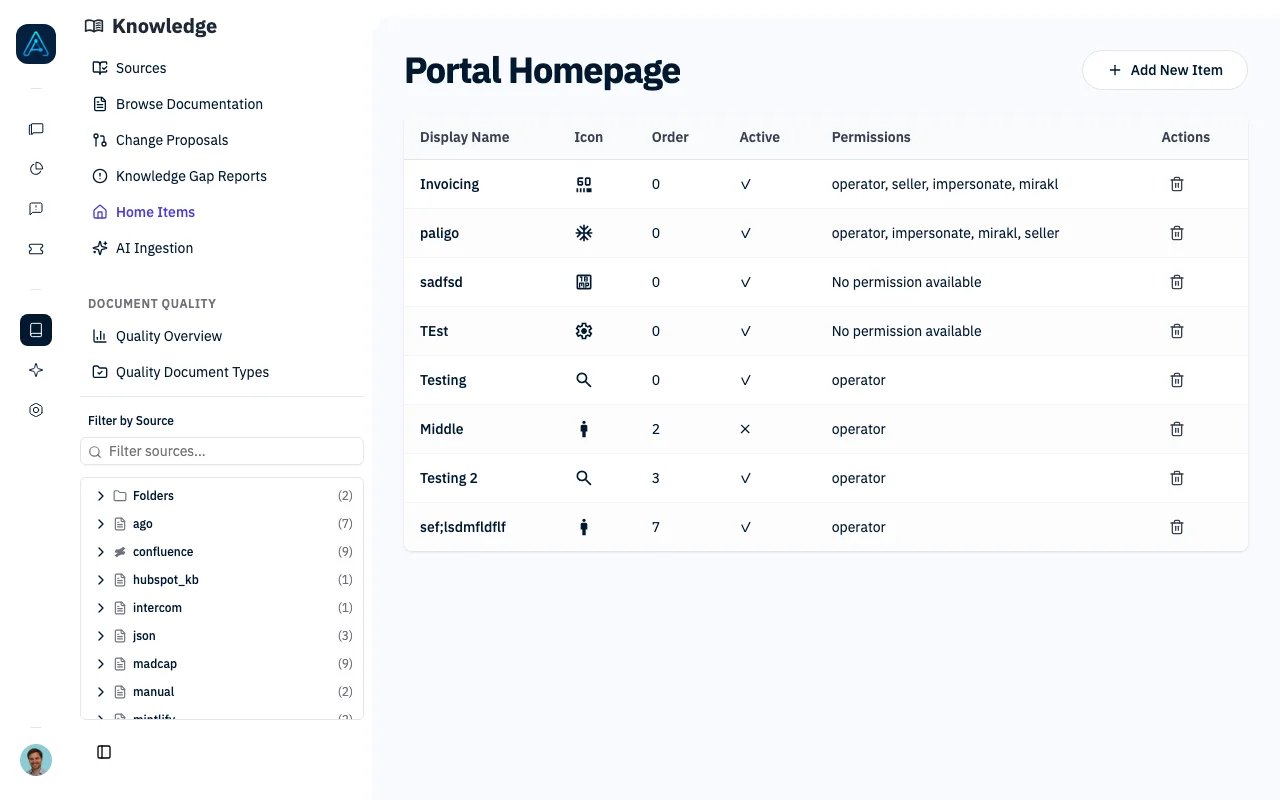 Customize the knowledge portal home page with navigation items, links, and descriptions. Control what users see based on their permissions and provide a localized experience with multi-language support.
## Overview
The Knowledge Home Page feature provides:
* **Custom Navigation Items**: Add links to knowledge sections, external resources, or specific pages
* **Permission-Based Visibility**: Show items only to users with specific permissions
* **Multi-Language Support**: Translate item names and descriptions
* **Ordering Control**: Arrange items in your preferred order
* **Internal/External Links**: Link to knowledge content or external URLs
## Home Page Items
### Item Properties
| Property | Description |
| -------------------- | --------------------------------------------------------------- |
| Display Name | Name shown to users (max 100 characters) |
| Description | Description or subtitle text |
| URL | Link destination (max 255 characters) |
| Icon | Icon displayed alongside the item |
| Order | Display order (lower numbers appear first) |
| Active | Whether the item is visible to users |
| External Link | Whether the URL opens an external site in a new tab |
| Required Permissions | Permissions needed to see this item (leave empty for all users) |
***
## Managing Home Page Items
### Creating an Item
1. Navigate to **Knowledge** → **Home Items**
2. Click **Add New**
3. Configure item properties:
* Enter display name and description
* Set the URL (internal path or external URL)
* Choose an icon
* Set the display order
* Toggle whether the item is active
* Configure required permissions (optional)
* Add translations for other languages (optional)
4. Click **Save**
### Editing an Item
1. Navigate to **Knowledge** → **Home Items**
2. Click the item you want to edit
3. Update the desired properties
4. Click **Save**
### Deleting an Item
1. Navigate to **Knowledge** → **Home Items**
2. Click the item you want to remove
3. Click **Delete**
4. Confirm the deletion
> **ℹ️ NOTE**: Home page items can also be managed via API. See the [Public API v1 Reference](../api/public-api-v1) for endpoint details.
***
## Multi-Language Translations
Each home page item can have translations for different languages.
### Translation Properties
| Property | Description |
| ------------- | ------------------------------------------ |
| Language Code | ISO language code (e.g., "en", "fr", "es") |
| Display Name | Translated display name |
| Description | Translated description |
### How Translations Work
1. **User visits portal**: System detects user's language preference
2. **Check for translation**: Look for translation matching user's language
3. **Display result**:
* If translation exists: Show translated name and description
* If no translation: Show the default display name and description
### Supported Languages
| Code | Language | Code | Language |
| ---- | -------- | ---- | ---------- |
| `en` | English | `pt` | Portuguese |
| `fr` | French | `nl` | Dutch |
| `es` | Spanish | `pl` | Polish |
| `de` | German | `ru` | Russian |
| `it` | Italian | `ja` | Japanese |
| `ko` | Korean | `zh` | Chinese |
| `ar` | Arabic | `tr` | Turkish |
***
## Permission-Based Visibility
Control which users can see each home page item based on their permissions.
### Setting Permissions
1. Create the permission in **Settings** → **User Management** → **Access Control**
2. When creating or editing a home page item, select the required permissions
3. Only users with the selected permissions will see the item
### Visibility Rules
| Scenario | Item Visible? |
| ------------------------------ | ------------------------- |
| No permissions required | Yes (all users) |
| User has required permission | Yes |
| User lacks required permission | No |
| Item is inactive | No (except in admin view) |
***
## Ordering Items
Items are displayed in order by:
1. Order value (ascending — lower numbers first)
2. Display name (alphabetically, as tiebreaker)
### Example Order Configuration
| Item | Order | Position |
| --------------- | ----- | -------- |
| Getting Started | 1 | First |
| FAQs | 2 | Second |
| Tutorials | 3 | Third |
| Contact Support | 99 | Last |
***
## Internal vs External Links
### Internal Links
* Leave the **External Link** toggle off
* Use relative paths (e.g., `/knowledge/section-name`)
* Opens within the portal
### External Links
* Enable the **External Link** toggle
* Use full URLs (e.g., `https://external-site.com/docs`)
* Opens in a new tab/window
***
## Best Practices
### Organization
* Use consistent ordering across your portal
* Group related content with similar order numbers
* Keep the most important items at the top
### Naming
* Use clear, descriptive display names
* Keep descriptions concise but helpful
* Verify translations are accurate
### Permissions
* Use permissions sparingly for a simpler experience
* Test visibility with different user types
* Document which permissions are required for each section
***
## Related
* [Knowledge Overview](./knowledge-overview) — Feature overview
Customize the knowledge portal home page with navigation items, links, and descriptions. Control what users see based on their permissions and provide a localized experience with multi-language support.
## Overview
The Knowledge Home Page feature provides:
* **Custom Navigation Items**: Add links to knowledge sections, external resources, or specific pages
* **Permission-Based Visibility**: Show items only to users with specific permissions
* **Multi-Language Support**: Translate item names and descriptions
* **Ordering Control**: Arrange items in your preferred order
* **Internal/External Links**: Link to knowledge content or external URLs
## Home Page Items
### Item Properties
| Property | Description |
| -------------------- | --------------------------------------------------------------- |
| Display Name | Name shown to users (max 100 characters) |
| Description | Description or subtitle text |
| URL | Link destination (max 255 characters) |
| Icon | Icon displayed alongside the item |
| Order | Display order (lower numbers appear first) |
| Active | Whether the item is visible to users |
| External Link | Whether the URL opens an external site in a new tab |
| Required Permissions | Permissions needed to see this item (leave empty for all users) |
***
## Managing Home Page Items
### Creating an Item
1. Navigate to **Knowledge** → **Home Items**
2. Click **Add New**
3. Configure item properties:
* Enter display name and description
* Set the URL (internal path or external URL)
* Choose an icon
* Set the display order
* Toggle whether the item is active
* Configure required permissions (optional)
* Add translations for other languages (optional)
4. Click **Save**
### Editing an Item
1. Navigate to **Knowledge** → **Home Items**
2. Click the item you want to edit
3. Update the desired properties
4. Click **Save**
### Deleting an Item
1. Navigate to **Knowledge** → **Home Items**
2. Click the item you want to remove
3. Click **Delete**
4. Confirm the deletion
> **ℹ️ NOTE**: Home page items can also be managed via API. See the [Public API v1 Reference](../api/public-api-v1) for endpoint details.
***
## Multi-Language Translations
Each home page item can have translations for different languages.
### Translation Properties
| Property | Description |
| ------------- | ------------------------------------------ |
| Language Code | ISO language code (e.g., "en", "fr", "es") |
| Display Name | Translated display name |
| Description | Translated description |
### How Translations Work
1. **User visits portal**: System detects user's language preference
2. **Check for translation**: Look for translation matching user's language
3. **Display result**:
* If translation exists: Show translated name and description
* If no translation: Show the default display name and description
### Supported Languages
| Code | Language | Code | Language |
| ---- | -------- | ---- | ---------- |
| `en` | English | `pt` | Portuguese |
| `fr` | French | `nl` | Dutch |
| `es` | Spanish | `pl` | Polish |
| `de` | German | `ru` | Russian |
| `it` | Italian | `ja` | Japanese |
| `ko` | Korean | `zh` | Chinese |
| `ar` | Arabic | `tr` | Turkish |
***
## Permission-Based Visibility
Control which users can see each home page item based on their permissions.
### Setting Permissions
1. Create the permission in **Settings** → **User Management** → **Access Control**
2. When creating or editing a home page item, select the required permissions
3. Only users with the selected permissions will see the item
### Visibility Rules
| Scenario | Item Visible? |
| ------------------------------ | ------------------------- |
| No permissions required | Yes (all users) |
| User has required permission | Yes |
| User lacks required permission | No |
| Item is inactive | No (except in admin view) |
***
## Ordering Items
Items are displayed in order by:
1. Order value (ascending — lower numbers first)
2. Display name (alphabetically, as tiebreaker)
### Example Order Configuration
| Item | Order | Position |
| --------------- | ----- | -------- |
| Getting Started | 1 | First |
| FAQs | 2 | Second |
| Tutorials | 3 | Third |
| Contact Support | 99 | Last |
***
## Internal vs External Links
### Internal Links
* Leave the **External Link** toggle off
* Use relative paths (e.g., `/knowledge/section-name`)
* Opens within the portal
### External Links
* Enable the **External Link** toggle
* Use full URLs (e.g., `https://external-site.com/docs`)
* Opens in a new tab/window
***
## Best Practices
### Organization
* Use consistent ordering across your portal
* Group related content with similar order numbers
* Keep the most important items at the top
### Naming
* Use clear, descriptive display names
* Keep descriptions concise but helpful
* Verify translations are accurate
### Permissions
* Use permissions sparingly for a simpler experience
* Test visibility with different user types
* Document which permissions are required for each section
***
## Related
* [Knowledge Overview](./knowledge-overview) — Feature overview