> ## Documentation Index
> Fetch the complete documentation index at: https://ago.mintlify.site/llms.txt
> Use this file to discover all available pages before exploring further.
# Change Proposals
> Review and manage content changes to your knowledge base
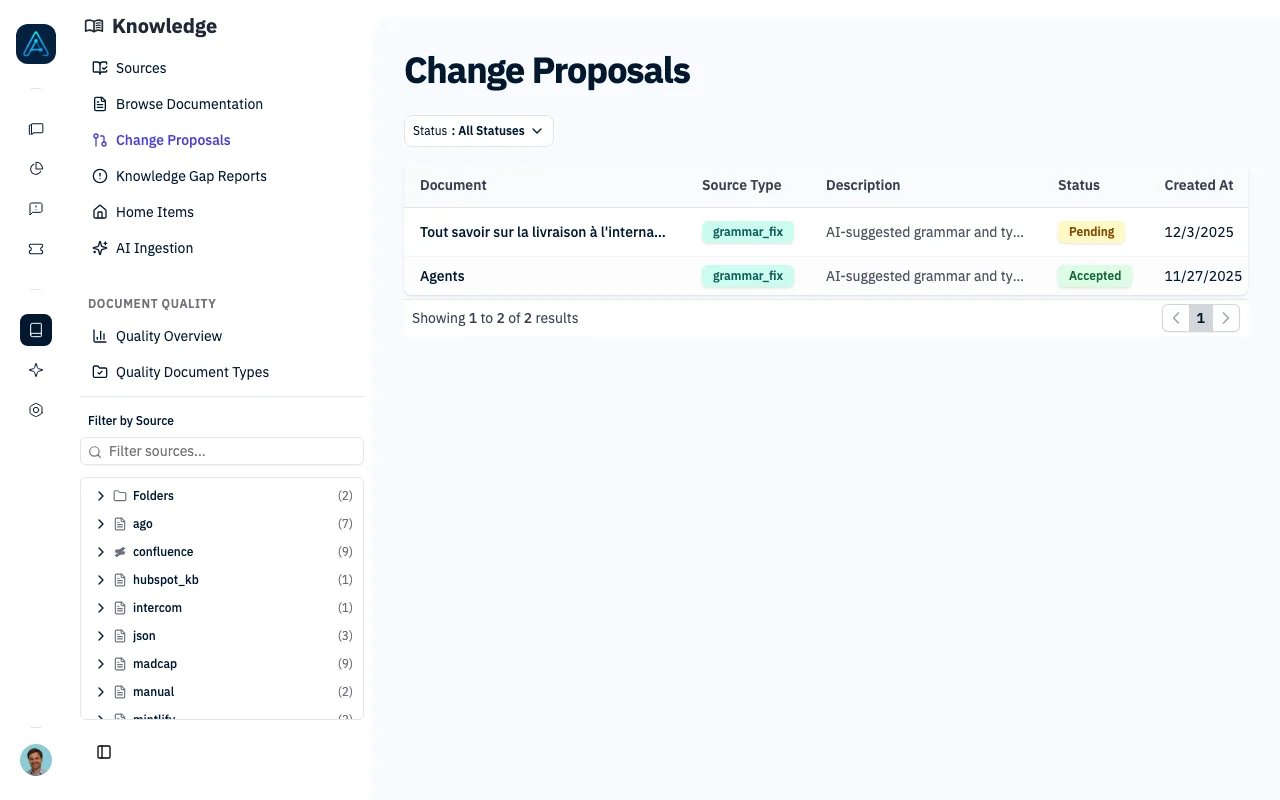 Change Proposals provide a structured workflow for reviewing and approving modifications to your knowledge base content. Whether changes come from quality analysis, user feedback, AI suggestions, or manual edits, all modifications can be reviewed before being applied.
## Overview
Change Proposals enable:
* **Content Review Workflow**: Review proposed changes before they're applied
* **Multiple Sources**: Accept proposals from quality analysis, feedback, AI, or manual edits
* **Edit Before Accept**: Modify proposed content before applying
* **Audit Trail**: Track who reviewed and when changes were made
## How It Works
```mermaid theme={null}
flowchart LR
A[Content Issue Detected] --> B[Proposal Created]
B --> C{Review}
C -->|Accept| D[Content Updated]
C -->|Reject| E[Proposal Closed]
C -->|Edit| F[Modify Content]
F --> D
```
1. **Issue Detection**: A content issue is identified (quality check, feedback, manual review)
2. **Proposal Creation**: A proposal is created with the suggested changes
3. **Review**: Administrator reviews the original vs. proposed content
4. **Decision**: Accept (with optional edits), reject, or modify the proposal
5. **Application**: Accepted changes are applied to the document
***
## Proposal Statuses
| Status | Description |
| ---------- | --------------------------- |
| `pending` | Awaiting review |
| `accepted` | Changes applied to document |
| `rejected` | Proposal declined |
***
## Source Types
Proposals can originate from different sources:
| Source Type | Description | Example |
| --------------- | --------------------- | ----------------------------------- |
| `quality_issue` | From quality analysis | Missing headings, unclear content |
| `feedback` | From user feedback | User-reported inaccuracy |
| `manual` | Manual staff edit | Direct content improvement |
| `ai_suggestion` | AI-generated | Grammar fixes, clarity improvements |
***
## Managing Proposals
### Viewing Proposals
**Via Admin Interface:**
1. Navigate to **Knowledge** → **Change Proposals**
2. Filter by status, source, or document
3. Click a proposal to view details
### Reviewing a Proposal
The review interface shows:
* **Original Content**: Current document content
* **Proposed Content**: Suggested changes
* **Source Information**: Why the change was proposed
* **Diff View**: Side-by-side comparison
### Accepting a Proposal
1. Review the proposed changes
2. Optionally edit the content before accepting
3. Click **Accept**
4. Add review notes (optional)
5. Changes are applied immediately
### Rejecting a Proposal
1. Review the proposed changes
2. Click **Reject**
3. Add review notes explaining why (recommended)
4. Proposal is marked as rejected
***
## Grammar Fix
The Grammar Fix feature creates change proposals automatically when you run it on a document. See [Knowledge Quality — Grammar Fix](./knowledge-quality#grammar-fix) for how to use it.
***
## Best Practices
### Review Workflow
1. **Regular Reviews**: Check pending proposals daily
2. **Prioritize Quality Issues**: Address quality-flagged content first
3. **Add Context**: Always add review notes when rejecting
4. **Verify Changes**: Test that accepted changes don't break formatting
### Source Type Usage
| When to Use | Source Type |
| ----------------------------- | --------------- |
| Quality score below threshold | `quality_issue` |
| User reports inaccuracy | `feedback` |
| Admin improves content | `manual` |
| AI corrects grammar/spelling | `ai_suggestion` |
***
## Related
* [Knowledge Quality](./knowledge-quality) — Quality analysis
* [Knowledge Update Requests](./knowledge-update-requests) — Request content updates
Change Proposals provide a structured workflow for reviewing and approving modifications to your knowledge base content. Whether changes come from quality analysis, user feedback, AI suggestions, or manual edits, all modifications can be reviewed before being applied.
## Overview
Change Proposals enable:
* **Content Review Workflow**: Review proposed changes before they're applied
* **Multiple Sources**: Accept proposals from quality analysis, feedback, AI, or manual edits
* **Edit Before Accept**: Modify proposed content before applying
* **Audit Trail**: Track who reviewed and when changes were made
## How It Works
```mermaid theme={null}
flowchart LR
A[Content Issue Detected] --> B[Proposal Created]
B --> C{Review}
C -->|Accept| D[Content Updated]
C -->|Reject| E[Proposal Closed]
C -->|Edit| F[Modify Content]
F --> D
```
1. **Issue Detection**: A content issue is identified (quality check, feedback, manual review)
2. **Proposal Creation**: A proposal is created with the suggested changes
3. **Review**: Administrator reviews the original vs. proposed content
4. **Decision**: Accept (with optional edits), reject, or modify the proposal
5. **Application**: Accepted changes are applied to the document
***
## Proposal Statuses
| Status | Description |
| ---------- | --------------------------- |
| `pending` | Awaiting review |
| `accepted` | Changes applied to document |
| `rejected` | Proposal declined |
***
## Source Types
Proposals can originate from different sources:
| Source Type | Description | Example |
| --------------- | --------------------- | ----------------------------------- |
| `quality_issue` | From quality analysis | Missing headings, unclear content |
| `feedback` | From user feedback | User-reported inaccuracy |
| `manual` | Manual staff edit | Direct content improvement |
| `ai_suggestion` | AI-generated | Grammar fixes, clarity improvements |
***
## Managing Proposals
### Viewing Proposals
**Via Admin Interface:**
1. Navigate to **Knowledge** → **Change Proposals**
2. Filter by status, source, or document
3. Click a proposal to view details
### Reviewing a Proposal
The review interface shows:
* **Original Content**: Current document content
* **Proposed Content**: Suggested changes
* **Source Information**: Why the change was proposed
* **Diff View**: Side-by-side comparison
### Accepting a Proposal
1. Review the proposed changes
2. Optionally edit the content before accepting
3. Click **Accept**
4. Add review notes (optional)
5. Changes are applied immediately
### Rejecting a Proposal
1. Review the proposed changes
2. Click **Reject**
3. Add review notes explaining why (recommended)
4. Proposal is marked as rejected
***
## Grammar Fix
The Grammar Fix feature creates change proposals automatically when you run it on a document. See [Knowledge Quality — Grammar Fix](./knowledge-quality#grammar-fix) for how to use it.
***
## Best Practices
### Review Workflow
1. **Regular Reviews**: Check pending proposals daily
2. **Prioritize Quality Issues**: Address quality-flagged content first
3. **Add Context**: Always add review notes when rejecting
4. **Verify Changes**: Test that accepted changes don't break formatting
### Source Type Usage
| When to Use | Source Type |
| ----------------------------- | --------------- |
| Quality score below threshold | `quality_issue` |
| User reports inaccuracy | `feedback` |
| Admin improves content | `manual` |
| AI corrects grammar/spelling | `ai_suggestion` |
***
## Related
* [Knowledge Quality](./knowledge-quality) — Quality analysis
* [Knowledge Update Requests](./knowledge-update-requests) — Request content updates