> ## Documentation Index
> Fetch the complete documentation index at: https://ago.mintlify.site/llms.txt
> Use this file to discover all available pages before exploring further.
# Feedback
> Review and manage user feedback with filtering, inline editing, and export capabilities
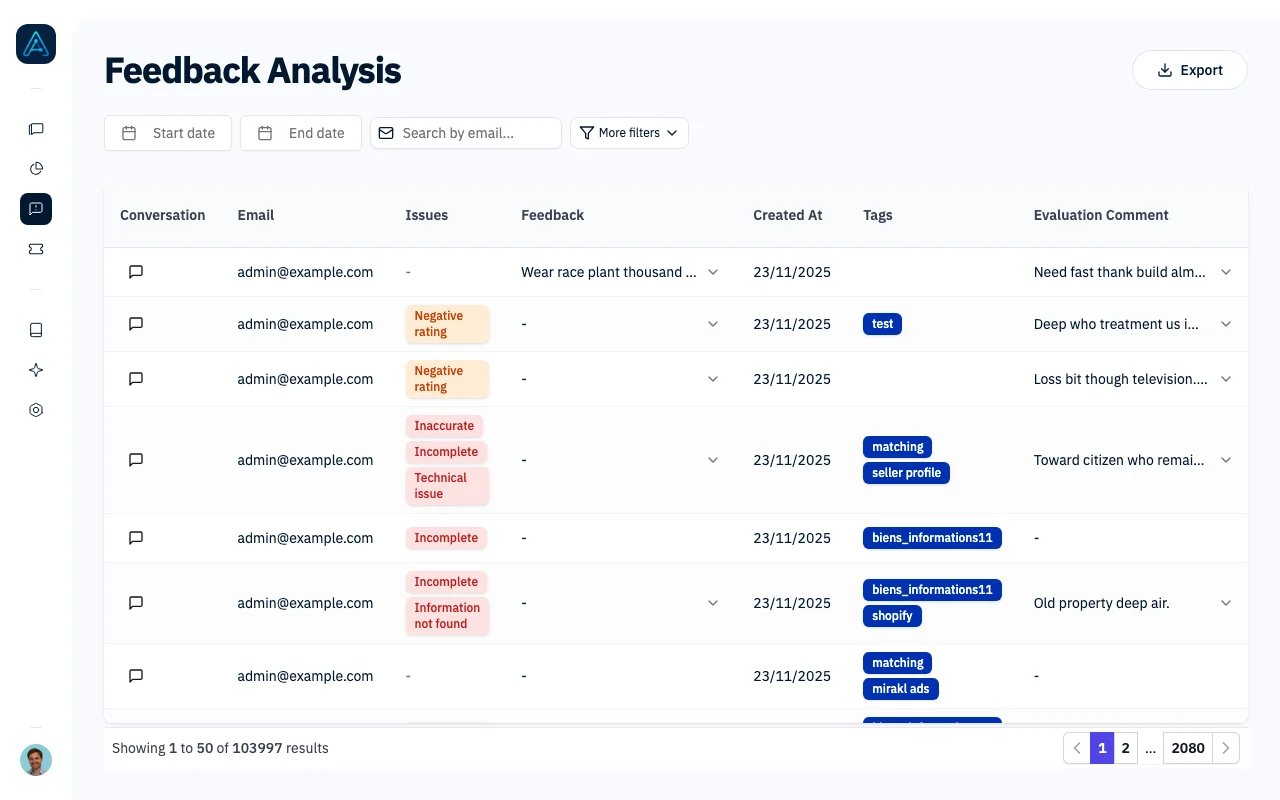
The Feedback page displays all user-submitted feedback about agent responses, allowing you to track issues, assign reviewers, and manage follow-up actions directly from the list view.
 ## Accessing the Feedback List
Navigate to **Feedbacks** in the sidebar.
You need Admin or Account Manager permissions to access the Feedback page.
## Feedback Table
The table displays feedback entries with the following columns:
| Column | Description |
| ----------------------- | -------------------------------------- |
| **Conversation** | Link to view the full conversation |
| **Email** | User who submitted the feedback |
| **Issues** | Badges showing feedback type(s) |
| **Additional Feedback** | User's written comments |
| **Created At** | When the feedback was submitted |
| **Tags** | Conversation tags and admin tags |
| **Evaluation Comment** | Admin notes on the evaluation |
| **Reviewer** | Assigned reviewer (editable) |
| **Admin Status** | Current status (editable) |
| **AI Debugger** | Quick access to debug the conversation |
## Issue Types
Feedback is categorized by issue type, shown as colored badges:
| Issue Type | Description | Badge Color |
| ------------------------- | ---------------------------------------- | ----------- |
| **Negative Rating** | User gave a thumbs-down | Orange |
| **Inaccurate** | Response contained incorrect information | Red |
| **Incomplete** | Response was missing information | Red |
| **Information Not Found** | Agent couldn't find the answer | Red |
| **Technical Issue** | System or technical problem | Red |
A single feedback entry can have multiple issue types.
## Primary Filters
These filters are always visible:
| Filter | Description |
| -------------- | ------------------------------------ |
| **Start Date** | Show feedback from this date onwards |
| **End Date** | Show feedback up to this date |
| **Email** | Search by user email address |
## Secondary Filters
Click "More filters" for additional options:
| Filter | Description |
| ---------------- | -------------------------------------------------------------------------------- |
| **Issue Type** | Filter by feedback category (multi-select) |
| **Tags** | Filter by conversation tags |
| **Admin Tags** | Filter by admin-only tags (includes "No Admin Tag" option for untagged feedback) |
| **Admin Status** | Filter by current status (includes "No Status" option for unprocessed feedback) |
| **User Type** | Filter by user permission level |
| **Reviewer** | Filter by assigned reviewer |
## Inline Editing
You can edit certain fields directly from the list view without opening the conversation:
### Reviewer Assignment
Click the Reviewer dropdown in any row to assign or change the reviewer. Changes are saved automatically.
### Admin Status
Click the Admin Status dropdown to update the status. Available statuses are configured in your platform settings.
### Expanding Details
Click any row to expand and view:
* Full additional feedback text
* Complete evaluation comments
## Exporting Data
Click the **Export** button to download filtered feedback as a CSV file. The export includes all columns and respects your current filters.
## Quick Actions
### View Conversation
Click the "Conversation" link to open the full conversation in the [Conversation Management](/features/conversation-management) view.
### AI Debugger
Click the "AI Debugger" button to analyze why the agent responded the way it did, useful for investigating inaccurate responses.
## Workflow Tips
### Triaging New Feedback
1. Filter by date range (e.g., last 24 hours)
2. Review issue types to prioritize
3. Assign reviewers for follow-up
4. Set admin status to track progress
### Investigating Inaccurate Responses
1. Filter by **Issue Type** = "Inaccurate"
2. Click conversation link to review
3. Use AI Debugger to understand the response
4. Update knowledge base if needed
5. Set status to "Resolved"
### Team Collaboration
1. Assign feedback to team members via Reviewer field
2. Use Admin Tags to categorize (e.g., "Knowledge Gap", "Bug")
3. Set Admin Status to track progress (e.g., "In Progress", "Fixed")
## Best Practices
1. **Review feedback daily**: Address issues while they're fresh
2. **Use status tracking**: Keep admin status updated so team knows what's been addressed
3. **Assign reviewers**: Distribute workload and maintain accountability
4. **Tag for patterns**: Use admin tags to identify recurring issues
5. **Close the loop**: After fixing an issue, update status and add evaluation comment
## Related Features
* [Conversation Management](/features/conversation-management) - Review and evaluate conversations
* [Feedback Analytics](/features/feedback-analytics) - Dashboard view of feedback trends
* [AI Debugger](/features/ai-debugger) - Investigate agent reasoning
## Accessing the Feedback List
Navigate to **Feedbacks** in the sidebar.
You need Admin or Account Manager permissions to access the Feedback page.
## Feedback Table
The table displays feedback entries with the following columns:
| Column | Description |
| ----------------------- | -------------------------------------- |
| **Conversation** | Link to view the full conversation |
| **Email** | User who submitted the feedback |
| **Issues** | Badges showing feedback type(s) |
| **Additional Feedback** | User's written comments |
| **Created At** | When the feedback was submitted |
| **Tags** | Conversation tags and admin tags |
| **Evaluation Comment** | Admin notes on the evaluation |
| **Reviewer** | Assigned reviewer (editable) |
| **Admin Status** | Current status (editable) |
| **AI Debugger** | Quick access to debug the conversation |
## Issue Types
Feedback is categorized by issue type, shown as colored badges:
| Issue Type | Description | Badge Color |
| ------------------------- | ---------------------------------------- | ----------- |
| **Negative Rating** | User gave a thumbs-down | Orange |
| **Inaccurate** | Response contained incorrect information | Red |
| **Incomplete** | Response was missing information | Red |
| **Information Not Found** | Agent couldn't find the answer | Red |
| **Technical Issue** | System or technical problem | Red |
A single feedback entry can have multiple issue types.
## Primary Filters
These filters are always visible:
| Filter | Description |
| -------------- | ------------------------------------ |
| **Start Date** | Show feedback from this date onwards |
| **End Date** | Show feedback up to this date |
| **Email** | Search by user email address |
## Secondary Filters
Click "More filters" for additional options:
| Filter | Description |
| ---------------- | -------------------------------------------------------------------------------- |
| **Issue Type** | Filter by feedback category (multi-select) |
| **Tags** | Filter by conversation tags |
| **Admin Tags** | Filter by admin-only tags (includes "No Admin Tag" option for untagged feedback) |
| **Admin Status** | Filter by current status (includes "No Status" option for unprocessed feedback) |
| **User Type** | Filter by user permission level |
| **Reviewer** | Filter by assigned reviewer |
## Inline Editing
You can edit certain fields directly from the list view without opening the conversation:
### Reviewer Assignment
Click the Reviewer dropdown in any row to assign or change the reviewer. Changes are saved automatically.
### Admin Status
Click the Admin Status dropdown to update the status. Available statuses are configured in your platform settings.
### Expanding Details
Click any row to expand and view:
* Full additional feedback text
* Complete evaluation comments
## Exporting Data
Click the **Export** button to download filtered feedback as a CSV file. The export includes all columns and respects your current filters.
## Quick Actions
### View Conversation
Click the "Conversation" link to open the full conversation in the [Conversation Management](/features/conversation-management) view.
### AI Debugger
Click the "AI Debugger" button to analyze why the agent responded the way it did, useful for investigating inaccurate responses.
## Workflow Tips
### Triaging New Feedback
1. Filter by date range (e.g., last 24 hours)
2. Review issue types to prioritize
3. Assign reviewers for follow-up
4. Set admin status to track progress
### Investigating Inaccurate Responses
1. Filter by **Issue Type** = "Inaccurate"
2. Click conversation link to review
3. Use AI Debugger to understand the response
4. Update knowledge base if needed
5. Set status to "Resolved"
### Team Collaboration
1. Assign feedback to team members via Reviewer field
2. Use Admin Tags to categorize (e.g., "Knowledge Gap", "Bug")
3. Set Admin Status to track progress (e.g., "In Progress", "Fixed")
## Best Practices
1. **Review feedback daily**: Address issues while they're fresh
2. **Use status tracking**: Keep admin status updated so team knows what's been addressed
3. **Assign reviewers**: Distribute workload and maintain accountability
4. **Tag for patterns**: Use admin tags to identify recurring issues
5. **Close the loop**: After fixing an issue, update status and add evaluation comment
## Related Features
* [Conversation Management](/features/conversation-management) - Review and evaluate conversations
* [Feedback Analytics](/features/feedback-analytics) - Dashboard view of feedback trends
* [AI Debugger](/features/ai-debugger) - Investigate agent reasoning