> ## Documentation Index
> Fetch the complete documentation index at: https://ago.mintlify.site/llms.txt
> Use this file to discover all available pages before exploring further.
# Conversations
> Browse, search, and filter all conversations with search and filter tools
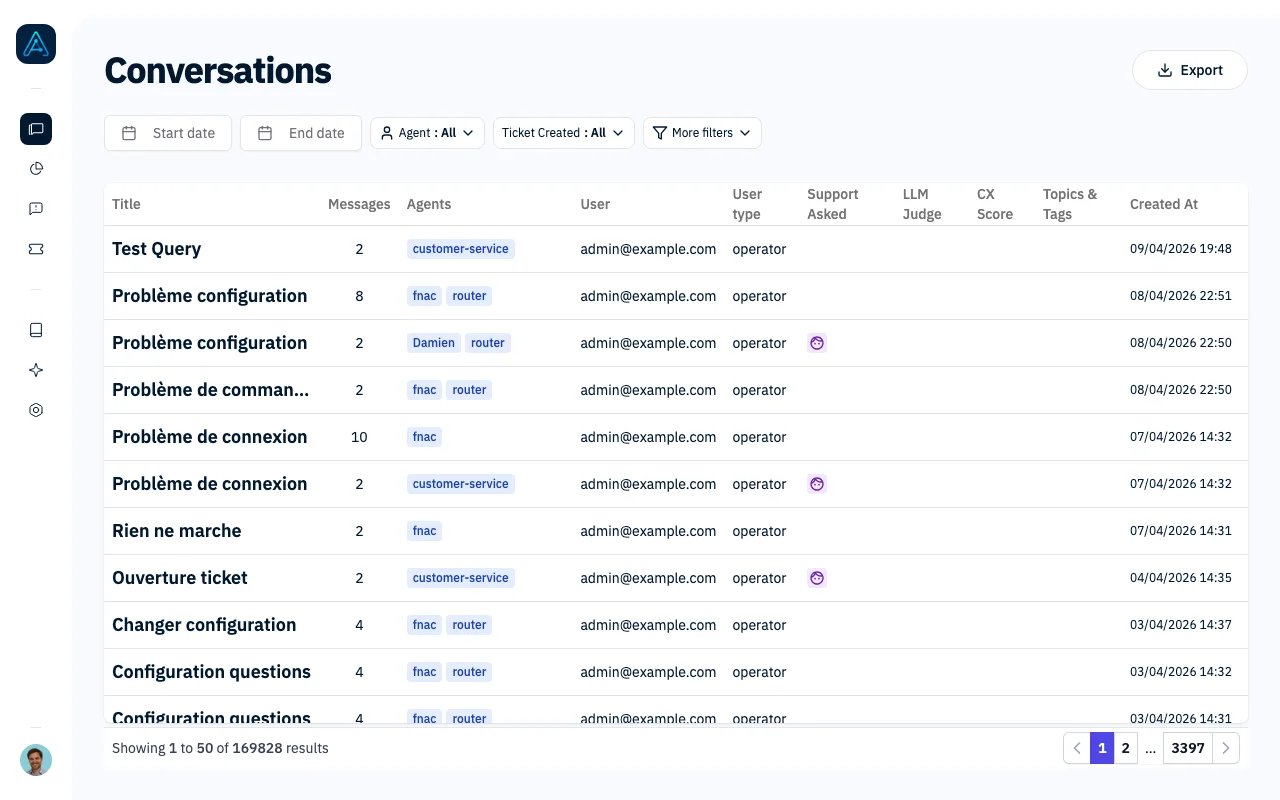
The Conversations page shows all conversations handled by your AI agents. Use the extensive filtering options to find specific conversations for review, analysis, or quality assurance.
 ## Accessing Conversations
Navigate to **Chat History** in the sidebar.
You need Admin or Account Manager permissions to access the Conversations page.
## Conversation Table
The table displays all conversations with the following information:
| Column | Description |
| ----------------- | ------------------------------------------------------ |
| **User** | Email address of the user who started the conversation |
| **Agent** | The AI agent that handled the conversation |
| **Messages** | Number of messages exchanged |
| **Created** | When the conversation started |
| **Evaluation** | Manual evaluation status (OK/KO/Neutral) |
| **CX Score** | Automated quality score (if evaluated) |
| **Topics & Tags** | Applied topics and tags |
Click any row to open the [Conversation Management](/features/conversation-management) view where you can evaluate and manage the thread.
## Primary Filters
These filters are always visible at the top of the page:
| Filter | Description |
| ------------------ | ------------------------------------------------- |
| **Start Date** | Show conversations from this date onwards |
| **End Date** | Show conversations up to this date |
| **Agent** | Filter by the AI agent that handled conversations |
| **Ticket Created** | Show only conversations that resulted in a ticket |
## Secondary Filters
Click "More filters" to access additional filtering options:
| Filter | Description |
| --------------------- | -------------------------------------------------------------------------------- |
| **Email** | Search by user email address (partial match supported) |
| **Evaluation** | Filter by manual evaluation: OK, KO, Neutral, or Not Evaluated |
| **CX Score Range** | Filter by automated score: Poor (0-49), Needs Improvement (50-79), Good (80-100) |
| **Search Content** | Full-text search within conversation messages |
| **User Type** | Filter by user permission level |
| **Organization** | Filter by user's organization |
| **Topic** | Filter by conversation topics (multi-select) |
| **Tags** | Filter by tags (multi-select) |
| **Reviewer Email** | Filter by assigned reviewer |
| **Knowledge Source** | Filter by knowledge source used in responses |
| **Knowledge Page ID** | Filter by specific documentation page referenced |
| **Support Asked** | Show conversations where human support was requested |
| **Needs Review** | Show conversations flagged for review by the LLM evaluator |
## Common Filter Combinations
### Quality Review
* **Needs Review** = Yes
* **CX Score Range** = Poor or Needs Improvement
### Escalation Analysis
* **Support Asked** = Yes
* **Ticket Created** = Yes
### Agent Performance
* **Agent** = \[Select agent]
* **Evaluation** = \[Select status]
* **Date range** = Last 30 days
### Topic Research
* **Search Content** = \[keyword]
* **Topic** = \[relevant topics]
## Exporting Data
Click the **Export** button to download the current filtered results as a CSV file. The export includes:
* All visible columns
* Applied filters are reflected in the exported data
* Maximum 10,000 records per export
Apply filters before exporting to get a focused dataset for your analysis.
## Navigation Features
### Pagination
Results are displayed in pages of 50 conversations. Use the pagination controls at the bottom to navigate between pages.
### Filter Persistence
Your filter settings are automatically saved in your browser. When you return to the page, your previous filters will still be applied.
### Quick Navigation
After opening a conversation, use the navigation arrows in the conversation view to move to the next or previous conversation without returning to the list.
## Best Practices
1. **Start with date range**: Narrow down by time period first, then add specific filters
2. **Use "Needs Review" for QA**: Focus your quality assurance efforts on flagged conversations
3. **Combine filters strategically**: Multiple filters work together (AND logic) to narrow results
4. **Export regularly**: Create periodic exports for trend analysis and reporting
5. **Clear filters when done**: Click "Clear filters" to reset and see all conversations
## Related Features
* [Conversation Management](/features/conversation-management) - Review and manage individual conversations
* [Thread Evaluator](/features/thread-evaluator) - Configure automated evaluation
* [Feedback Analytics](/features/feedback-analytics) - Analyze user feedback trends
## Accessing Conversations
Navigate to **Chat History** in the sidebar.
You need Admin or Account Manager permissions to access the Conversations page.
## Conversation Table
The table displays all conversations with the following information:
| Column | Description |
| ----------------- | ------------------------------------------------------ |
| **User** | Email address of the user who started the conversation |
| **Agent** | The AI agent that handled the conversation |
| **Messages** | Number of messages exchanged |
| **Created** | When the conversation started |
| **Evaluation** | Manual evaluation status (OK/KO/Neutral) |
| **CX Score** | Automated quality score (if evaluated) |
| **Topics & Tags** | Applied topics and tags |
Click any row to open the [Conversation Management](/features/conversation-management) view where you can evaluate and manage the thread.
## Primary Filters
These filters are always visible at the top of the page:
| Filter | Description |
| ------------------ | ------------------------------------------------- |
| **Start Date** | Show conversations from this date onwards |
| **End Date** | Show conversations up to this date |
| **Agent** | Filter by the AI agent that handled conversations |
| **Ticket Created** | Show only conversations that resulted in a ticket |
## Secondary Filters
Click "More filters" to access additional filtering options:
| Filter | Description |
| --------------------- | -------------------------------------------------------------------------------- |
| **Email** | Search by user email address (partial match supported) |
| **Evaluation** | Filter by manual evaluation: OK, KO, Neutral, or Not Evaluated |
| **CX Score Range** | Filter by automated score: Poor (0-49), Needs Improvement (50-79), Good (80-100) |
| **Search Content** | Full-text search within conversation messages |
| **User Type** | Filter by user permission level |
| **Organization** | Filter by user's organization |
| **Topic** | Filter by conversation topics (multi-select) |
| **Tags** | Filter by tags (multi-select) |
| **Reviewer Email** | Filter by assigned reviewer |
| **Knowledge Source** | Filter by knowledge source used in responses |
| **Knowledge Page ID** | Filter by specific documentation page referenced |
| **Support Asked** | Show conversations where human support was requested |
| **Needs Review** | Show conversations flagged for review by the LLM evaluator |
## Common Filter Combinations
### Quality Review
* **Needs Review** = Yes
* **CX Score Range** = Poor or Needs Improvement
### Escalation Analysis
* **Support Asked** = Yes
* **Ticket Created** = Yes
### Agent Performance
* **Agent** = \[Select agent]
* **Evaluation** = \[Select status]
* **Date range** = Last 30 days
### Topic Research
* **Search Content** = \[keyword]
* **Topic** = \[relevant topics]
## Exporting Data
Click the **Export** button to download the current filtered results as a CSV file. The export includes:
* All visible columns
* Applied filters are reflected in the exported data
* Maximum 10,000 records per export
Apply filters before exporting to get a focused dataset for your analysis.
## Navigation Features
### Pagination
Results are displayed in pages of 50 conversations. Use the pagination controls at the bottom to navigate between pages.
### Filter Persistence
Your filter settings are automatically saved in your browser. When you return to the page, your previous filters will still be applied.
### Quick Navigation
After opening a conversation, use the navigation arrows in the conversation view to move to the next or previous conversation without returning to the list.
## Best Practices
1. **Start with date range**: Narrow down by time period first, then add specific filters
2. **Use "Needs Review" for QA**: Focus your quality assurance efforts on flagged conversations
3. **Combine filters strategically**: Multiple filters work together (AND logic) to narrow results
4. **Export regularly**: Create periodic exports for trend analysis and reporting
5. **Clear filters when done**: Click "Clear filters" to reset and see all conversations
## Related Features
* [Conversation Management](/features/conversation-management) - Review and manage individual conversations
* [Thread Evaluator](/features/thread-evaluator) - Configure automated evaluation
* [Feedback Analytics](/features/feedback-analytics) - Analyze user feedback trends