> ## Documentation Index
> Fetch the complete documentation index at: https://ago.mintlify.site/llms.txt
> Use this file to discover all available pages before exploring further.
# AI Studio Overview
> Build, configure, and improve your AI agents
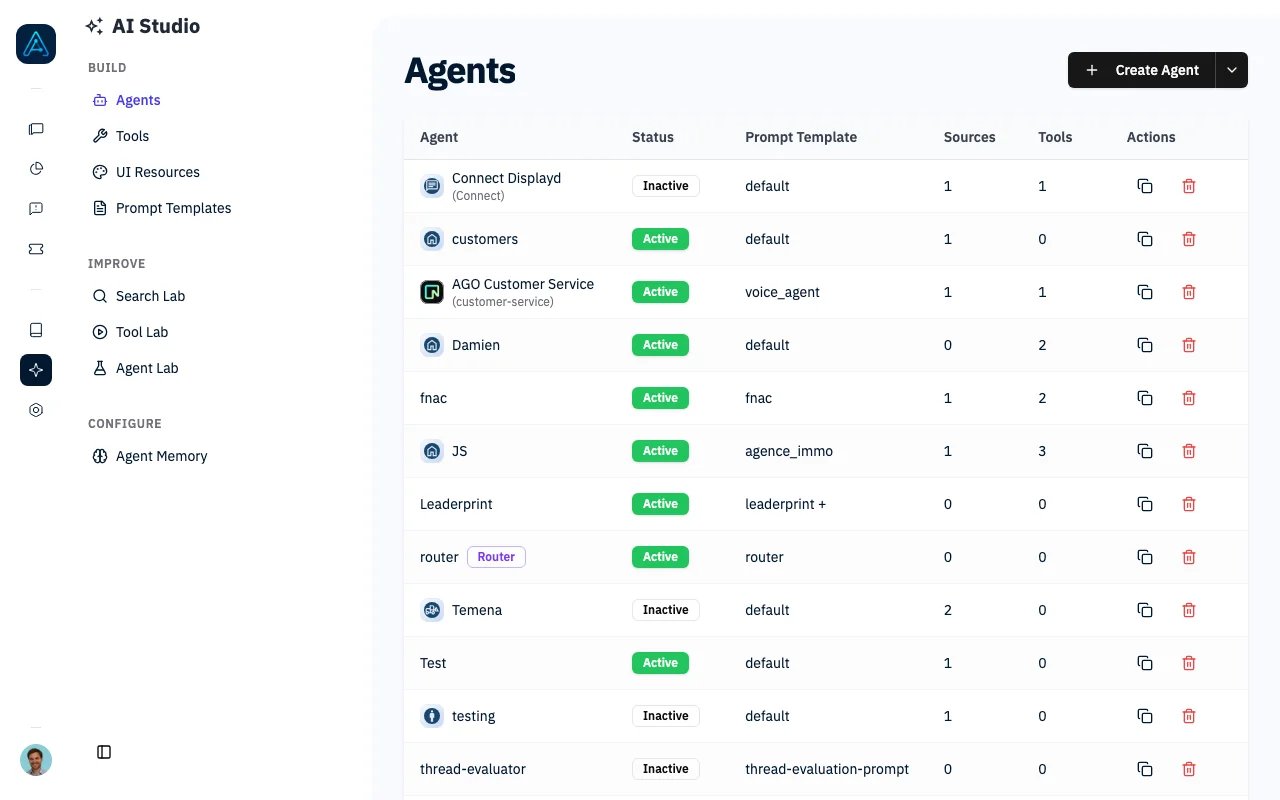
AI Studio is where you build, configure, and improve your AI agents. Create intelligent assistants that answer questions, execute tasks, and provide exceptional user experiences.
 ## What is AI Studio?
AI Studio is AGO's agent development environment. It provides everything you need to create AI-powered assistants: from prompt engineering and tool configuration to quality testing and performance tuning.
```mermaid theme={null}
flowchart LR
A[Prompt Templates] --> B[Agents]
C[Tools] --> B
D[Knowledge Sources] --> B
B --> E[User Conversations]
E --> F[Quality Analysis]
F --> G[Improvements]
G --> A
```
## Key Concepts
### Agents
An **agent** is an AI assistant configured for specific tasks. Each agent has:
* A prompt template defining its behavior
* Access to knowledge sources
* Tools for taking actions
* LLM settings for response generation
* Permission controls for access
AGO supports four agent types: **Standard** (real-time chat), **Background** (async processing), **Reasoning** (multi-step thinking), and **Router** (automatic delegation to specialists).
See [Agents](../agent/agents) for detailed configuration.
### Prompt Templates
**Prompt templates** are the instructions that guide agent behavior. They define the agent's role, personality, response guidelines, and how it uses knowledge and tools.
See [Prompt Templates](./prompt-templates) for configuration and best practices.
### Tools
**Tools** extend agent capabilities beyond conversation. Agents can create support tickets, send emails, query external APIs, invoke other agents, and return rich UI components.
See [Tools](./tools) for the complete list and configuration.
### LLM Configuration
Configure the AI models powering your agents at the global level, then override per-agent if needed:
* **Main model** for conversations
* **Fast model** for quick tasks
* **Reasoning model** for complex analysis
## How Agents Work
When a user sends a message:
1. **Message Routing**: Determine which agent handles the request
2. **Knowledge Retrieval**: Fetch relevant documents from sources
3. **Prompt Assembly**: Combine template + knowledge + context
4. **LLM Processing**: Generate response using configured model
5. **Tool Execution**: Call tools if needed (tickets, APIs, etc.)
6. **Response Delivery**: Stream response to user
```mermaid theme={null}
flowchart TB
U[User] --> M[Main Agent]
M --> |billing question| B[Billing Agent]
M --> |technical issue| T[Technical Agent]
M --> |general inquiry| M
B --> M
T --> M
M --> U
```
## Quality Assurance
AI Studio includes built-in testing and debugging:
* **[Simulation Testing](./simulation-testing)**: Automated test suites with personas and expected outcomes
* **[AI Debugger](./ai-debugger)**: Inspect retrieval scores, tool calls, and token usage for any conversation
## Configuration Hierarchy
Settings flow from global to specific. Per-agent settings override global defaults when set.
```mermaid theme={null}
flowchart TD
A[Global Settings] --> B[Per-Agent Settings]
B --> C[Per-Tool Settings]
```
| Level | What you configure |
| ------------- | -------------------------------------------------------------- |
| **Global** | Default LLM, temperature, reranker, file attachments |
| **Per-Agent** | Custom LLM, temperature, knowledge sources, tools, permissions |
| **Per-Tool** | Input schema, prompt, API credentials, source restrictions |
***
## Next Steps
Create and configure agents
Write effective prompts
Extend agent capabilities
Automated quality assurance
Design patterns and tips
Build your first agent step-by-step
## What is AI Studio?
AI Studio is AGO's agent development environment. It provides everything you need to create AI-powered assistants: from prompt engineering and tool configuration to quality testing and performance tuning.
```mermaid theme={null}
flowchart LR
A[Prompt Templates] --> B[Agents]
C[Tools] --> B
D[Knowledge Sources] --> B
B --> E[User Conversations]
E --> F[Quality Analysis]
F --> G[Improvements]
G --> A
```
## Key Concepts
### Agents
An **agent** is an AI assistant configured for specific tasks. Each agent has:
* A prompt template defining its behavior
* Access to knowledge sources
* Tools for taking actions
* LLM settings for response generation
* Permission controls for access
AGO supports four agent types: **Standard** (real-time chat), **Background** (async processing), **Reasoning** (multi-step thinking), and **Router** (automatic delegation to specialists).
See [Agents](../agent/agents) for detailed configuration.
### Prompt Templates
**Prompt templates** are the instructions that guide agent behavior. They define the agent's role, personality, response guidelines, and how it uses knowledge and tools.
See [Prompt Templates](./prompt-templates) for configuration and best practices.
### Tools
**Tools** extend agent capabilities beyond conversation. Agents can create support tickets, send emails, query external APIs, invoke other agents, and return rich UI components.
See [Tools](./tools) for the complete list and configuration.
### LLM Configuration
Configure the AI models powering your agents at the global level, then override per-agent if needed:
* **Main model** for conversations
* **Fast model** for quick tasks
* **Reasoning model** for complex analysis
## How Agents Work
When a user sends a message:
1. **Message Routing**: Determine which agent handles the request
2. **Knowledge Retrieval**: Fetch relevant documents from sources
3. **Prompt Assembly**: Combine template + knowledge + context
4. **LLM Processing**: Generate response using configured model
5. **Tool Execution**: Call tools if needed (tickets, APIs, etc.)
6. **Response Delivery**: Stream response to user
```mermaid theme={null}
flowchart TB
U[User] --> M[Main Agent]
M --> |billing question| B[Billing Agent]
M --> |technical issue| T[Technical Agent]
M --> |general inquiry| M
B --> M
T --> M
M --> U
```
## Quality Assurance
AI Studio includes built-in testing and debugging:
* **[Simulation Testing](./simulation-testing)**: Automated test suites with personas and expected outcomes
* **[AI Debugger](./ai-debugger)**: Inspect retrieval scores, tool calls, and token usage for any conversation
## Configuration Hierarchy
Settings flow from global to specific. Per-agent settings override global defaults when set.
```mermaid theme={null}
flowchart TD
A[Global Settings] --> B[Per-Agent Settings]
B --> C[Per-Tool Settings]
```
| Level | What you configure |
| ------------- | -------------------------------------------------------------- |
| **Global** | Default LLM, temperature, reranker, file attachments |
| **Per-Agent** | Custom LLM, temperature, knowledge sources, tools, permissions |
| **Per-Tool** | Input schema, prompt, API credentials, source restrictions |
***
## Next Steps
Create and configure agents
Write effective prompts
Extend agent capabilities
Automated quality assurance
Design patterns and tips
Build your first agent step-by-step