> ## Documentation Index
> Fetch the complete documentation index at: https://ago.mintlify.site/llms.txt
> Use this file to discover all available pages before exploring further.
# Agents
> Configure AI agents that interact with users and execute tasks
AI Agents are the core of the AGO platform. They interact with users, answer questions, and execute tasks based on your knowledge base and configured tools.
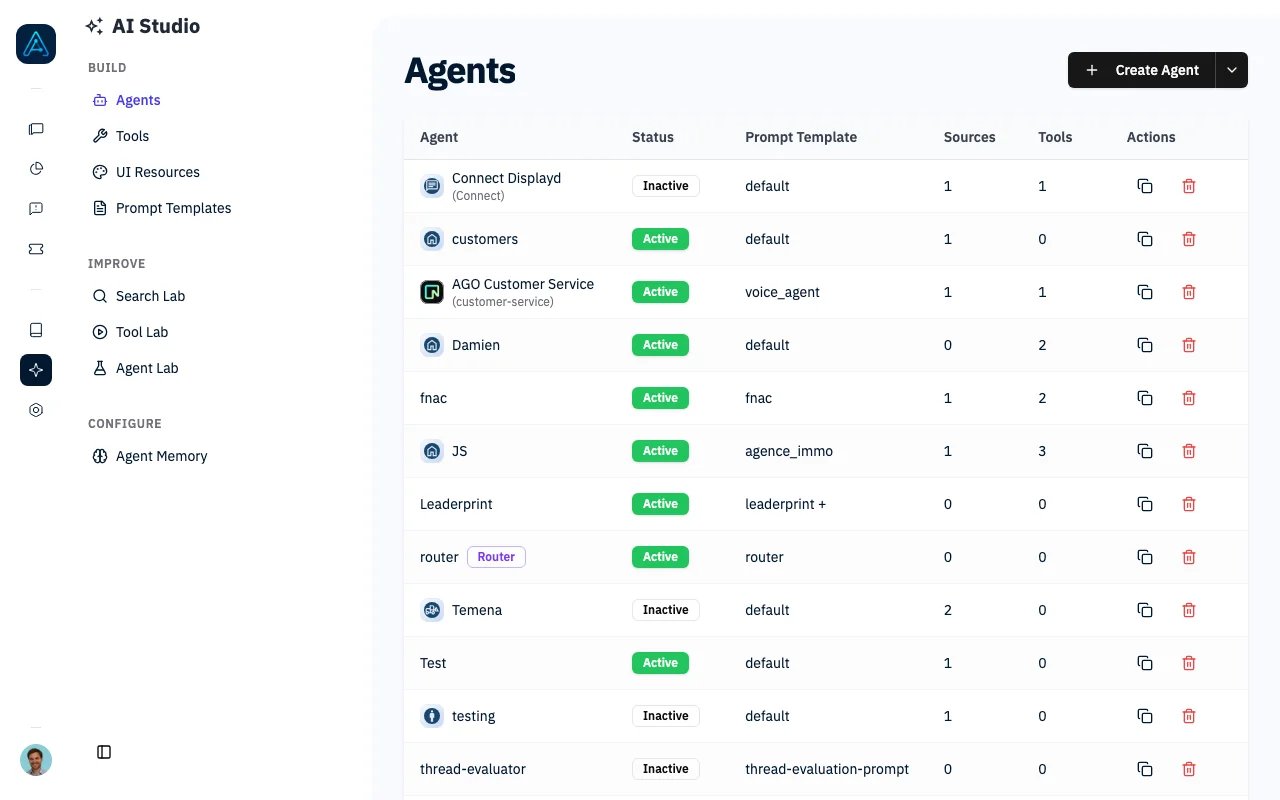 ## Overview
Agents in AGO are intelligent assistants that can:
* Answer questions using your knowledge base
* Execute actions using integrated tools
* Maintain context across conversation threads
* Handle background tasks for long-running operations
* Route requests to appropriate knowledge sources
* Invoke other agents for specialized tasks
* Collect user satisfaction feedback
* Use recent ticket history for personalized responses
## Prerequisites
### System Requirements
* AGO platform deployed and accessible
* Admin access to configure agents
### Knowledge Required
* Understanding of AI/LLM concepts (temperature, tokens)
* Familiarity with your organization's knowledge sources
### Configuration Required
* At least one knowledge source connected
* LLM model configured in AGO Config
***
## Agent Types
AGO supports three types of agents, each optimized for different use cases.
### Standard Agents
Real-time conversational agents that provide immediate responses by:
* Retrieving relevant documents from knowledge base
* Generating contextual responses
* Streaming responses to users via SSE (Server-Sent Events)
* Using tools when necessary
**Best for:** Interactive chat, Q\&A, customer support
### Background Agents
Long-running agents for complex tasks that:
* Process requests asynchronously in the background
* Provide progress updates during execution
* Handle multi-step workflows
* Execute time-consuming operations
**How to enable:** In the agent settings, toggle **Background Agent** to enabled.
**Progress tracking:** Background agent progress can be monitored via the chat interface or programmatically through the API.
**Best for:** Report generation, data analysis, complex research tasks
#### Action Approvals
A tool can be marked **Require approval in background runs** in its builder (see [Tools](/features/tools)). When a background agent is about to use such a tool — issuing a refund, for example — the run pauses and an approval card appears in the conversation:
* Staff users see which tool the agent wants to use and the exact values it wants to send, with **Approve** and **Reject** buttons. Staff members also receive a bell notification.
* Other viewers see that the run is waiting for a decision, without the tool's data.
* **Approve** lets the agent execute the action and continue. **Reject** skips the action; the agent is told it was not approved and concludes accordingly.
* A pending approval expires after **72 hours**. The run is then stopped and the conversation shows that the approval expired.
Every decision (who approved or rejected, and when) is recorded and shown in the run's progress log.
#### Interrupted Runs
Background runs save their progress as they go. If a run is interrupted — during a deployment, for example — it is not lost: a card appears in the conversation asking a staff member whether to **resume the run** from its last completed step or **stop it**. Resuming may re-run the step that was in flight when the interruption happened, which is why a person confirms it rather than the system resuming silently.
### Reasoning Agents
Extended reasoning capabilities for complex problem-solving:
* Multiple reasoning iterations for thorough analysis
* Uses dedicated reasoning model from global config
* Ideal for complex logic and multi-step reasoning
**How to enable:** In the agent settings, toggle **Reasoning Agent** to enabled and set the **Reasoning Iterations** value (default: 1).
> **ℹ️ NOTE**: Reasoning agents use the dedicated reasoning model configured in your AGO backend settings, separate from the default LLM.
**Best for:** Complex problem solving, analysis requiring multiple reasoning steps, decision-making tasks
### Router Agents
Router agents transparently route each user message to the most appropriate specialized agent. The routing is invisible to the user — they see responses as if they were speaking directly to the selected specialist.
**Best for:** Multi-agent orchestration, request triage, routing users to domain-specific specialists
> **ℹ️ NOTE**: An agent cannot be both a router agent and a reasoning agent at the same time.
See the [Router Agent](./router) page for full configuration details, routing logic, and best practices.
***
## Agent Documentation Sections
### [Agent APIs](../api/public-api-v1)
Learn how to programmatically send messages to agents and integrate AGO into your applications.
**Topics Covered:**
* Send message API endpoint
* Request/response formats
* File attachment handling
* Server-Sent Events (SSE) streaming
* Background agent processing
* Error handling and fallback mechanisms
**Use Cases:**
* Custom chat interfaces
* Mobile app integration
* Workflow automation
* Chatbot embedding
***
### Agent Configuration
Configure how agents behave and who can access them:
#### [Agent Permissions](../users/agent-permissions)
Control which users and groups can access specific agents.
**Topics Covered:**
* Permission-based agent selection
* User group assignments
* Role-based access control
* Default agent configuration
#### [Agents Homepage Selection](../features/agents-homepage-selection)
Configure which agents appear on the homepage for different user groups.
**Topics Covered:**
* Homepage agent display
* Priority ordering
* User-specific agent recommendations
* Custom agent selection logic
***
## Agent Capabilities
### Knowledge Base Integration
Agents can access and search through:
* Imported documentation (Notion, Confluence, Paligo, Zendesk, etc.)
* Knowledge articles created directly in AGO
* Pinned documents that are always included in context
**Configuration options:**
* **Documents to retrieve**: How many documents to fetch for context (default: 8)
* **Documents to display**: How many to show users in sources (default: 8)
* **Enable reranker**: Rerank results for better relevance
* **Pinned documents**: Documents always included in agent context
### Tool Usage
Agents can execute tools to:
* Create support tickets
* Query external APIs
* Perform calculations
* Retrieve real-time data
* Execute custom workflows
* Send emails
* Invoke other agents
See [Tools Documentation](../features/tools) for the complete list of available tools.
### Agent-as-Tool
Agents can invoke other agents as tools, enabling:
* **Specialization**: Create focused agents for specific domains
* **Delegation**: Route complex queries to specialized agents
* **Composition**: Build complex workflows from simple agents
**Configuration:**
| Setting | Default | Description |
| -------------------------- | ------- | ----------------------------------------------- |
| Enable as Tool | Off | Allow other agents to invoke this agent |
| Tool Description | (empty) | Description shown when used as a tool |
| Agent Tools | (none) | Other agents this agent can invoke |
| Share Conversation Context | Off | Pass parent conversation history |
| Max Call Depth | 5 | Maximum nesting depth (prevents infinite loops) |
> **⚠️ WARNING**: Set the max call depth appropriately to prevent infinite recursion when agents invoke each other.
### Context Management
Agents maintain context by:
* Tracking conversation history
* Remembering user preferences
* Linking related threads
* Preserving file attachments
### Multi-language Support
Agents support multiple languages through:
* Automatic language detection
* Translated knowledge base content
* Localized responses
* Multi-language document retrieval
### Satisfaction Feedback
Collect user feedback after agent responses:
| Setting | Default | Description |
| ---------------------------- | ---------------- | ---------------------------------------------- |
| Enable Satisfaction Feedback | Off | Enable feedback collection after responses |
| Feedback Question | (empty) | Question to display (max 500 characters) |
| Helper Text | (empty) | Helper text shown below the feedback buttons |
| Negative Feedback Action | Show ticket form | What happens when user gives negative feedback |
**Negative feedback actions:**
* `ticket_form`: Show ticket creation form
* `feedback_form`: Show detailed feedback form
* `message_only`: Display a message
**Response type** (`satisfaction_feedback_response_type`):
* `yes_no` (default): Two buttons — Yes / No
* `smiley_3`: Three smiley faces — happy, neutral, unhappy
### Ticket Context Injection
Give your agent awareness of the user's recent support tickets. When enabled, the agent's system prompt automatically includes a summary of the user's ticket history, allowing it to provide more personalized and context-aware responses.
**How it works:** Before each conversation, AGO retrieves the user's recent tickets and injects a summary into the agent's system prompt. The agent sees each ticket's status, subject, last update date, and a link to the ticket.
**Example context injected:**
```
Here are the user's recent support tickets for context:
- [Open] Login issue on mobile app (Last update: Jan 15, 2026) (Link: https://support.example.com/ticket/42)
- [Closed] Password reset request (Last update: Jan 10, 2026)
```
| Setting | Default | Description |
| --------------------- | ------- | ------------------------------------------------------------------------ |
| Enable Ticket Context | Off | Inject the user's recent tickets into the agent's context |
| Days Limit | 7 | Only include tickets from the last N days. Leave empty for no time limit |
**Configuration tips:**
* **Time limit**: Set the days limit to control how far back tickets are included. Use `7` for recent context or leave empty to include all tickets
* **Performance**: A maximum of 10 tickets are included, ordered by most recent first
* **Ticketing system required**: The user must have tickets in a connected ticketing system for context to appear
> **ℹ️ NOTE**: Ticket context is only injected when the user is authenticated. Anonymous users will not have ticket context.
***
## Configuration Options
### Basic Settings
| Setting | Required | Description |
| ------------------- | -------- | ----------------------------------------------------------------------------------------------------------------------- |
| Name | Yes | Internal identifier (must be unique) |
| Display Name | No | User-facing name shown in chat |
| Icon | No | Emoji icon for the agent |
| Custom Icon | No | Uploaded image for the agent avatar |
| Status | Yes | Active or inactive |
| Selectable by users | No | When off, the agent stays active for tools and routing but does not appear in the user-facing agent picker. Default: on |
| Display Order | No | Position on the homepage |
| Prompt Template | Yes | The prompt template that defines agent behavior |
### LLM Settings
| Setting | Default | Description |
| ----------- | ---------------- | --------------------------------------------- |
| Custom LLM | (global default) | Override the default LLM model for this agent |
| Temperature | (global default) | Response creativity (0.0–2.0) |
| Top P | (global default) | Nucleus sampling threshold (0.0–1.0) |
> **ℹ️ NOTE**:
>
> * **Temperature**: Lower values (0.0-0.3) produce consistent, deterministic responses. Higher values (0.7-1.0) allow more creative variation.
> * **Top P**: Controls diversity by limiting token selection to the most probable tokens whose cumulative probability exceeds this threshold.
### Knowledge Settings
| Setting | Default | Description |
| -------------------------- | ------- | ------------------------------------------- |
| Knowledge Sources | (none) | Which knowledge sources this agent searches |
| Pinned Documents | (none) | Documents always included in agent context |
| Documents to Retrieve | 8 | How many documents to fetch for context |
| Documents to Display | 8 | How many source documents to show users |
| Enable Reranker | Off | Rerank results for better relevance |
| Ignore Source Restrictions | Off | Bypass tool source restrictions |
### Tool Settings
| Setting | Default | Description |
| ----------- | ------- | ------------------------------------------- |
| Tools | (none) | Tools available to this agent |
| Agent Tools | (none) | Other agents this agent can invoke as tools |
### Background/Reasoning Settings
| Setting | Default | Description |
| ---------------------- | ------- | ------------------------------------------------- |
| Background Agent | Off | Run tasks asynchronously in the background |
| Reasoning Agent | Off | Enable extended multi-step reasoning |
| Router Agent | Off | Automatically delegate to specialized agents |
| Default Fallback Agent | (none) | Fallback agent when the router can't find a match |
| Reasoning Iterations | 1 | Number of reasoning cycles |
***
## Global Agent Settings
These settings in AGO Config affect all agents system-wide. Individual agents can override some of these settings.
### System-Wide Configuration
| Setting | Default | Description |
| ----------------------------- | ----------- | -------------------------------------------------- |
| Auto-add Ticketing Tool | On | Automatically add the ticketing tool to all agents |
| Default Ticketing Tool Prompt | (see below) | Default instructions for the ticketing tool |
| FAQ Similarity Threshold | 0.85 | Threshold for FAQ matching (0.0–1.0) |
| File Attachments | Off | Allow file uploads in chat messages |
| Enable Reranker | Off | Enable result reranking globally |
### Default Ticketing Tool Description
```
You are the ticketing system. Use this tool when the user wants:
- to talk to a human / call the support
- if you detect frustrations
- the user wants to open a ticket
- the user wants to perform an action that needs to open a ticket
The prerequisite is that the user has previously given information about
its problem otherwise we can't help them with this tool.
```
### Configuring Global Settings
These settings are configured at the system level via the Config API. See the [Public API v1 Reference](../api/public-api-v1) for details on how to update these settings programmatically.
### Override Behavior
| Global Setting | Per-Agent Override |
| ---------------- | ------------------------------------------ |
| Enable Reranker | Agent-level reranker toggle |
| LLM settings | Agent-level Custom LLM, Temperature, Top P |
| File Attachments | Cannot override per-agent |
| Ticketing Tool | Managed via agent's tool assignments |
***
***
## Troubleshooting
**Problem**: Agent can't find relevant documents despite content existing in knowledge base.
**Solutions**:
1. Verify the knowledge source is assigned to the agent
2. Check if the reranker is enabled for better relevance
3. Increase the "Documents to Retrieve" setting to fetch more context
4. Review document chunking - documents may be split poorly
5. Check if content is in the correct language
**Problem**: Responses vary significantly for the same question.
**Solutions**:
1. Lower the Temperature setting (try 0.1–0.3)
2. Lower the Top P setting (try 0.5–0.7)
3. Add pinned documents with authoritative answers
**Problem**: Background agent tasks stay in "processing" state.
**Solutions**:
1. Check background processing logs for errors
2. Verify the task hasn't exceeded timeout limits
3. Monitor progress via `/message/{id}/progress-stream` endpoint
4. Check if external tool calls are hanging
**Problem**: Agent can't invoke another agent as a tool.
**Solutions**:
1. Verify the target agent has "Enable as Tool" turned on
2. Check the invoking agent has the target in its Agent Tools list
3. Ensure the max call depth hasn't been exceeded
4. Review the tool description for clarity
**Problem**: Feedback buttons don't show after responses.
**Solutions**:
1. Verify "Enable Satisfaction Feedback" is turned on for the agent
2. Check that the feedback question is not empty
3. Ensure widget version supports feedback
***
## API Reference
For programmatic access to agents, see:
* [Public API v1 Reference](../api/public-api-v1) - Agent management and messaging
***
## Related
* [Router Agent](./router) — Automatic message routing to specialist agents
* [Prompt Templates](../features/prompt-templates) — Create and manage prompt templates
* [Agent Memory](../features/agent-memory) — Configure conversation memory
* [Tools](../features/tools) — Add capabilities to your agents
* [Agent Permissions](../users/agent-permissions) — Control agent access
* [Simulation Testing](../features/simulation-testing) — Test agent behavior
* [Agent Best Practices](../guides/agent-best-practices) — Design patterns and tips
* [Build Your First Agent](../guides/getting-started-tutorial) — Step-by-step tutorial
## Overview
Agents in AGO are intelligent assistants that can:
* Answer questions using your knowledge base
* Execute actions using integrated tools
* Maintain context across conversation threads
* Handle background tasks for long-running operations
* Route requests to appropriate knowledge sources
* Invoke other agents for specialized tasks
* Collect user satisfaction feedback
* Use recent ticket history for personalized responses
## Prerequisites
### System Requirements
* AGO platform deployed and accessible
* Admin access to configure agents
### Knowledge Required
* Understanding of AI/LLM concepts (temperature, tokens)
* Familiarity with your organization's knowledge sources
### Configuration Required
* At least one knowledge source connected
* LLM model configured in AGO Config
***
## Agent Types
AGO supports three types of agents, each optimized for different use cases.
### Standard Agents
Real-time conversational agents that provide immediate responses by:
* Retrieving relevant documents from knowledge base
* Generating contextual responses
* Streaming responses to users via SSE (Server-Sent Events)
* Using tools when necessary
**Best for:** Interactive chat, Q\&A, customer support
### Background Agents
Long-running agents for complex tasks that:
* Process requests asynchronously in the background
* Provide progress updates during execution
* Handle multi-step workflows
* Execute time-consuming operations
**How to enable:** In the agent settings, toggle **Background Agent** to enabled.
**Progress tracking:** Background agent progress can be monitored via the chat interface or programmatically through the API.
**Best for:** Report generation, data analysis, complex research tasks
#### Action Approvals
A tool can be marked **Require approval in background runs** in its builder (see [Tools](/features/tools)). When a background agent is about to use such a tool — issuing a refund, for example — the run pauses and an approval card appears in the conversation:
* Staff users see which tool the agent wants to use and the exact values it wants to send, with **Approve** and **Reject** buttons. Staff members also receive a bell notification.
* Other viewers see that the run is waiting for a decision, without the tool's data.
* **Approve** lets the agent execute the action and continue. **Reject** skips the action; the agent is told it was not approved and concludes accordingly.
* A pending approval expires after **72 hours**. The run is then stopped and the conversation shows that the approval expired.
Every decision (who approved or rejected, and when) is recorded and shown in the run's progress log.
#### Interrupted Runs
Background runs save their progress as they go. If a run is interrupted — during a deployment, for example — it is not lost: a card appears in the conversation asking a staff member whether to **resume the run** from its last completed step or **stop it**. Resuming may re-run the step that was in flight when the interruption happened, which is why a person confirms it rather than the system resuming silently.
### Reasoning Agents
Extended reasoning capabilities for complex problem-solving:
* Multiple reasoning iterations for thorough analysis
* Uses dedicated reasoning model from global config
* Ideal for complex logic and multi-step reasoning
**How to enable:** In the agent settings, toggle **Reasoning Agent** to enabled and set the **Reasoning Iterations** value (default: 1).
> **ℹ️ NOTE**: Reasoning agents use the dedicated reasoning model configured in your AGO backend settings, separate from the default LLM.
**Best for:** Complex problem solving, analysis requiring multiple reasoning steps, decision-making tasks
### Router Agents
Router agents transparently route each user message to the most appropriate specialized agent. The routing is invisible to the user — they see responses as if they were speaking directly to the selected specialist.
**Best for:** Multi-agent orchestration, request triage, routing users to domain-specific specialists
> **ℹ️ NOTE**: An agent cannot be both a router agent and a reasoning agent at the same time.
See the [Router Agent](./router) page for full configuration details, routing logic, and best practices.
***
## Agent Documentation Sections
### [Agent APIs](../api/public-api-v1)
Learn how to programmatically send messages to agents and integrate AGO into your applications.
**Topics Covered:**
* Send message API endpoint
* Request/response formats
* File attachment handling
* Server-Sent Events (SSE) streaming
* Background agent processing
* Error handling and fallback mechanisms
**Use Cases:**
* Custom chat interfaces
* Mobile app integration
* Workflow automation
* Chatbot embedding
***
### Agent Configuration
Configure how agents behave and who can access them:
#### [Agent Permissions](../users/agent-permissions)
Control which users and groups can access specific agents.
**Topics Covered:**
* Permission-based agent selection
* User group assignments
* Role-based access control
* Default agent configuration
#### [Agents Homepage Selection](../features/agents-homepage-selection)
Configure which agents appear on the homepage for different user groups.
**Topics Covered:**
* Homepage agent display
* Priority ordering
* User-specific agent recommendations
* Custom agent selection logic
***
## Agent Capabilities
### Knowledge Base Integration
Agents can access and search through:
* Imported documentation (Notion, Confluence, Paligo, Zendesk, etc.)
* Knowledge articles created directly in AGO
* Pinned documents that are always included in context
**Configuration options:**
* **Documents to retrieve**: How many documents to fetch for context (default: 8)
* **Documents to display**: How many to show users in sources (default: 8)
* **Enable reranker**: Rerank results for better relevance
* **Pinned documents**: Documents always included in agent context
### Tool Usage
Agents can execute tools to:
* Create support tickets
* Query external APIs
* Perform calculations
* Retrieve real-time data
* Execute custom workflows
* Send emails
* Invoke other agents
See [Tools Documentation](../features/tools) for the complete list of available tools.
### Agent-as-Tool
Agents can invoke other agents as tools, enabling:
* **Specialization**: Create focused agents for specific domains
* **Delegation**: Route complex queries to specialized agents
* **Composition**: Build complex workflows from simple agents
**Configuration:**
| Setting | Default | Description |
| -------------------------- | ------- | ----------------------------------------------- |
| Enable as Tool | Off | Allow other agents to invoke this agent |
| Tool Description | (empty) | Description shown when used as a tool |
| Agent Tools | (none) | Other agents this agent can invoke |
| Share Conversation Context | Off | Pass parent conversation history |
| Max Call Depth | 5 | Maximum nesting depth (prevents infinite loops) |
> **⚠️ WARNING**: Set the max call depth appropriately to prevent infinite recursion when agents invoke each other.
### Context Management
Agents maintain context by:
* Tracking conversation history
* Remembering user preferences
* Linking related threads
* Preserving file attachments
### Multi-language Support
Agents support multiple languages through:
* Automatic language detection
* Translated knowledge base content
* Localized responses
* Multi-language document retrieval
### Satisfaction Feedback
Collect user feedback after agent responses:
| Setting | Default | Description |
| ---------------------------- | ---------------- | ---------------------------------------------- |
| Enable Satisfaction Feedback | Off | Enable feedback collection after responses |
| Feedback Question | (empty) | Question to display (max 500 characters) |
| Helper Text | (empty) | Helper text shown below the feedback buttons |
| Negative Feedback Action | Show ticket form | What happens when user gives negative feedback |
**Negative feedback actions:**
* `ticket_form`: Show ticket creation form
* `feedback_form`: Show detailed feedback form
* `message_only`: Display a message
**Response type** (`satisfaction_feedback_response_type`):
* `yes_no` (default): Two buttons — Yes / No
* `smiley_3`: Three smiley faces — happy, neutral, unhappy
### Ticket Context Injection
Give your agent awareness of the user's recent support tickets. When enabled, the agent's system prompt automatically includes a summary of the user's ticket history, allowing it to provide more personalized and context-aware responses.
**How it works:** Before each conversation, AGO retrieves the user's recent tickets and injects a summary into the agent's system prompt. The agent sees each ticket's status, subject, last update date, and a link to the ticket.
**Example context injected:**
```
Here are the user's recent support tickets for context:
- [Open] Login issue on mobile app (Last update: Jan 15, 2026) (Link: https://support.example.com/ticket/42)
- [Closed] Password reset request (Last update: Jan 10, 2026)
```
| Setting | Default | Description |
| --------------------- | ------- | ------------------------------------------------------------------------ |
| Enable Ticket Context | Off | Inject the user's recent tickets into the agent's context |
| Days Limit | 7 | Only include tickets from the last N days. Leave empty for no time limit |
**Configuration tips:**
* **Time limit**: Set the days limit to control how far back tickets are included. Use `7` for recent context or leave empty to include all tickets
* **Performance**: A maximum of 10 tickets are included, ordered by most recent first
* **Ticketing system required**: The user must have tickets in a connected ticketing system for context to appear
> **ℹ️ NOTE**: Ticket context is only injected when the user is authenticated. Anonymous users will not have ticket context.
***
## Configuration Options
### Basic Settings
| Setting | Required | Description |
| ------------------- | -------- | ----------------------------------------------------------------------------------------------------------------------- |
| Name | Yes | Internal identifier (must be unique) |
| Display Name | No | User-facing name shown in chat |
| Icon | No | Emoji icon for the agent |
| Custom Icon | No | Uploaded image for the agent avatar |
| Status | Yes | Active or inactive |
| Selectable by users | No | When off, the agent stays active for tools and routing but does not appear in the user-facing agent picker. Default: on |
| Display Order | No | Position on the homepage |
| Prompt Template | Yes | The prompt template that defines agent behavior |
### LLM Settings
| Setting | Default | Description |
| ----------- | ---------------- | --------------------------------------------- |
| Custom LLM | (global default) | Override the default LLM model for this agent |
| Temperature | (global default) | Response creativity (0.0–2.0) |
| Top P | (global default) | Nucleus sampling threshold (0.0–1.0) |
> **ℹ️ NOTE**:
>
> * **Temperature**: Lower values (0.0-0.3) produce consistent, deterministic responses. Higher values (0.7-1.0) allow more creative variation.
> * **Top P**: Controls diversity by limiting token selection to the most probable tokens whose cumulative probability exceeds this threshold.
### Knowledge Settings
| Setting | Default | Description |
| -------------------------- | ------- | ------------------------------------------- |
| Knowledge Sources | (none) | Which knowledge sources this agent searches |
| Pinned Documents | (none) | Documents always included in agent context |
| Documents to Retrieve | 8 | How many documents to fetch for context |
| Documents to Display | 8 | How many source documents to show users |
| Enable Reranker | Off | Rerank results for better relevance |
| Ignore Source Restrictions | Off | Bypass tool source restrictions |
### Tool Settings
| Setting | Default | Description |
| ----------- | ------- | ------------------------------------------- |
| Tools | (none) | Tools available to this agent |
| Agent Tools | (none) | Other agents this agent can invoke as tools |
### Background/Reasoning Settings
| Setting | Default | Description |
| ---------------------- | ------- | ------------------------------------------------- |
| Background Agent | Off | Run tasks asynchronously in the background |
| Reasoning Agent | Off | Enable extended multi-step reasoning |
| Router Agent | Off | Automatically delegate to specialized agents |
| Default Fallback Agent | (none) | Fallback agent when the router can't find a match |
| Reasoning Iterations | 1 | Number of reasoning cycles |
***
## Global Agent Settings
These settings in AGO Config affect all agents system-wide. Individual agents can override some of these settings.
### System-Wide Configuration
| Setting | Default | Description |
| ----------------------------- | ----------- | -------------------------------------------------- |
| Auto-add Ticketing Tool | On | Automatically add the ticketing tool to all agents |
| Default Ticketing Tool Prompt | (see below) | Default instructions for the ticketing tool |
| FAQ Similarity Threshold | 0.85 | Threshold for FAQ matching (0.0–1.0) |
| File Attachments | Off | Allow file uploads in chat messages |
| Enable Reranker | Off | Enable result reranking globally |
### Default Ticketing Tool Description
```
You are the ticketing system. Use this tool when the user wants:
- to talk to a human / call the support
- if you detect frustrations
- the user wants to open a ticket
- the user wants to perform an action that needs to open a ticket
The prerequisite is that the user has previously given information about
its problem otherwise we can't help them with this tool.
```
### Configuring Global Settings
These settings are configured at the system level via the Config API. See the [Public API v1 Reference](../api/public-api-v1) for details on how to update these settings programmatically.
### Override Behavior
| Global Setting | Per-Agent Override |
| ---------------- | ------------------------------------------ |
| Enable Reranker | Agent-level reranker toggle |
| LLM settings | Agent-level Custom LLM, Temperature, Top P |
| File Attachments | Cannot override per-agent |
| Ticketing Tool | Managed via agent's tool assignments |
***
***
## Troubleshooting
**Problem**: Agent can't find relevant documents despite content existing in knowledge base.
**Solutions**:
1. Verify the knowledge source is assigned to the agent
2. Check if the reranker is enabled for better relevance
3. Increase the "Documents to Retrieve" setting to fetch more context
4. Review document chunking - documents may be split poorly
5. Check if content is in the correct language
**Problem**: Responses vary significantly for the same question.
**Solutions**:
1. Lower the Temperature setting (try 0.1–0.3)
2. Lower the Top P setting (try 0.5–0.7)
3. Add pinned documents with authoritative answers
**Problem**: Background agent tasks stay in "processing" state.
**Solutions**:
1. Check background processing logs for errors
2. Verify the task hasn't exceeded timeout limits
3. Monitor progress via `/message/{id}/progress-stream` endpoint
4. Check if external tool calls are hanging
**Problem**: Agent can't invoke another agent as a tool.
**Solutions**:
1. Verify the target agent has "Enable as Tool" turned on
2. Check the invoking agent has the target in its Agent Tools list
3. Ensure the max call depth hasn't been exceeded
4. Review the tool description for clarity
**Problem**: Feedback buttons don't show after responses.
**Solutions**:
1. Verify "Enable Satisfaction Feedback" is turned on for the agent
2. Check that the feedback question is not empty
3. Ensure widget version supports feedback
***
## API Reference
For programmatic access to agents, see:
* [Public API v1 Reference](../api/public-api-v1) - Agent management and messaging
***
## Related
* [Router Agent](./router) — Automatic message routing to specialist agents
* [Prompt Templates](../features/prompt-templates) — Create and manage prompt templates
* [Agent Memory](../features/agent-memory) — Configure conversation memory
* [Tools](../features/tools) — Add capabilities to your agents
* [Agent Permissions](../users/agent-permissions) — Control agent access
* [Simulation Testing](../features/simulation-testing) — Test agent behavior
* [Agent Best Practices](../guides/agent-best-practices) — Design patterns and tips
* [Build Your First Agent](../guides/getting-started-tutorial) — Step-by-step tutorial